
What is AGPM?
Microsoft Advanced Group Policy Management (AGPM) extends the capabilities of the Group Policy Management Console (GPMC) to provide comprehensive change control and improved management for Group Policy Objects (GPOs)
Benefits:
1. Check in and check out to create a audit trail for changes
2. Versioning, history and rollback of GPO
3. Reporting html a plus ** (compare difference between version of GP)
4. Flexible delegation model
5. Changes are offline (If checked out), changes are only live if checked in
In order to deploy AGPM, MDOP must be used (Microsoft Desktop Optimization Pack (MDOP). MDOP includes:
Application Virtualization (App-V), which transforms applications into centrally managed services that are never installed and don’t conflict with other applications.
User Experience Virtualization (UE-V), an enterprise-scale solution that delivers a personal Windows experience across many devices, is simple to deploy, and easily integrates with current management tools.
BitLocker Administration and Monitoring (MBAM), which enables you to scale deployment, by simplifying key recovery, centralizing compliance monitoring and reporting, and minimizing the costs associated with provisioning and supporting encrypted drives.
Advanced Group Policy Management (AGPM), which makes it easier to keep enterprise-wide desktop configurations up to date, provide greater control, and reduce downtime and total cost of ownership (TCO).
Diagnostics and Recovery Toolkit (DaRT), which helps IT teams make PCs safer to use, keeps employees productive, and makes desktops easier and less expensive to manage.

GP changes are processed on AGPM server first. If changes are checked in, DC will process and push out to clients and gets replicated.
1. Installation of AGPM component is here. Install it on the server where AGPM will be configured. The server requires Group policy management role
https://www.microsoft.com/en-us/download/details.aspx?id=54967
<<AGPM4.0SP1_Server_X64_KB4014009.exe>>
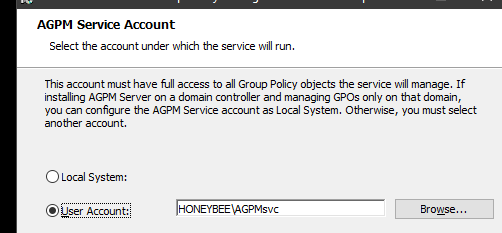
2. Create service account (domain account with no password expiration) and give domain admin privilege. Then run the installation
For AGPM service account
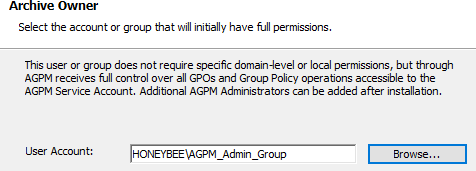
Archive owner
The user or group- owner of archive has full control of all GPO within AGPM through a group (good for providing multiple users admin access or provide domain admins in this group)
3. Installation logs here:
“%userprofile%\local settings\temp”, press Enter. please find AGPM installation log “Agpmmsi.log”
4. Once the AGPM server part is installed on the server side. Install the client portion to access the change control portion
***It is best you install the Microsoft Advance Group Policy Management Client on any computer in your organization that has the Group Policy Management Console (GPMC) installed. The GPMC is part of RSAT toolkit:
https://www.microsoft.com/en-us/download/details.aspx?id=45520
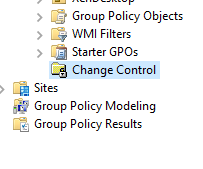
Access AGPM via the change control icon


**
Change Control >
Controlled tab - managed GPO under AGPM in production
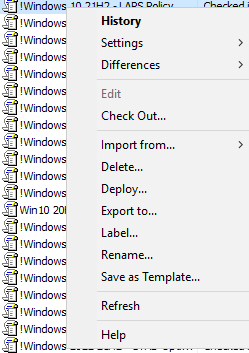
Uncontrolled- GPO that is in production but not managed by AGPM. Right click to take control.

The gpo copy in production gets copied to archive so it can be edited once its in control.

When its checked out for editing, you are editing an offline copy.
Once the changes are done, check in and select "Deploy" to deploy it to production.

Testing- Export production policy to test lab environment
Edit it > import it back to production
 Steven’s Knowledge Base