
Error handling is useful to decipher which line of code is not working correctly. Once the issue occurs, you can either stop, continue, break or prompt from that error. You are able to create your own error message for the script block as well. The implementation of error handling is great for logging ,etc. Powershell also does not have terminating error by default, so error handling helps a lot.
When writing try/catch scriptblock, it is recommended to output error under catch block with $.exception.message or with error variable such as $error. Admin can also adjust the $ErrorActionPreference to silently continue, break or stop script block once error is triggered.
$_.exception.message #shows the default powershell system error. Better than red error text. Another option to view errors is in a array list called $Error. $Error stores all the error in current session.
To view most recent error message:
$Error[1]
Error actions:
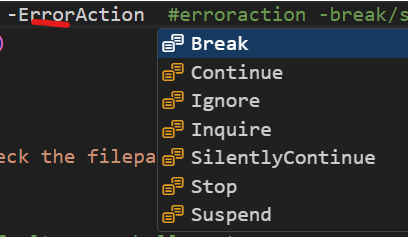
The “Stop” Error Action halts script execution upon encountering an error. For instance:

“Continue” serves as the default Error Action, displaying errors while enabling the script to proceed:

With “SilentlyContinue,” error messages remain concealed, allowing the script to continue unabated:

“Ignore” behaves similarly to “SilentlyContinue” but refrains from recording errors in `$Error`:

“Inquire” prompts user interaction when an error occurs, presenting choices for action:

$ErrorActionPreference # View the current error action
$ErrorActionPreference ="stop" # To set the error action
$ErrorActionPreference ="Break"
Error handling format
Code in the Try block is executed, and if an error occurs, execution is transferred to the Catch block. The Finally block runs irrespective of whether an error occurred or not, making it ideal for cleanup operations
try {insert scriptblock}catch{ insert error message}
try {
    # Code that might throw an error
    Get-Content -Path "C:\NonExistentFile.txt"
}
catch {
    # Handle the error
    Write-Error "An error occurred: $_"
}
finally {
    # Cleanup code
    Write-Output "End of error handling"
}
Note: -erroraction can break/continue/ignore/stop the script if an error triggers
Example – Retrieve the content of a file and try to replace a string, if the file does not exist, output something in the catch scriptblock
try{
$file = 'C:\Sli929 Repository\tester\Test.txt'
$content = Get-Content -path $file -ErrorAction Break  #erroraction -break/stop/continue/ etc..
$content -replace ("\bBob\b",'zzz')
  }Catch{
    Write-output "Please double check the filepath"
         }
Result
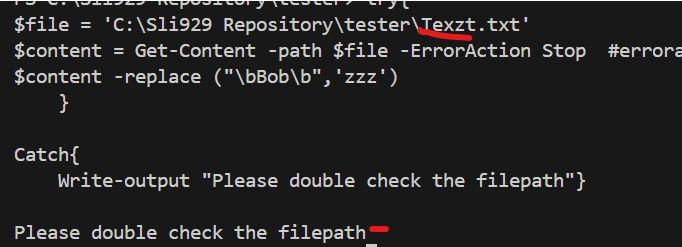
Error handling format:
Another method to catch error is the “Finally” block after “Catch”
Try{}  #what the scriptblock is trying to do
Catch{} #catch error and display custom error message
Finally{} #Useful for database, api, remote  connections after its closed. It will execute even after catch is triggered. Error or no error
try{
    $file = 'C:\Sli929 Repository\tester\Test.txt'
    $content = Get-Content -path $file -ErrorAction Stop
    do {
    $value = $content | Select-String ('Bob')
    Write-Host $value
    Write-Host "Total number of string is" $value.Count

    }
    while ($value.Contains('Bob'))
}
Catch {Write-Host $_.Exception.Message
        Write-Host "check scriptblock"}
Finally {Write-Host "Error check - ending script"}
Output:
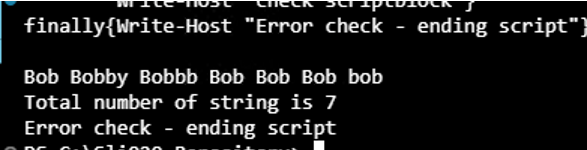
Output with error: (The catch scriptblock kicks in with “Check script block” output and lists the error in white font instead of red from the $_.Exception.Message). The finally script block ends the script.

Catch specific strings from error block
The following code searches for specific string within the error code and then take action IF those strings are found.
$message = $_.Exception
    if( $message -like "*AAD is busy*" -or
        $message -like "*Sync is already running*" -or
        $message -like "* A sync cycle has already being requested*" -or
        $message -like "*Cannot start a new run till this one completes*"){
        # Output warning
        Write-warning "Encountered error : [AAD is busy] or [Sync is already running].....checking sync progress....."
Example – IF error catches [AAD is busy] or [Sync is already running] – it triggers a specific step for those.
function StartDeltaSync {

try{

# Get ADSync module - check for module install first
Get-ADSync
# start sync
Write-Output @"
    ####################################
            Starting delta sync
    ####################################
"@
# Trigger Delta sync once module is loaded
$Deltasync = Start-ADSyncSyncCycle -PolicyType Delta -Verbose -ErrorAction stop
$ADSyncSetting = Get-ADSyncScheduler
    if($Deltasync.result -eq "Success" ){

        # Result code is success when sync is triggered
        Write-Output "`nDelta sync triggered successfully......."
        Start-Sleep -Seconds 5

        # Check sync progress....
        ADSyncProgress
    }
}
catch{
    $message = $_.Exception
    if( $message -like "*AAD is busy*" -or
        $message -like "*Sync is already running*" -or
        $message -like "* A sync cycle has already being requested*" -or
        $message -like "*Cannot start a new run till this one completes*"){
        # Output warning
        Write-warning "Encountered error : [AAD is busy] or [Sync is already running].....checking sync progress....."

        # Check sync progress....
        ADSyncProgress
    }else{
   # This catches all other non-identity issues
        Write-Error -message "`n ~~~~~ Critical error encountered ~~~~~ "
        Write-Output " $($_.Exception.Message)"
        Write-Output "Current AD sync Scheduler setting:`n$($ADSyncSetting|out-string)"
        Continue
        }
    }
}#End function [StartDeltaSync]

