
GPOs are objects, just like any other sort of objects in Active Directory. Administrators will create GPOs and remove them depending on the needs of the organization. In a normal condition, once a GPO is deleted from GPMC, the corresponding folder will be also deleted from SYSVOL folder. So there is no need to check the SYSVOL folder to verify if you have folders associated to dead GPOs. However, in rare circumstances, the folder associated to a deleted GPO, is not deleted automatically. In that case, we will have a folder, which is associated to a GPO, which has been deleted before. These folders however may do no harm to our Active Directory, but also they are not useful. In this case it is better to clean up these GPO and their associated folders from your Active Directory.
Goal: Clean up GPM and get rid of any policy that is not being used [unlinked] and ones that are deleted but still appears in sysvol folder [orphaned objects].
Powershell command to find inconsistent sysvol – GPO relations.
1. Save script as Get-OrphanedGPO
*Replace blue929.com with your domain.
$domain = “blue929.com”

$gpoGuids = @()
$sysvolGuids = @()
$gpoGuids = Get-GPO -All -Domain $domain | Select-Object @{ n=’GUID’; e = {$_.Id.ToString()}} | Select-Object -ExpandProperty GUID
$polPath = “\\$domain\SYSVOL\$domain\Policies”
$polFolders = Get-ChildItem $polPath -Exclude ‘PolicyDefinitions’ | Select-Object -ExpandProperty name
foreach ($folder in $polFolders)
{
$sysvolGuids += $folder -replace ‘{|}’, “”
}
Compare-Object -ReferenceObject $sysvolGuids -DifferenceObject $gpoGuids | Select-Object -ExpandProperty InputObject
2. Place ps script in a folder, navigate to the folder where the script is from powershell
3. Type in “.\Get-OrphanedGPO.PS1” and execute

It will show any inconsistent GUID in the sysvol folder that does not correlate with the GPO. In normal environment, any GPO created will have a unique GUID assigned to it. The SYSVOL folder [\\dc\SYSVOL\blue929.com\Policies] also creates a folder with those same GUID. If all is working normally, there should be a 1 to 1 match.
In this situation, I included test directories within the SYSVOL folder, and the script displayed the folders I had generated. This shows there is no direct one-to-one mirror for objects in GP and SYSVOL , as it couldn’t locate any associated Group Policy Objects (GPOs) with matching GUIDs. As a result, these objects are considered orphaned.
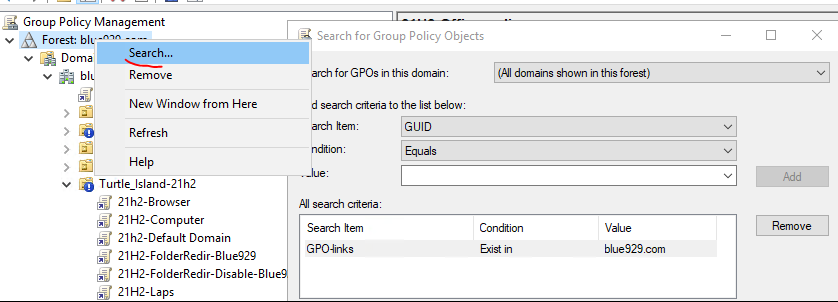
*In case where you need to look up and match the GUID to a specific GPO, go to GPM, right click on your forest and select search.

Unlinked GPO
Find unused objects that has not been linked to any OU. It will back the current GPO first to C:\GPObackup.
*Optional – the script deletes unlinked GPO, feel free to remove the last command if needed ($_.Displayname | Remove-GPO -Confirm)
Import-Module GroupPolicy
 $Date = Get-Date -Format dd_MM_yyyy
 $BackupDir = "c:\GPOBackup\$Date"
## Creates a directory to store the GPO reports
 if (-Not(Test-Path -Path $BackupDir))  {
   New-Item -ItemType Directory $BackupDir -Force
 }
# Get all GPOs with the gpo report type as XML and also look for the section  in the xml report.
# Consider only the GPOs that doesnt have  section.
 Get-GPO -All | Where-Object { $_ | Get-GPOReport -ReportType XML | Select-String -NotMatch "<LinksTo>" } | ForEach-Object {
   # Backup the GPO, HTML report and saving the GPO details to text file are optional.
   Backup-GPO -Name $_.DisplayName -Path $BackupDir
    # Run the report and save as an HTML report to disk
   Get-GPOReport -Name $_.DisplayName -ReportType Html -Path "$BackupDir\$($_.DisplayName).html"
   # Create and append to a text file called UnlinkedGPOs.txt in the backup folder that
   # contains each GPO object that Get-GPO returns
   $_ | Select-Object * | Out-File "$BackupDir\UnLinkedGPOs.txt" -Append
   # Remove the GPO but first prompt before removing
   $_.Displayname | Remove-GPO -Confirm
 }

## https://adamtheautomator.com/unlinked-gpo/
1. When script is executed, it saves the unlinked GP to c:\GPOBackup and displays all GPO that are not linked.


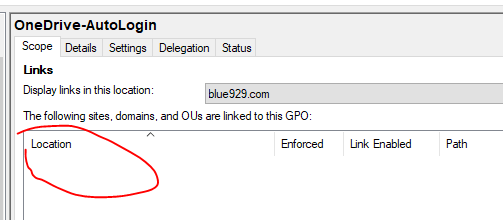
2. Verify that it is not linked to any OU

 Steven’s Knowledge Base