
The CVE-2021-1675 print vulnerability has persisted since 2021, posing risks of both local privilege escalation (LPE) and remote code execution (RCE) within Windows’ print spooler. While the ultimate remedy involves deactivating the print spooler and permitting only local printing, this strategy may not be feasible for most organizations
Goal: mitigate print nightmare to force authenticated users to download drivers and print from only approved print servers in the domain.
1. Disable print spooler service for ALL SYSTEMS that does not utilize it. Like domain controllers, azure ad connect server, federation servers, etc…
2. Deploy the following Group policies:
Enable point and Print restriction. This locks the user to one print server as far as getting drivers for click and print. Prevents downloads or print to any other print server unless it is listed.
Computer Configuration > Policies > Administrative Templates > Printer > Point and Print Restrictions
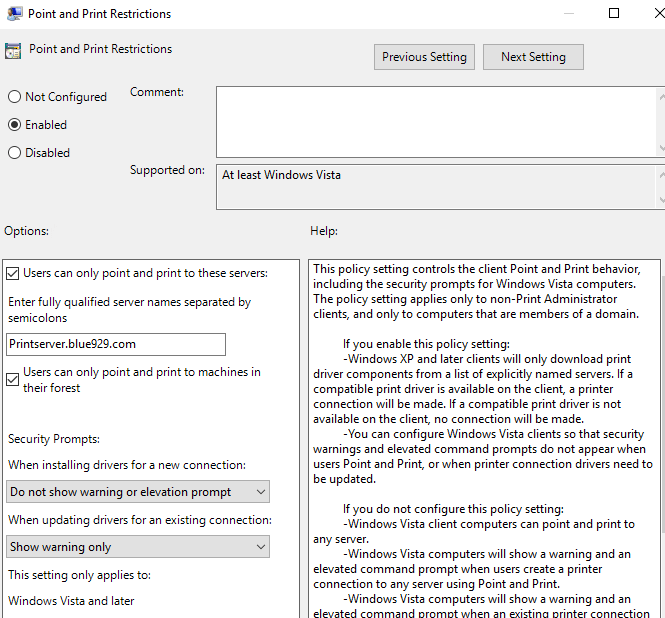
HKEY_LOCAL_MACHINE\Software\Policies\Microsoft\Windows NT\Printers\PointAndPrint

3. Here is the second policy to edit to restrict to one server where drivers are allow to be downloaded. Add the print server here.
Computer Configuration > Administrative Templates > Printers> Package Point and Print- Approved servers
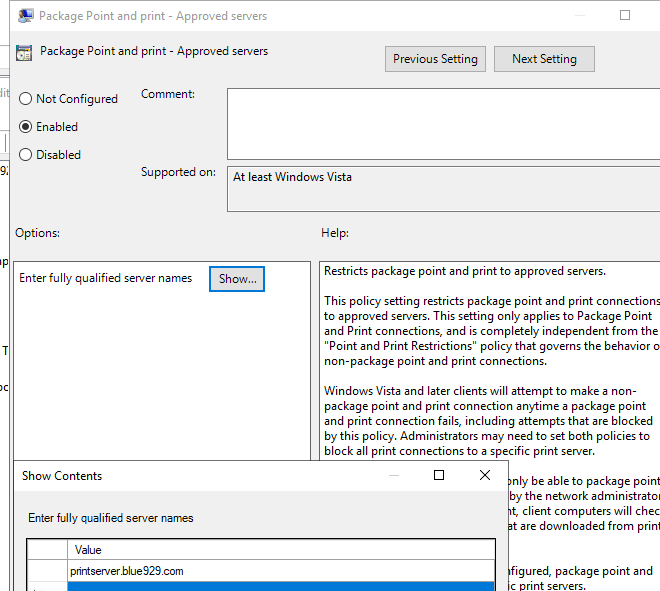
Reg values location:
HKEY_LOCAL_MACHINE\Software\Policies\Microsoft\Windows NT\Printers\PackagePointandPrint\ListofServers
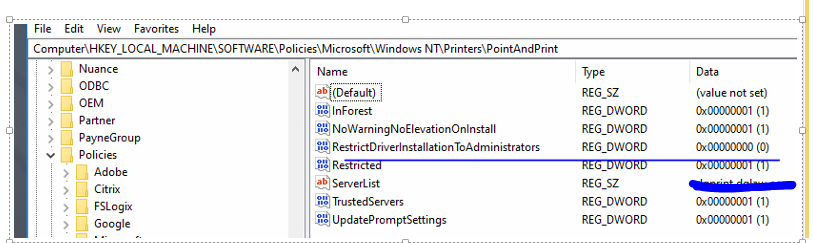
4. The third policy will disable prompt to install driver with admin privilege and allow users to download print driver without issue.
Set the Computer Configuration > Administrative Templates > Printers> Limits print driver installation to Administrators setting to “disabled”.

Registry value location:
HKEY_LOCAL_MACHINE\Software\Policies\Microsoft\Windows NT\Printers\PointAndPrint\RestrictDriverInstallationToAdministrators
No more of this if user decides to manually add a print from print server:

Result: Once all three policy are modified, it should mitigate the print nightmare vulnerability without impacting user experience.
Source:
https://theitbros.com/allow-non-admins-install-printer-drivers-via-gpo/
https://community.spiceworks.com/topic/2335538-printer-deployment-via-gpo-not-working
https://learn.microsoft.com/en-us/troubleshoot/windows-client/group-policy/point-print-restrictions-policies-ignored
 Steven’s Knowledge Base