
Now that we know how to enable and disable office add-in resiliency for all users, how do we proceed to only disable it for certain users? It is fairly straightforward, it requires item level targeting to filter out what registry values we want to apply and which group we want to apply it to.
Goal: To disable kofax add-in for certain users in AD group [Outlook_disable_kofax]
1. Create your Ad group [Outlook_Disable_Kofax], users in this group will have their kofax add-in disabled in outlook only.
Configure DoNotDisableAddinList:
A) Create a DELETE action to remove the following reg key for users in [Outlook_Disable_Kofax] group.
SOFTWARE\Policies\Microsoft\office\16.0\Outlook\resiliency\DoNotDisableAddinList\NPDFOutlookAddin.NPDFOutlook.1
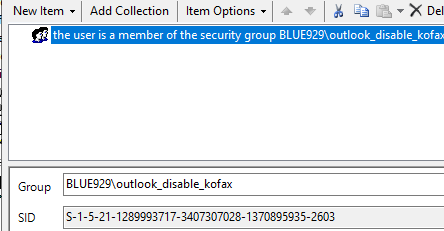
Item level targeting should only include the group and if keys exist.

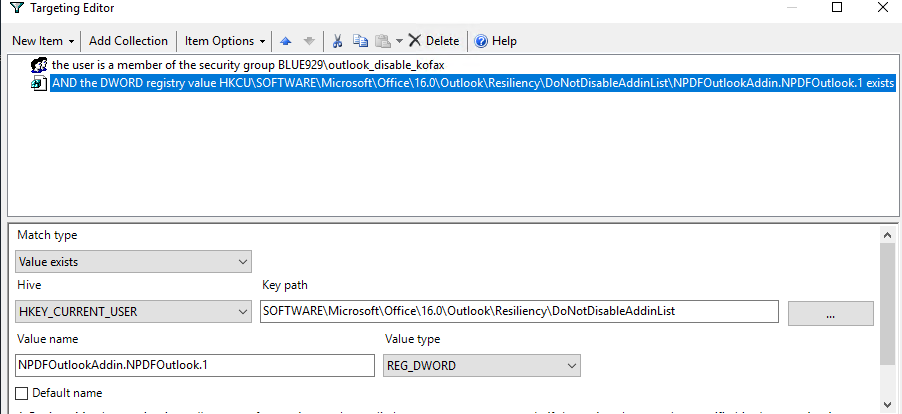
B) Update the existing UPDATE action to NOT deploy reg values to users in the [Outlook_Disable_kofax] group but to everyone else instead.
Select item level targeting under common tab > new item >add security group >item option > IS NOT
SOFTWARE\Microsoft\Office\16.0\Outlook\Resiliency\DoNotDisableAddinList\NPDFOutlookAddin.NPDFOutlook.1

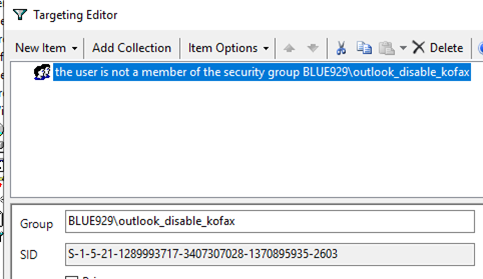
2. Now that we got rid of the kofax reg value under DoNotDisableAddinList key. We must now delete the ProgID from AddinList key if the users already has kofax add in enabled. Even if the user does not have the add in enable, it is recommend to put a delete action to remove any remaining values that may have it enabled under:
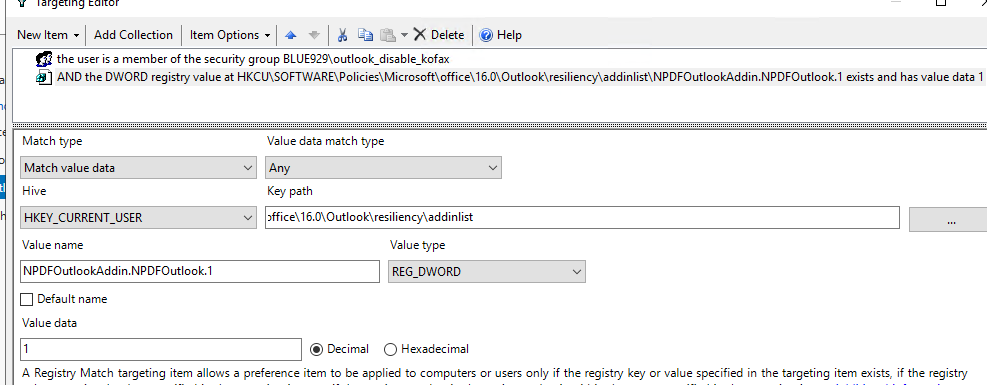
HKEY_CURRENT_USER\Software\Policies\Microsoft\Office\16.0\Outlook\Resiliency\AddinList\NPDFOutlookAddin.NPDFOutlook.1
A) Create a DELETE action and target only the ad group [Outlook_Disable_kofax] and if the registry value exist with value of “1”

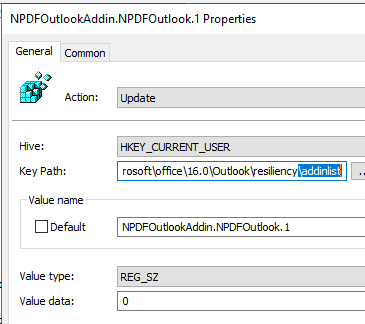
B) Once the keys are deleted, create an UPDATE action and assign value of “0” to the ProgID [NPDFOutlookAddin.NPDFOutlook.1] to disable it completely. Configure item level targeting to ONLY apply it to the [Outlook_Disable_Kofax] group.

Result:
The users in the AD group has their add in disabled in outlook. This requires values under both \DoNotDisableAddinList and \AddinList to be deleted and item level targeting to be configured for the updated action.
In summary, there should be two delete action and two update actions, all of them configured for item level targeting to apply whether user is in or not in [Outlook_disable_kofax]

Verify the policy:
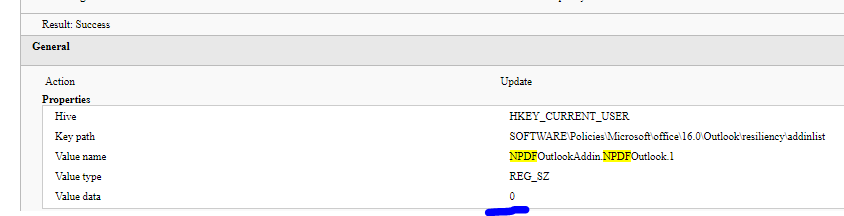
**Now that the add-in is disabled in outlook, a new registry delete action has to be assigned to Word, excel, and powerpoint to disable the add-in across all office products.
The registry items follows the same rules as above, apply item level targeting to your UPDATE items and create a DELETE action to apply to the specific AD group.
 Steven’s Knowledge Base