
For organization that utilizes windows OS, enabling enterprise sync for Edge is a no brainier. This brings more convenience for users when they are roaming between multiple devices. Microsoft edge enterprise can sync the following items:
Favorites
Passwords
Addresses and more (form-fill)
Collections
Settings
Extensions
Open tabs (available in Microsoft Edge version 88 or later)
History (available in Microsoft Edge version 88 or later)
Goal: Enable Microsoft Edge sync using group policy in an organization.
1. Under group policy, navigate to Computer configuration > policies > Administrative template > Microsoft Edge > Enable Force Sync of Browser data and do not show sync consent prompt


Results:

**
> If Microsoft edge does not appear under administrative template, the ADMX for Edge must be download and copied over to sysvol directory. The admx download is below:
https://www.microsoft.com/en-us/edge/business/download?form=MA13FJ
> Admin can review settings deployed for Edge by pasting “Edge:\\policy” in url

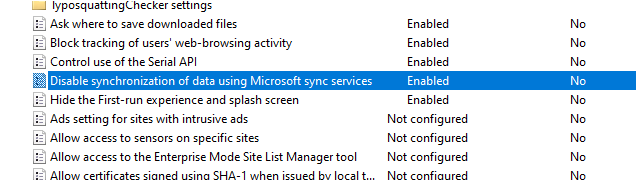
> If organization requires disabling edge sync:
Select “Enable” Computer config > ADMX > Microsoft edge >disable sync of data using Microsoft sync service
Source:
https://learn.microsoft.com/en-us/deployedge/microsoft-edge-enterprise-sync
https://www.microsoft.com/en-us/edge/business/download?form=MA13FJ
 Steven’s Knowledge Base