
Goal: Copy over a set of files to a folder and copy a single set of files to a folder. Useful scenario includes copying over xml or settings file to use for apps. Also useful to copy over .exe apps, which can then be toggled by script to run.
1. Establish the folder structure on your servers. My file share will be located in
Server: Mecm2
File share location: D:\drive
Sharing permission for D\: Authenticated users [Read]
Network path: \\mecm2\TestFolder
Sharing permission for Test folder: Authenticated user [Read/execute, Read, List folder content]
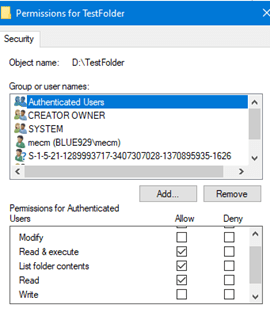
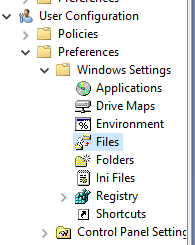
2. Inside the test folder will contain a single file. This test will copy the file to user’s %appdata% folder. Given that we are working with a user’s profile, navigate to GP > User Configuration > Preferences > windows setting > Files.
* I would use computer configuration if copying files to folder under c:\ folders that requires admin access.
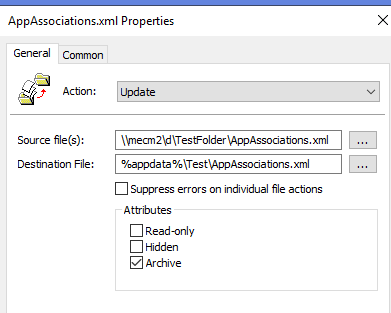
3. Enter the source file: include the extension of the file. The destination path must also have the existing “test” folder. If the extension is not included, it will show up as AppAssociations.file

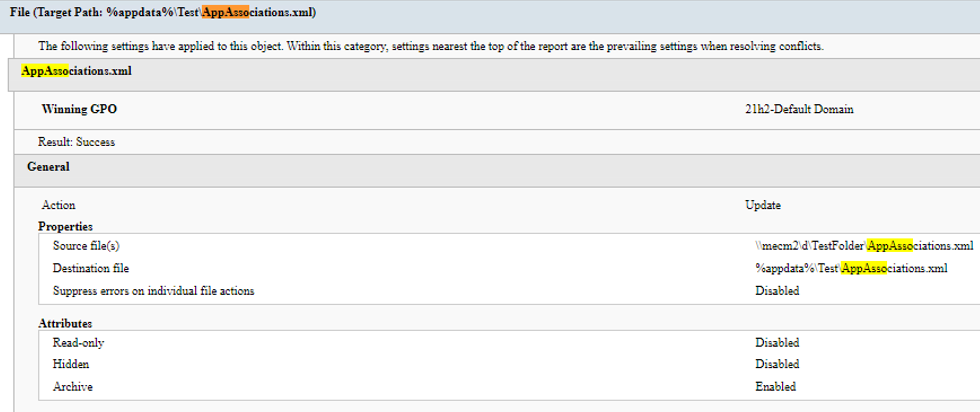
Result:

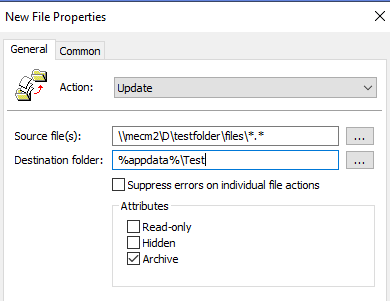
4. The above works for a few single files. What happens if I need to copy over a large number of files? In this case, a wildcard, “*.*” must be used.
The update action will be used so files do not get overwritten. If the file doesn’t exist, it will copy the file to the destination, if the file name already exist, it will NOT overwrite it.

In the previous copy, AppAssociation has 11:53 AM edit time on the %appdata%\test destination and the AppAssociations edit time here shows 1:03 PM.

After the policy applied, the 1:03 Pm did not show up because the file already exist, which means it did not get copied over if same file name already exist.
Source folder contains a folder and set of files. \\mecm2\D\testfolder\files
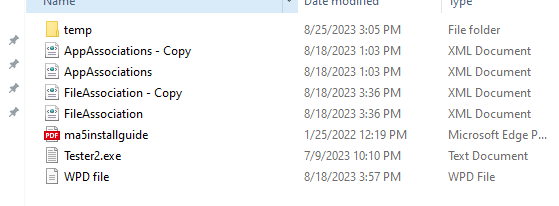
Result:
Sub folder does not get copied over

**
Result: Failure (Error Code: 0x80070005)-
Check the destination file or set the share folder to allow authenticated users
Source:
https://kunaludapi.blogspot.com/2015/08/copy-files-on-all-computers-using-group.html
 Steven’s Knowledge Base