
Goal: Deploy mobile device management solution for iOS device in the firm. Enroll, provision and deploy apps to users.
1. Try workspace one trial sign up here (requires company domain and not public domain address). https://www.vmware.com/workspace-one/free-trial.html
2. Click on activation email and sign up for a new account with the same email used for the trial.
3. Once you are in the workspace one console > under service > go to UEM
MDM service-
Getting Started > Getting Started (awmdm.com)

4. To enroll iOS device, apple push certificate must be configured first in order to deploy MDMmanagement profile into the phones.
5. Navigate to Groups & Settings > All Settings > Devices & Users > Apple > APNs For MDM in the Workspace ONE UEM Console.
6. Upload the .plist file to Apple Push Certificates portal website using a company or spare apple ID. Apple will then generate an Apple-signed certificate (.pem file). Upload it under APN for MDM.
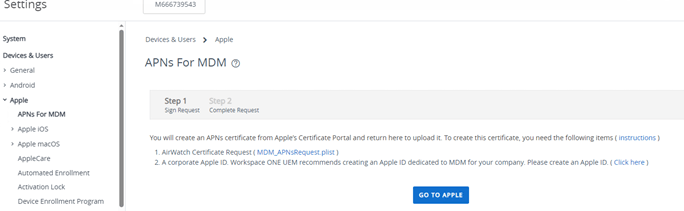

7. Once the APN (Apple Push Notification) is done, proceed with enrollment.
**In order to enroll device, a user must be created first in order to map the user to a device.
Under Accounts > Users > Click “Add”. Fill out the info for username, password, email, domain, etc..
8. This post will enroll iOS device without email auto discovery (logging in with email). The following requirement are listed:

Test lab:
Group ID- M6663876 [under groups and setting > groups > organizations groups> details]
Server URL- cn1784.awmdm.com [Listed in URL]

Settings for enrollment > Settings >device and users > general > enrollment >
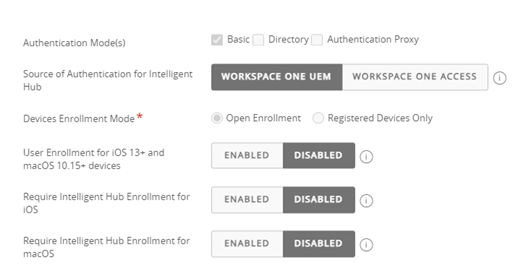
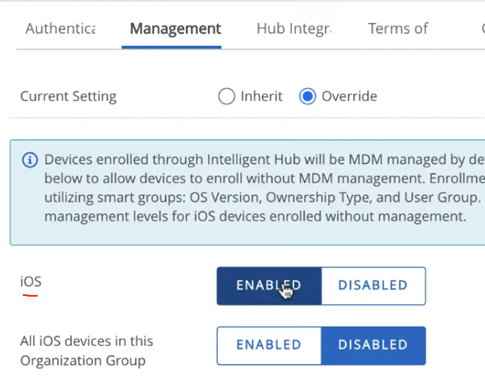
9. On phone- download intelligence hub –
Input server URL [cn1784.awmdm.com]
group ID [M6663876 ]
and enter username and password. (Username must be created manually)
Proceed with instructions that pops up. Download profile and install. Once the profile is install, the device should show up in workspace ONE. Any email configuration setup should load and apps will prompt for download.

** Troubleshooting and Tips
> For phones with email configuration deployment-
If user gets exchange server error:
Check for vpn or mcAfee home network protection and disable it. If those are turned on, there will be issues syncing emails.

> If users gets an error when they try to sent out emails
Turn off low power mode

> Some emails are being sent out and others are not
Go to Settings - turn off Undo Send delay
 > Mail, tap Undo Send Delay, then choose a length of time to delay outgoing email messages.
Source:
 Steven’s Knowledge Base