
Microsoft Intune offers powerful Mobile Device Management (MDM) and Mobile Application Management (MAM) capabilities for iOS and iPadOS devices, enabling organizations to efficiently manage and secure their mobile ecosystem. Here’s a brief overview of iOS/iPadOS MDM/MAM enrollment with Intune:
- Enrollment Options: Intune supports multiple enrollment methods, including User Enrollment, Device Enrollment Program (DEP), and Automated Device Enrollment. These methods cater to various scenarios, from corporate-owned devices to BYOD (Bring Your Own Device) setups.
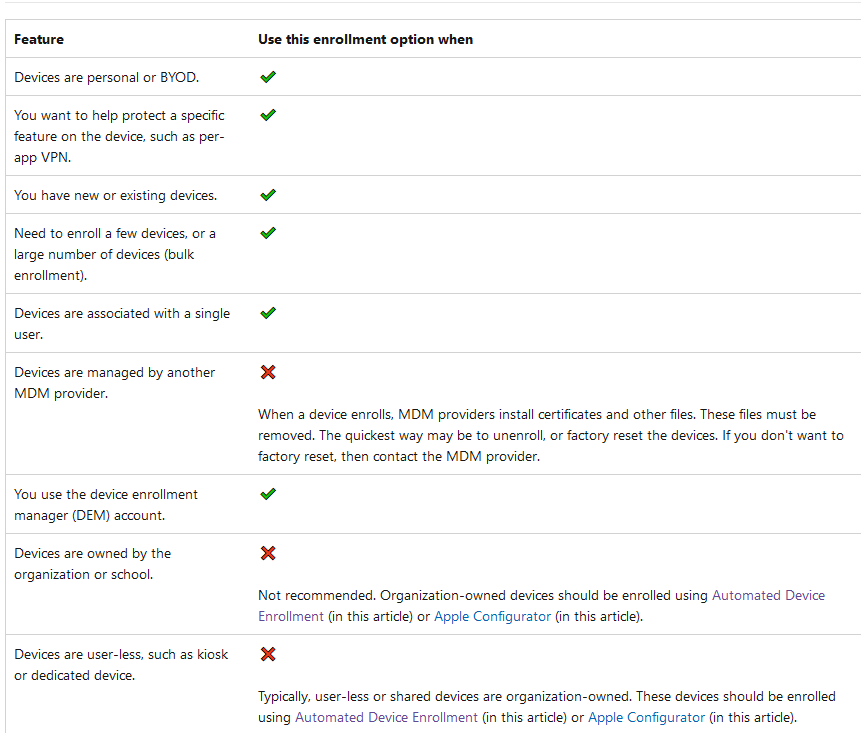
- User Enrollment: In BYOD scenarios, users can manually enroll their iOS/iPadOS devices into Intune by downloading the Intune Company Portal app from the App Store. This grants IT limited control over corporate data and applications while preserving user privacy.
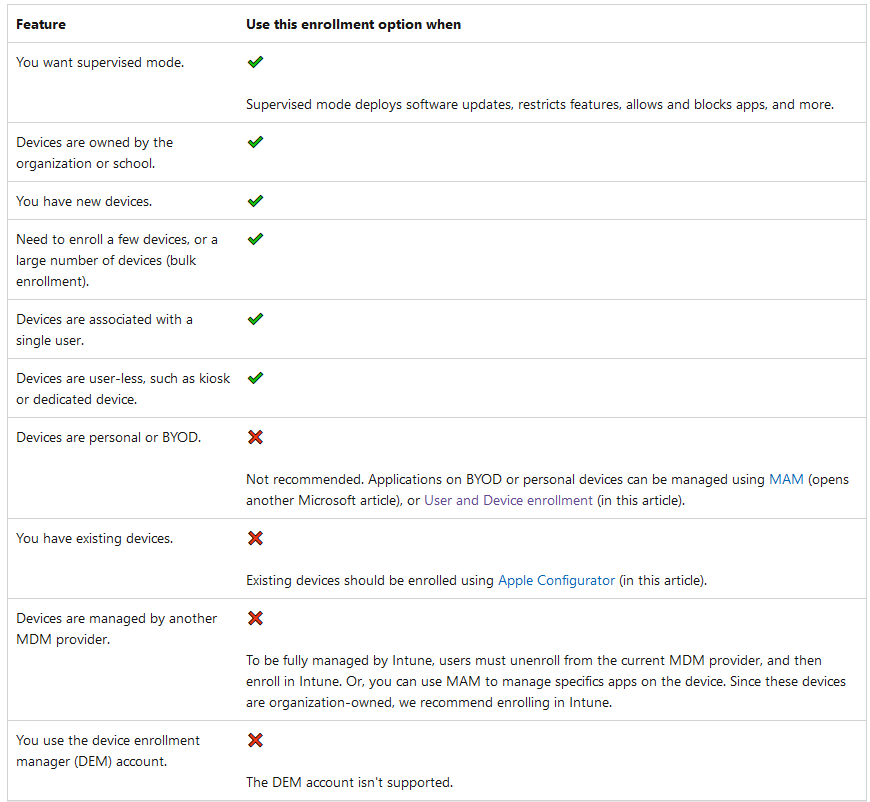
- Device Enrollment Program (DEP): DEP, now part of Apple Business Manager, streamlines device provisioning by automating enrollment in Intune. Corporate-owned devices are automatically configured with the necessary settings, ensuring they adhere to company policies right out of the box.
- Policy Management: Intune allows IT administrators to define and enforce policies, covering security configurations, app installations, and network settings. Conditional Access policies can be applied to control access to corporate resources based on device compliance.
- App Distribution: Intune facilitates app deployment to iOS/iPadOS devices. IT can push both public apps from the App Store and private enterprise apps to enrolled devices. App updates and removals can also be managed centrally.
- MAM (Mobile Application Management): Intune offers MAM capabilities to protect corporate data within apps, even on personally owned devices. Apps can be containerized, ensuring that business data remains separate and secure, while personal data remains untouched.
- Security Features: Intune provides a suite of security features, including remote wipe, passcode enforcement, and encryption settings. It also integrates with Microsoft Defender for Endpoint to enhance threat protection.
- Monitoring and Reporting: Comprehensive reporting and monitoring tools in Intune enable IT teams to track device and app compliance, security incidents, and usage statistics. This data helps in making data-driven decisions and maintaining security.
- Integration: Intune seamlessly integrates with other Microsoft services like Azure Active Directory and Microsoft 365, ensuring a holistic approach to device and data management.
In conclusion, iOS/iPadOS MDM/MAM enrollment with Intune offers a versatile and robust solution for organizations to effectively manage and secure their Apple devices. It caters to diverse deployment scenarios while providing the tools needed to enforce policies, protect data, and maintain a high level of security and compliance across the mobile environment.
Device enrollment- Corporate device Supervised mode checklist
User enrollment or Device enrollment- Personal device checklist
 Steven’s Knowledge Base