
This device-based conditional access policy requires users’ personal and corporate devices to be marked as compliant before accessing any Office 365 applications. Any modification to device settings after enrollment will block access to the apps. This policy requires devices to be compliant at all times. This policy discourages user from modifying their phone security settings and help protect sensitive business data.
Goal: Require devices to be marked as compliant before users can access Office 365 apps, including both personal and corporate devices after enrollment.
Important note
The Require device to be marked as compliant control:
- Only supports Windows 10+, iOS, Android, and macOS devices registered with Microsoft Entra ID and enrolled with Intune.
- Microsoft Edge in InPrivate mode is considered a non-compliant device. Meaning user cannot access office 365 apps from InPrivate mode
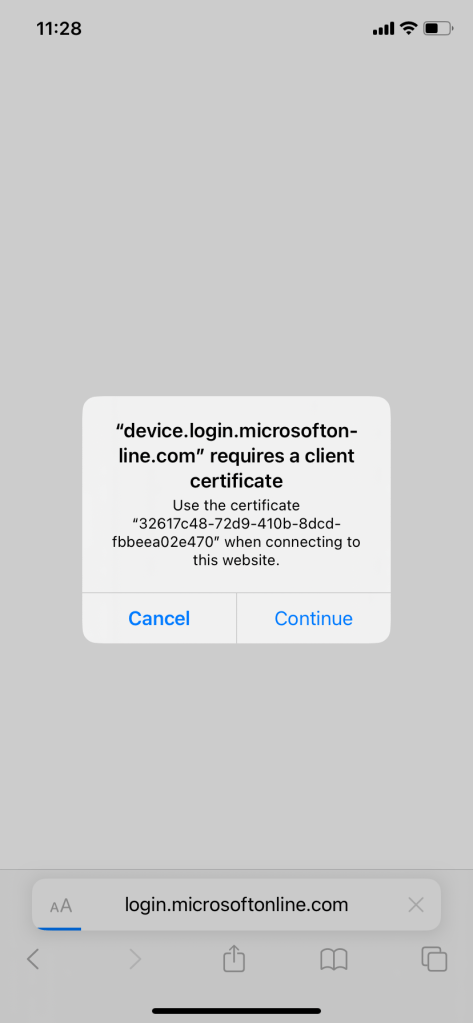
On Windows, iOS, Android, macOS, and some third-party web browsers, Microsoft Entra ID identifies the device by using a client certificate that is provisioned when the device is registered with Microsoft Entra ID. When a user first signs in through the browser, the user is prompted to select the certificate. The user must select this certificate before they can continue to use the browser.
Require Compliant Device for Office 365 Apps
This policy require compliant devices to access office 365 apps for personal and corporate iOS and Android devices. To create the policy:
Navigate to Intune portal > device > conditional access > policies > new policy.
Name: [iOS-Android-BYOD-COBO] 0365-Require-Compliant Device
Assignments:
Users:
Include: iOS_BYOD_Assigned, Android_BYOD_Assigned, iOS_COBO_Assigned, Android_COBO_Assigned
Exclude: Break glass group

Target resources:
Include: Office 365

Conditions:
Device Platforms: iOS, Android

Access control:
Grant:  Require device to be marked as compliant
What does the Office 365 target?
The following list is provided as a reference and includes a detailed list of services and applications that are included in the Conditional Access Office 365 app.
- Augmentation Loop
- Call Recorder
- Connectors
- Device Management Service
- EnrichmentSvc
- IC3 Gateway
- Media Analysis and Transformation Service
- Message Recall app
- Messaging Async Media
- MessagingAsyncMediaProd
- Microsoft 365 Reporting Service
- Microsoft Discovery Service
- Microsoft Exchange Online Protection
- Microsoft Flow
- Microsoft Flow GCC
- Microsoft Forms
- Microsoft Forms Web
- Microsoft Forms Web in Azure Government
- Microsoft Legacy To-Do WebApp
- Microsoft Office 365 Portal
- Microsoft Office client application
- Microsoft People Cards Service
- Microsoft SharePoint Online – SharePoint Home
- Microsoft Stream Portal
- Microsoft Stream Service
- Microsoft Teams
- Microsoft Teams – T4L Web Client
- Microsoft Teams – Teams And Channels Service
- Microsoft Teams Chat Aggregator
- Microsoft Teams Graph Service
- Microsoft Teams Retail Service
- Microsoft Teams Services
- Microsoft Teams UIS
- Microsoft Teams Web Client
- Microsoft To-Do WebApp
- Microsoft Whiteboard Services
- O365 Suite UX
- OCPS Checkin Service
- Office 365 app, corresponding to a migrated siteId.
- Office 365 Exchange Microservices
- Office 365 Exchange Online
- Office 365 Search Service
- Office 365 SharePoint Online
- Office 365 Yammer
- Office Delve
- Office Hive
- Office Hive Azure Government
- Office Online
- Office Services Manager
- Office Services Manager in USGov
- Office Shredding Service
- Office365 Shell WCSS-Client
- Office365 Shell WCSS-Client in Azure Government
- OfficeClientService
- OfficeHome
- OneDrive
- OneDrive SyncEngine
- OneNote
- Outlook Browser Extension
- Outlook Service for Exchange
- PowerApps Service
- PowerApps Web
- PowerApps Web GCC
- ProjectWorkManagement
- ProjectWorkManagement_USGov
- Reply at mention
- Security & Compliance Center
- SharePoint Online Web Client Extensibility
- SharePoint Online Web Client Extensibility Isolated
- Skype and Teams Tenant Admin API
- Skype for Business Online
- Skype meeting broadcast
- Skype Presence Service
- SmartCompose
- Sway
- Targeted Messaging Service
- The GCC DoD app for office.com
- The Office365 Shell DoD WCSS-Client
User experience
When user try to access any of the Office 365 apps with a non-compliant device, they will be blocked.
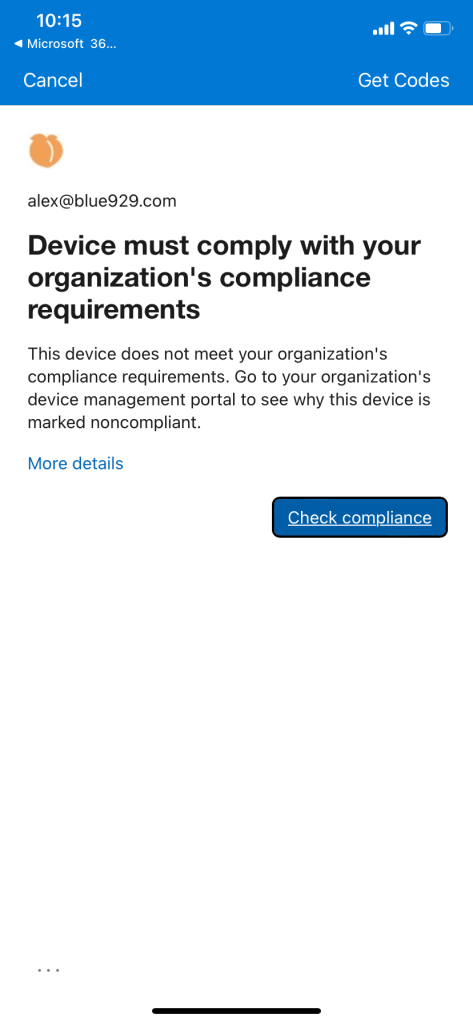
From company portal app:
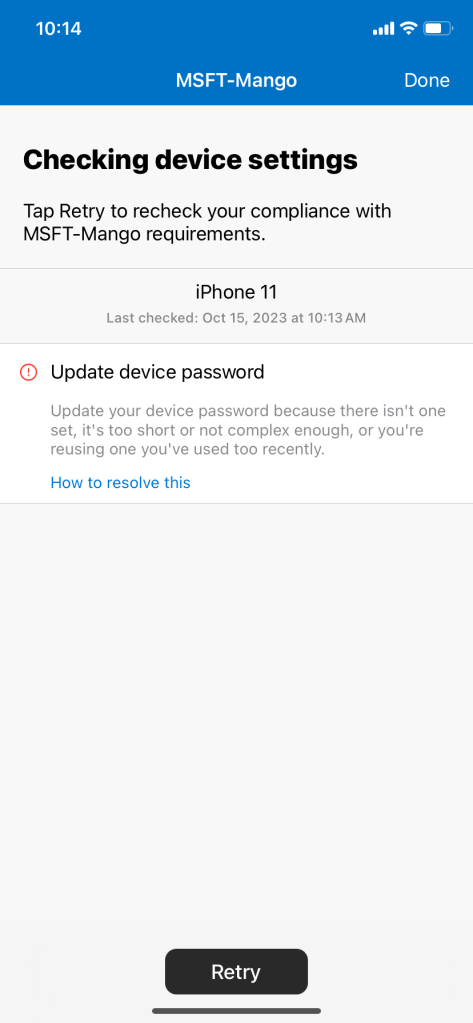
Exmaple:
If there is a 6 pin passcode requirement and user only set 4 pin instead:
User will be notified to change their passcode every few minutes to meet compliance policy standards.

Source
https://learn.microsoft.com/en-us/mem/intune/protect/create-compliance-policy
https://medium.com/gitbit/require-compliant-devices-to-access-microsoft-365-6978bbf0748d
 Steven’s Knowledge Base