
The following contains some best practices tips to harden the opnsense box. Completely optional but highly recommended, especially if the environment is not a home lab.
1) Change default password
The default login is root : opnsense
From GUI: System > Access > Users > select users > Modify the password

From Console:
Select option 3 > reset

2) Disable root access
Logging in as the root user is generally not advised because the root user has full access to files and processes. Create a second admin account so there is a backup in case the second account gets compromised. Usage of root should be last resort.
Before disabling root account – create a new administrator account:
Navigate to System > access > users > select “+”
Make sure the group membership admin is selected.


Log out and sign in with the second user account.
Navigate to System > access > users > select “root” > edit > disable
The root icon should be greyed out
**Set up MFA for new user if prefer (Recommended)

3) Disable SSH connections
Disable root login and ssh connection through System > settings > Administration
Uncheck:
- Enable Secure shell
- Permit root user login
- Permit password login

4) Secure the GUI portal
Few things to harden the GUI portal. Go to
System > Settings > Administration
• Enable HTTPS
• Enable HTTP Strict Transport Security to prevent MiTM attacks.
• DNS rebind protection should be unchecked, which means its enabled.
• Under Listen interface, restrict access to GUI from a specific VLAN or physical interface.
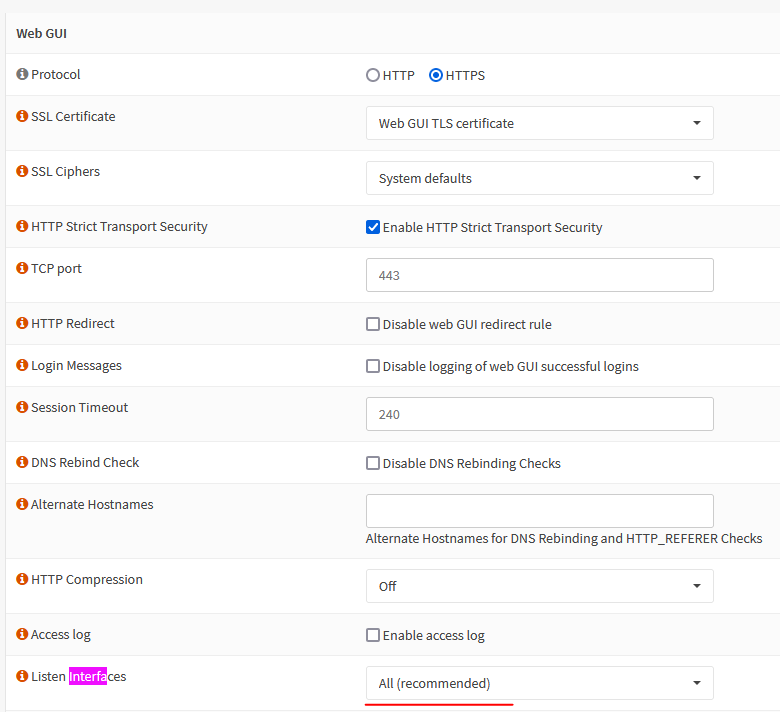
• Optional – Restrict access to OPNsense GUI using firewall rules.
Create alias and point those to the management IP.
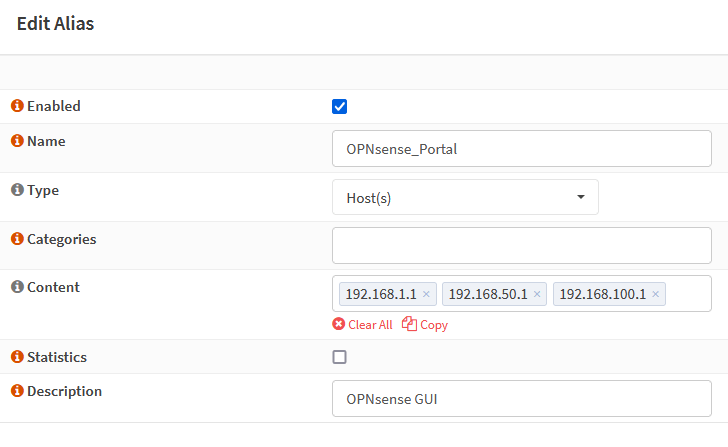
Create firewall rule to block based on tcp/udp protocol (SSH/HTTP/HTTPS) with inbound destination to the alias.
Any client in the VLAN wifi will not be able to connect to OPNsense via GUI or SSH.

***For GUI, you can proceed to replace Self-Signed Certificate with a Valid Certificate (optional, but recommended)
5) Set up Cron jobs to auto update firmware
Keep your system up to date by creating scheduled jobs
System > Settings > Cron > select “+” > toggle Automatic firmware update

6) Other optional features that can be implemented to further enhanced what OPNsense has to offer –
DNS over TLS with Unbound DNS
DNS Block Lists (DNSBL) with Unbound DNS
IDS/IPS with Suricate
Set up Vlans
Implement Spamhaus DROP or geo block with firewall rules
Source
https://docs.opnsense.org/manual/install.html
https://homenetworkguy.com/how-to/disable-root-user-opnsense/
https://docs.opnsense.org/manual/settingsmenu.html
https://www.zenarmor.com/docs/network-security-tutorials/opnsense-security-and-hardening-best-practice-guide
 Steven’s Knowledge Base