
When an IT admin reaches the startup guide, they will be prompted to choose a discovery method for printers. This step is crucial for discovering and managing printers within the organization. The available discovery methods include IP easy discovery, IP broadcast, and IP sweep. Among these, the least intrusive option is IP sweep. Adding AD server as printer server will also suffice as printer discovery.
**Do note that Network print devices (Discovery) and scheduled device status polling (Polling) are two different ways of collecting data. Data will be polled post discovery of device such as (Serial/Model/Status, etc..)
The SNMP Sweep Discovery method (IP Sweep) is:
·  The preferred method of accurately discovering printers on a network via subnets and SNMP strings.
·  Results in a more controlled and orderly flow of data between printers and Centreware Web (unlike the Broadcast method). A packet is sent to every IP address in the user-defined subnet or address range list to minimize network traffic.
>> Notes (..)
**With IP Sweep Discovery, you can add the Internet Printing Protocol (IPP) as a last resort during device querying, in the event that the device fails to respond to SNMP v1/v2 queries. This might introduce delays and additional traffic.
**When discovering computers, you can select whether or not to use WMI queries through RPC communication to computers that do not respond to ICMP pings. If not enabled (set by default), those computers that do not respond to an ICMP ping are considered “disconnected” and the discovery method moves on. This results in faster discovery and status change at a cost of additional network traffic.
Important:
If the SNMP Community Name Strings for the customer’s printers have been set to anything other than public or private (the default Community Name Strings), the discovery methods must include these Community Name values. Under administration > discovery method > SNMP V1/V2 – insert SNMP string to query only printers with the string. Discovery will NOT work if there is a mismatch of SNMP string between CWW and printer.
Configuring IP Sweep Discovery
Use the following procedure to set up an IP Sweep Discovery:
1. Select Administration > Discovery > Discovery Methods. (The IP easy discovery is the default and cannot be deleted. It is OK to leave as is)
2. To create a new IP Sweep, select Actions > New Discovery > Select IP Sweep.
3. Enter a name for the discovery in the Name field.

4. On the bottom, if there is an existing discovery to use as a template, select from Currently Defined Discovery. Otherwise, use Blank Discovery. Click Continue
5. Discovery status- There may be information displayed regarding the data retrieved from the last time this Discovery method was run under discovery status.

6. Schedule– If appropriate, schedule the Discovery to repeat at a specific frequency (every x days, weeks or months), starting at a particular date and time. Note: Selecting Never means to run on demand when you select Actions > Run Discovery Now.
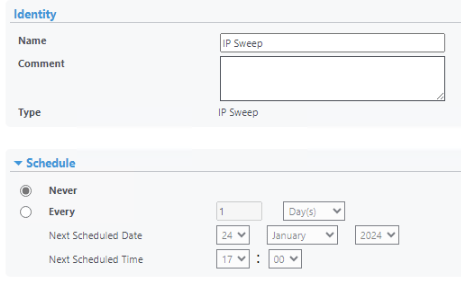
7. For the selected IP Sweep:
Manual Specified IP address- Admin can choose an single IP, subnet or range of address
– One at a time as a Single Address or DNS Name
– As an address range (e.g., addresses starting at 13.10.20.7 and ending at 13.10.20.18)
– As a subnet, enter a single address and the Mask, and the IP segment is defined
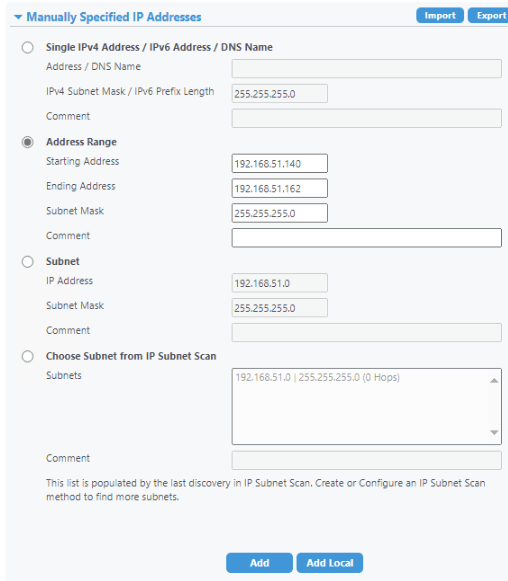
8. Once the scope is defined, click Add. The values are added to the scan list in the Current IP Addresses box. Automatically retrieve IP address – Admin can choose to upload IP from CSV (Optional)

9. From the Advanced section, specify a specific Timeout and Retry count. For successive SNMP requests (all but Broadcast), the timeout period is the wait time after each request is made. The Retry count repeats the SNMP request for the number of times specified. (A starting value of 3-5 seconds for Timeout and 1 Retry is a reasonable starting point.)

10. Optional- Select Printers to use IPP to catch devices that do not respond to SNMP v1 or v2. Performance penalty.
11. When selections are completed, click Save.
Verify:
Administration > Discovery > Discovery Method > select IP sweep > select Run discovery now.
Once discovery is done, Go to Printers > printers > newly discovered to view.

Result – Newly Discovered devices:

Restricting Discovery by Manufacturer:
You can restrict Centreware Web to only discover Xerox network printers, or it can discover all network printers. If Admin wish to modify discovery restrictions – (Administration > Network > Network usage configuration)

 Steven’s Knowledge Base