
You can set up Centreware Web to enable Status Retrieval and Alerts only during specific Hours of Operation.
When configured this way, Status and Extended Data Retrieval are limited to the designated Operational Hours, which restricts Centreware Web’s ability to retrieve Status and Alert updates. This is not recommended. By default, Centreware Web has no such restrictions, allowing Status and Extended Data Retrieval to occur at any time throughout the 24-hour day.
Hours of Operation:
If Admin wish to modify hours of operation (Administration > Network > Network usage configuration)

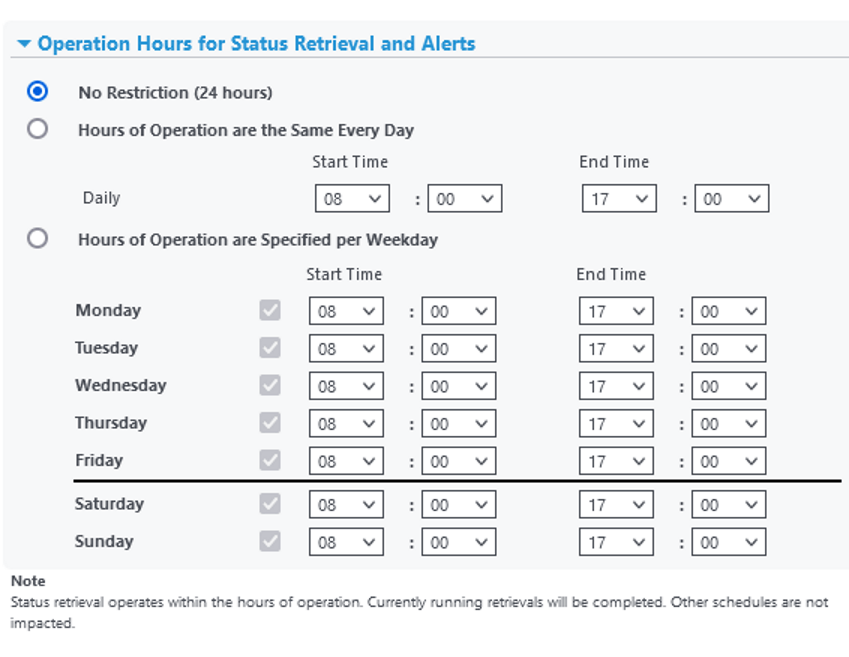
Note: If the retrieval of Status, meters, supplies, alerts or other extended data is currently processing, the
tasks will complete regardless of specified hours. In the future, the retrievals will comply with the restricted
schedule.
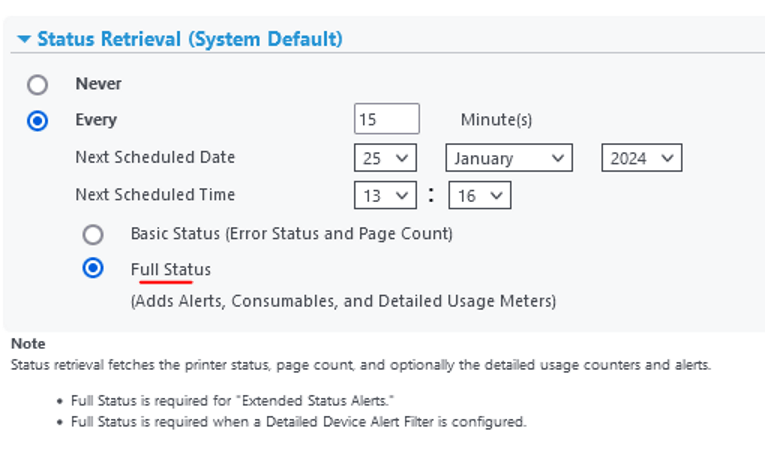
Status Retrieval:
Select Full status for in-depth alerts that requires it (Example- ones with [2] next to it)
If Admin wish to modify status retrieval settings – (Administration > Network > Network usage configuration)
 Steven’s Knowledge Base