
A variable is a unit of memory in which values are stored. Useful values that can be stored in a variable include cmdlets, statements , Store STRING (Text), NUMBERS (values), Boolean logic, paths, settings and many more. Variable names aren’t case-sensitive, and can include spaces and special characters. Variables is a MUST in any script and is called for when computing complex logic. Understanding variable will help immensely in long run.
Variable starts with “$” and a name. Our variable name here is “Variable1” and we will assign the data string “abc”. Numbers do not need quotations “”
Example:
$Variable44 = “abc”
$Variable45 = 123
Example – if $x =1, $y = 3, then $x+$y = 4
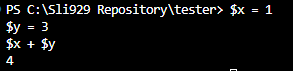
How to concatenate if variable is both a string and a integer?
$Variable44 = "abc"
$Variable45 = 123

$variable46 = $Variable44 += $Variable45
# Output is abc123. The object type becomes a string

Extending beyond Variables are methods (properties) of the variable. I want to get what type of value is present. It is crucial to know which type of value you are dealing with as some is not compatible with one other (ex: Using export-csv with custom psobject may lead to columns with invalid dataset.)
Example:
$Variable44.GetType()

$myStatementF= $false #boolean value (True or false)

The following entails methods for data string variables:
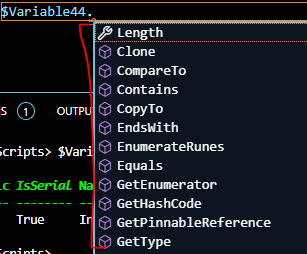
The following entails methods for cmdlet variable [Get-date]

There are many types of value such as boolean, array, ps custom object, etc. Depending on the value type, it comes with different set of methods (properties) of that value.
Modifying the Variable Type:
Decimals default is shown as double. For example, 11.5 is a double value.

If user wish to store the variable as INT, then run the command
[Int]$Variable1
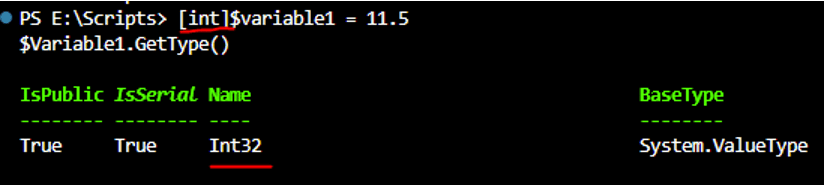
Whole numbers default is shown as Integers.

If user like to store an INT as a double, run the command
[Double]$Variable3

Clearing Variable:
There may be times where variable needs to be removed/clear if there is a duplicate variable somewhere or testing is done.
- How can I list back all the variables that I have created before?
- This gets all the variables, not just the ones you created, you need to filter to variable you are concerned about: Get-Variable -name <name without $>
- How do I then clear all the contents of the variables?
- Clear-Variable -name <name without $>
- How do I remove/delete a variable?
- Remove-Variable -name <name >
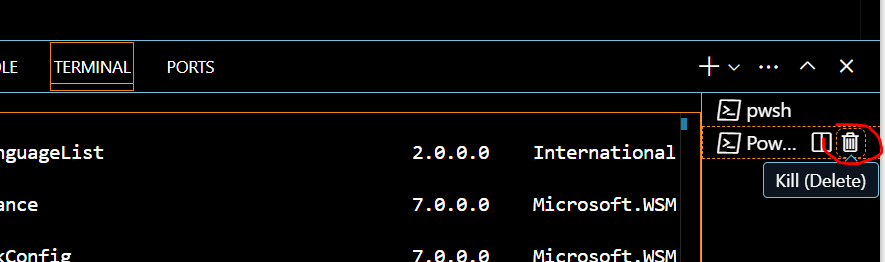
By far, the easiest way is to kill the terminal session then recreate it. This wipes off all the variables that is cached.
Practice:
$Variable1 = "abc"      #string can be single or double quote"
$Variable1              #will display the string, abc.#
$Variable1.GetType()    #return what type of variable it is, which is STRING #

$variable2 = 8989.2  #no quotes for numbers#
$variable2.GetType() #The method returns the properties of the variable as an integer32, if result shows double (it refers to decimal)#

####################################

$variable11 = 11
$variable12 = 12
$variable11 + $variable12 #will result in 23#
$Total = $variable11 + $variable12  #Store result in another variable ($Total)#
$Total2 = $variable12 % 2  #Store result in another variable ($Total2) - % equals reminder. 12/2=6 no reminder. Result is 0. Can be used for conditional statement #

#####################################

$myStatementF= $false
$mystatementT= $True

$myStatementF.GetType() #The results show Boolean#
$mystatementT.GetType()

($variable11 -eq $variable12) #Will result in boolean value of False since 11 is not equal to 12 (conditional statement)#
 Steven’s Knowledge Base