
PowerShell’s custom objects give you the ability to create your own data structures with properties and methods, which can be easily queried and manipulated
PSCustomObjects differ from hash tables in that they represent an entity, whereas hash tables only store key-value pairs. When outputting a hash table, the columns are labeled “Name” and “Value,” indicating the key-value structure, but it cannot hold additional details about each key. The items in a hash table only reflect the key and its value. While a hash table is technically an object, its functionality is limited and it is not ideal for representing structured data.
On the other hand, creating a custom PowerShell object makes the data more useful and easier to interpret. Custom objects are better suited for representing structured information. For example, a server object created with the [PSCustomObject] keyword can contain more than just the serial number. It can include properties such as the server’s name, service tag, vendor, and model.
Create PScustomObject
# Method 1:
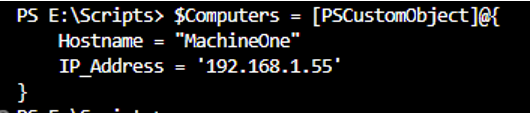
#Create custom object - past the keys and changes them to PSCustom objects
#Custom object is called Computers and are assigned Name: Hostname and IP address
and their assigned values

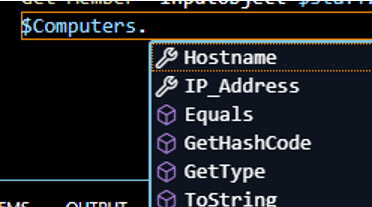
$Computers = [PSCustomObject]@{

    Hostname = 'MachineOne'
    IP_Address = '192.168.1.55'

	}
# Method 2:
Add-member -InputObject $staff1

#The name of the method/property assigned to $Staff1 will be StaffID with value of 100.
Add-member -InputObject $staff1 -MemberType NoteProperty -name 'StaffID' -value'100'

#Add more objects with different values, use -force to overwrite values
Add-member -InputObject $staff1 -MemberType NoteProperty -name 'StaffID' -value 100 -force
Add-member -InputObject $staff1 -MemberType NoteProperty -name 'FirstName' -value 'Steven'
Add-member -InputObject $staff1 -MemberType NoteProperty -name 'LastName' -value 'Li'
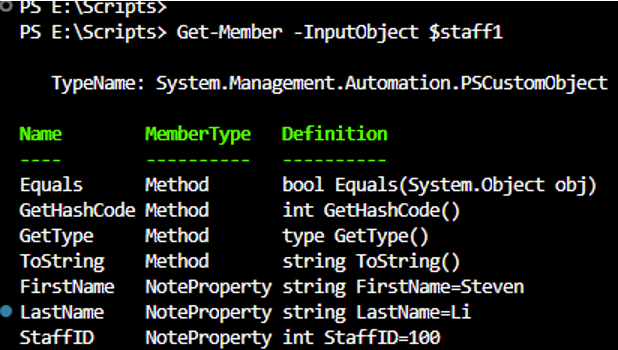
Get member info for custom object
#Get all the method/properties of the custom object – $staff1
Get-Member -InputObject $staff1
Get-Member -InputObject $Computers -Name 'hostname'

Get-Member -InputObject $Computers -view All

 Steven’s Knowledge Base