
What are IF statements?
The first thing the if statement does is evaluate the expression in parentheses. If it evaluates to $true, then it executes the scriptblock in the braces. If the value was $false, then it would skip over that scriptblock.

Common operators used in IF statement:
-eq for equality
-ne for not equal
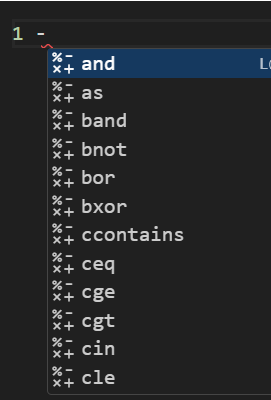
Examples:
1 -eq 1 #operator means equals, one equal to one
8 -ne 8 #not equal, eight not equal to eight
1 -lt 2 #less than, one less than two
3 -le 2 #less or equals to, three less then or equal to two
4 -gt 5 #greater than, four greater than five
6 -ge 6 #greater or equal, six greater than or equal to 6
How does one evaluate if a condition is true or false?
Admin can use the operators above to determine if a value is greater, equal, or less than in their IF statements. For example:
#conditions for arrays table '@()'
#Determine if number "4" is included in the array of "1,2,3". It will result in false.
@(1,2,3) -contains 4

#-contains is not case sensitive, result will be True
@('orange','pear') -Contains 'PEAR'
#-contains is case sensitive by adding 'C', result will be false
@('orange','pear') -Ccontains 'PEAR'

#check with single string
#Returns true since is does not check for case sensitive
('baby') -eq 'BABY'
#Returns false since is does check for case sensitive
('baby') -Ceq 'BABY'

Examples
#Set filepath to variable then test the path with ‘test-path -path’
$Testpath = 'C:\Sli929 Repository\tester\Test.txt'

Test-Path -Path $Testpath #results in True
IF statement:(If condition is true, execute action)
#create conditional statement with 'test-path -path'
#Write If statements with If(Check condition){Execute action}- Great for evaluating MULTIPLE VARIABLES

If (Test-path -Path $Testpath)
{
	Write-Output 'File path is valid!'
}

#If file path is True, it will output 'File path is valid! else it does not output anything
IFELSE:(If condition is NOT true, execute action)
#Create conditional statement with IFELSE; If(check){action}Else{action}

If (Test-path -path $Testpath){

    get-Content -Path $Testpath

        }Else {Write-Output "Invalid $testpath Please check file path"}
#Use double quote when outputting variables ($testpath)

#Turn content of file to variable with $data and get line count if path exist
If (Test-path -path $Testpath)
    {$Data = get-Content -Path $Testpath
        $Data.Count
    }
Nested If statement:

Example 1:
Put additional IF statement under the first and insert conditions and actions for it.

IF()
{
	IF(){}
	ElseIf(){}

}
Else{}

Example:
This example gets the file path and gets counts of number of line in the FIRST IF.
The SECOND IF will query operators to check the line count.

If (Test-path -path $Testpath) #Check if path is valid
    {$Data = get-Content -Path $Testpath  #Get Content of path
        $Data.Count  #Count the lines of code

#Check First condition
        If ($Data.count -lt 2){Write-Output 'This file has less than 2 lines'}

#Check second condition
        ElseIf($Data.count -gt 5){Write-Output "The file: $Testpath has more than 5 lines of code"}

#Output third condition if above is false, ELSE statement for second IF
        Else {Write-Output "The file has between 2 and 5 lines of code"}
        Write-Output "Test string post condition check"
    }
#Else statement for FIRST IF
    Else {Write-Output "Invalid $testpath Please check file path"
Example 2:
Example 2 will retrieve a single name from the first line of a text file that contains multiple names.
Create variable to map path to file:
$filepath = “C:\Sli929 Repository\tester\Test.txt”
$FileData = Get-Content $filepath
$FileData.Count
Create variable to only display the first line in the text file with array index of [0]
$FirstName = $Filedata[0]
$FirstName

Create IF STATEMENT to output the names; format is followed:
#Variable
#If (True)
#Execute {if,elseif,else...}

$filepath = "C:\Sli929 Repository\tester\Test.txt"
$FileData = Get-Content $filepath
$FirstName = $FileData[0]

if ($FirstName -eq 'Kim') {Write-Output "Name is kim"}
Elseif ($FirstName -eq "john") {Write-Output "My name is John"}
Elseif ($FirstName -eq "Bob") {Write-Output "My name is Bob"}
Else {Write-Output "Not listed"}
 Steven’s Knowledge Base