
Do Until keeps running as long as the condition is false. When the condition becomes true it will stop.
Difference between Do While and Do Until:
A Do…While loop continues processing WHILE a condition evaluates as True, a Do…Until loop processes UNTIL a condition becomes True. In the Do Until loop, the condition is checked after the code has been executed, meaning it will always execute at least one iteration. This differs from the While loop, which checks the condition before execution.
#Do until loop. Run until CONDITION IS FALSE.

Do {Statement}
Until (Condition = false)

Do {Write-Output "Hi"}
    until ($False)
Example The example below will keep looping for input until user types in “Close”. If user does not type in the correct string, “close”, it loops back to “Please try again”
Write-Output "Opening application"
Write-Output "Please type in close"
Write-Output "Type in Close to close windows"
Do {
    $input = Read-Host -prompt "Please try again"
}
Until ($input -eq  "close")

Example: Iterate the $counter until the count gets to more than 5.
$counter = 1
Do {
    Write-Output "Counter value is $counter"
    $counter++
} Until ($counter -gt 5)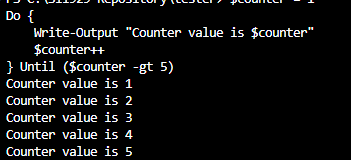
 Steven’s Knowledge Base