
Do something until a CONDITION BECOMES TRUE. You also have the While loop in PowerShell, without the Do part. They are basically the same, both run until a condition is met.
Unlike the While loop, which checks the condition before executing the code block, the Do While loop checks the condition after the code block has been executed. This ensures the code block is executed at least once, regardless of the condition.
Do {Statement}
While(condition = true)
Do {Write-Output “Hi”}
While ($true)
Example: Displays “starting loop 1,2,3,etc..” for 5 times. Triggers loop while $a is less or equal to 5
$a = 1
Do
{
 "Starting Loop $a"
 $a
 $a++
 "Now `$a is $a"
} While ($a -le 5)

Example: Do loop for user input WHILE input is NOT ‘Close’
Write-Output "Opening application"
Write-Output "Please input string"
Write-Output "Type in Close to close windows"

Do {
    $input = Read-Host -prompt "Please try again"
}
While ($input -ne "Close")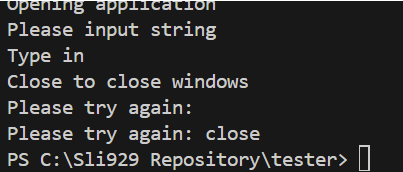
 Steven’s Knowledge Base