
What is For loop?
The For statement (also known as a For loop) is a language construct you can use to create a loop that runs commands in a command block while a specified condition evaluates to $true.
A typical use of the For loop is to iterate an array of values and to operate on a subset of these values. In most cases, if you want to iterate all the values in an array, consider using a Foreach statement.
for (initiate with $i=0; Put Condition; Repeat)
{
    <Statement list>
}
Example: While $num is less than 10, “$num++” triggers an increment of until it stops. Outputs numbers 1-9.
for($num=0;$num -lt 10; $num++)
{Write-Output $num}Example: Output only even numbers. use “$num=$num+2” or “num+=2”
for($num=0;$num -lt 10; $num=$num+2)
{Write-Output $num}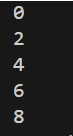
Example: Iterate via items on array using the index. Increment the number of index to show all string in array. The example counts the index of the array and outputs the name for every third number.[0]= Steve,[3]=Steve, [6]=Steve, [9]=john.
$array=@("Steve", "Bob", "John", "Steve", "Bob", "John", "Steve", "Bob", "John", "John")
For($i=0; $i -lt $array.Length; $i+=3)
    {Write-Output $array[$i]}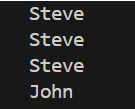
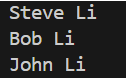
Example: Adds a string to the array with $array[$i]+=” Li”. The For() WRITES to array block. It COMMITS the changes in the array.
$array=@("Steve", "Bob", "John")
For($i=0; $i -lt $array.Length; $i++){

     $array[$i]+=' Li'
     Write-Output $array

    }
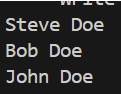
Example: Add string to array with ForEach. ForEach() READS from array. No commits and no changes in the Array.
$array=@("Steve", "Bob", "John")
foreach($name in $array){

       $name+=" Doe"
       Write-Output $name
}
 Steven’s Knowledge Base