
The while statement (also known as a while loop) is a language construct for creating a loop that runs commands in a command block as long as a conditional test evaluates to TRUE. More Flexible than ForEach() since you get to control how many times the loop runs. Used for applications that requires user input to be true
while (condition is true)
    {execute statement}
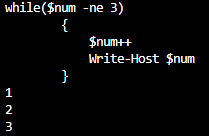
Example: While $num is not equal to 3, loop continues without stop with increment of 1
	while($num -ne 3)
	{
	    $num++
	    Write-Host $num
	}
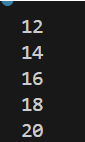
Example: While 10 is less than 20, iterate value of 2 until it reaches 20.
$x=10
While($x -lt 20){

   $x+=2
   Write-Output $x

}
Example: While it is less than 47 minutes, continue loop until it reaches 47 minute mark using (get-date) cmdlet
# Get-Date -Minute  - Cmdlet with "-minute" parameter

# (Get-Date).Minute - Cmdlet with ".minute" method

while((get-date).Minute -lt 47)

    {Get-Date}
Example: Fetch user input and executes based on input. This loops all the cmdlets below “While($True){}”
While($True){
Write-Output "Opening application"
Write-Output "Please input string"
$input = Read-Host "Enter Close to close window"
if($input -eq 'Close')
     {Write-Output "Closing....."
        Break}
}

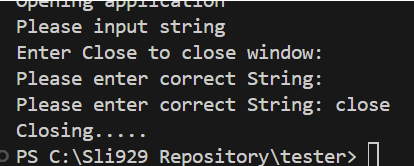
Example: If the user input is NOT “close”, It will keep asking “Please enter correct string”
Write-Output "Opening application"
Write-Output "Please input string"
$input = Read-Host "Enter Close to close window"

while($input -ne 'close')
{ $input = Read-Host "Please enter correct String"
    if($input -eq 'Close')
    {Write-Output "Closing....."}
}

#No need to use break as it is handle by while loop -ne condition
 Steven’s Knowledge Base