
Since windows 10 is coming to end of life in October 2025, it is time to upgrade workstations to windows 11. The following powershell script is intended for SCCM, PDQ, or any other administration tools that includes powershell scripting. It is divided into three parts:
- Hardware Check
- Windows 11 ISO execution
- Clean up
The script applies only to specific models within Dell and Lenovo family. However, this can be adjusted in the script to apply to other models as well. The scripts all have logging with start-transcript. Feel free to omit Tee-object for logging if prefer. It is highly recommended to update driver and firmware for devices before in place upgrade.
The method of deployment is PDQ:

Does this replace WSUS?
While WSUS should be the primary method for deploying Windows 11, it lacks explicit logging and system firmware modification. Although IT admins might have other reasons to use PowerShell for deployment, PowerShell rollout is considered a secondary approach. There are other methods of rollout including GPO, reg edits ,etc. Personal preference, it would be powershell since I have a greater control of what kind of information I can retrieve from deployment.
Part 1:
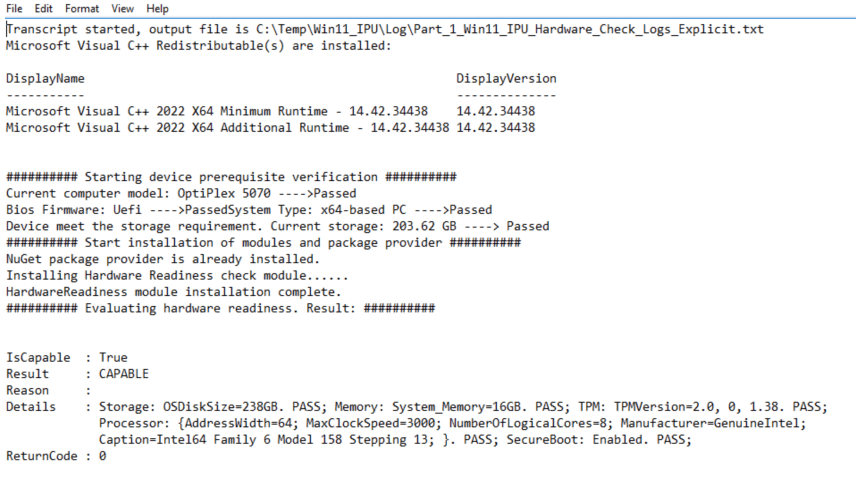
Uses hardware readiness module to check for hardware prerequisites. If secure boot or TPM is off, it turns it back on and enables it. The script requires secure boot to be turned on.
Results:
<######################################################################
Part 1:
Begin the script to check windows 11 requirement before starting in place upgrade:

• Processor: 1GHz or faster CPU or System on a Chip (SoC) with two or more cores.
• RAM: 4GB.
• Hard drive: 64GB or larger.
• System firmware: UEFI, Secure Boot capable.
• TPM: Trusted Platform Module (TPM) version 2.0.
• Graphics: Compatible with DirectX 12 or later with WDDM 2.0 driver.
• Display resolution: High definition (720p) display greater than 9″ diagonally, 8 bits per color channel.

Notes:
1. This script is intended ONLY for Dell and Lenovo system. It is part 1 of the hardware check. It contains two phases.
    Phase 1 triggers a passive compatibility check only on specific models, checks for UEFI and x64 based model
    Phase 2 triggers an active TPM and Secure boot check. If those are turned off, the script will turn it back on
    At the end of the phase, device will restart. The next script, Part 2 will retrigger hardware check again and only mount win11 iso setup.exe if it returns code is equal to 0

2.  For system with windows 10 installed with UEFI on and secure boot off, it is ok to turn secure boot on post install.
    However, if Bios Mode is set to Legacy/BIOS then windows must be reinstalled.


3.  Using -Match targets substring, string can be partial. Using -Contains targets entire string, must be whole word.

4. Secure boot must be supported under UEFI firmware but is NOT REQUIRED to be enabled for IPU. It is highly recommended to enable it in order harden security posture. More Info: https://umatechnology.org/is-secure-boot-required-for-windows-11/
5. TPM 2.0 is REQUIRED to be enabled for windows 11 IPU
6. Error code 66 = failed to IPU

######################################################################>

# Start filter by scoping out specific device models for organization. This narrows down the scope of which model is qualified for win11 and which models the company wants to use due to EOL status
# Phase 1 is to trigger compatibility check only on specific models

######################################################################
<# Start Phase 1:
Only allow the specific models with UEFI and x64 system type
Dell: Optiplex 5060,5070,5080,5090,SFF Plus 7020
Lenovo: E14(21JR001RUS)
#>
######################################################

# Start logging
# Command start time: 20250405141035  = 2025-04-05 2:10pm Format:YYYY-MM-DD HH MM SS
Start-Transcript -Path "C:\Temp\Win11_IPU\Log\Part_1_Win11_IPU_Hardware_Check_Logs_Explicit.txt" -Force -IncludeInvocationHeader

# Start logging under C:\temp\Win11_IPU\Log folder. If folder does not exist, create one.
$LogPath = "C:\temp\Win11_IPU\Log"
$Log = "Part_1_HardWare_Verification_Logs.txt"
$AllError = "Part_1_HardWare_Verification_Errors.txt"
$TestPath = Test-Path -Path $LogPath


if($TestPath -eq $false ){
    New-Item -Path "C:\Temp\Win11_IPU" -Name "Log" -ItemType "Directory"
}

#########################################################
# Block Windows 11 Re run
$OSInfo = Get-CimInstance -ClassName Win32_OperatingSystem | Select-Object Version, Caption
if($OSInfo.Caption -match "Microsoft Windows 11"){

    Write-Output "`n########## Current OS is $($OSInfo.Caption).....Closing script ##########" | Tee-Object "$($LogPath)\$Log" -Append
    exit 66

}
#########################################################
# Install prerequisites for DellBIOSProvider module:

# Detect if device has Microsoft visual c++ installed
$vc_redist_installed = Get-ItemProperty HKLM:\SOFTWARE\Microsoft\Windows\CurrentVersion\Uninstall\* |
    Where-Object {$_.DisplayName -like "Microsoft Visual C++*"} |
    Select-Object DisplayName, DisplayVersion

if ($vc_redist_installed) {
    Write-Output "Microsoft Visual C++ Redistributable(s) are installed:" | Tee-Object "$($LogPath)\$Log" -Append

    $vc_redist_installed | Format-Table -AutoSize
} else {
    Write-Output "`n########## No Microsoft Visual C++ Redistributable is installed.....Starting installation of latest version ##########`n" | Tee-Object "$($LogPath)\$Log" -Append
    [System.Net.ServicePointManager]::SecurityProtocol = [System.Net.ServicePointManager]::SecurityProtocol -bor 3072; iex ((New-Object System.Net.WebClient).DownloadString('https://vcredist.com/install.ps1'))
}
#########################################################
# Get the model, System Type, and Bios Firmware. Output the results in console and into log path
$Device_Info = Get-ComputerInfo -Property CSmodel,CsSystemType,BiosFirmwareType,CsManufacturer
$model = @("OptiPlex 5060","OptiPlex 5070","OptiPlex 5080","OptiPlex 5090","OptiPlex 7040","OptiPlex SFF Plus 7020","21JR001RUS","21EB001RUS")

try {
# Evaulate system model. Exist script if model does not match $model array

if(($model -contains $Device_Info.CSmodel)){

    Write-Output "`n########## Starting device prerequisite verification ##########`n" | Tee-Object "$($LogPath)\$Log" -Append
    Write-Output "Current computer model: $($Device_Info.CSmodel) ---->Passed" | Tee-Object "$($LogPath)\$Log" -Append

    }else{

        Write-Output "Incorrect model, please double check the scope ---> closing script" | Tee-Object "$($LogPath)\$Log" -Append

        Stop-Transcript #End logging
        exit 66 #Exit out of script

    }

#If System model check passes, continue with Bios firmware and System type(x64) evaulation
if(($Device_Info.BiosFirmwareType -match "Uefi") -and ($Device_Info.CsSystemType -match "x64-based")){

    Write-Output "Bios Firmware: $($device_info.BiosFirmwareType) ---->Passed`nSystem Type: $($device_info.CsSystemType) ---->Passed"| Tee-Object "$($LogPath)\$Log" -Append


    }#First IF evaulation for -(UEFI and system Type)

        else{

            Write-Output "Current Bios Firmware: $($device_info.BiosFirmwareType)`nSystem is not compatbile for Windows 11 Upgrade --- closing script" | Tee-Object "$($LogPath)\$Log" -Append
                    Stop-Transcript #End logging
            exit 66 #Exit out of script

            }

# Evaulate available storage space required for in place upgrade for C: drive
$Storage = Get-Volume -DriveLetter C
$AvailableSpace = [math]::Round(($Storage.SizeRemaining)/1GB,2)

# Get the value in kb then round up to next 2 decimal. Convert to GB. If value is less than 20gb, exit script
if($AvailableSpace -lt 20){

    Write-Output "Device does not meet the storage requirement. At least 20gb of free space is needed for in place upgrade" | Tee-Object "$($LogPath)\$Log" -Append
    Exit 66

        }elseif($AvailableSpace -ge 20){

            Write-Output "Device meet the storage requirement. Current storage: $AvailableSpace GB ----> Passed" | Tee-Object "$($LogPath)\$Log" -Append

        } # End IF Else storage check


}#try/catch
catch {
    Write-Output "$($_.Exception.Message)"  | Tee-Object "$($LogPath)\$Log" -Append
    }


######################################################################
<# Start Phase 2: Correction phase

Evaulate the rest of the requirement:

Storage
Memory
TPM
Processor
SecureBoot

This module provides functionality to check if a Windows system meets the hardware requirements for Windows 11.
Based on Microsoft's official hardware readiness check script
https://www.powershellgallery.com/packages/HardwareReadiness/1.0.2

If it fails hardware check for reasons related to TPM or Secure boot, the following below will correct it.
#>
######################################################################
#Install and import hardware readiness check module

Write-Output "`n########## Start installation of modules and package provider ##########`n" | Tee-Object "$($LogPath)\$Log" -Append

$HWReadiness = try{

# Get Package provider - Nuget and Hardware Readiness module
    if (Get-PackageProvider -Name NuGet -ErrorAction SilentlyContinue) {
        Write-Output  "NuGet package provider is already installed." | Tee-Object "$($LogPath)\$Log" -Append
    }
    else {
        Write-Output "Installing Nuget Package provider....."  | Tee-Object "$($LogPath)\$Log" -Append
        Install-PackageProvider Nuget -Force

        # Check for package present
        if (Get-PackageProvider -Name NuGet -ErrorAction SilentlyContinue) {{
            Write-Output  "NuGet package provider installation complete." | Tee-Object "$($LogPath)\$Log" -Append
            }
        }
    }# End Else


########

    if (Get-Module -Name HardwareReadiness -ErrorAction SilentlyContinue) {
        Write-Output "HardwareReadiness module is installed." | Tee-Object "$($LogPath)\$Log" -Append
    }
    else {
        Write-Output "Installing Hardware Readiness check module......"  | Tee-Object "$($LogPath)\$Log" -Append
        # Get Module
        Install-Module -Name HardwareReadiness -Force
        Import-module HardwareReadiness -Force

        # Check for HardwareReadiness module
        if (Get-Module -Name HardwareReadiness -ErrorAction SilentlyContinue) {
             Write-Output "HardwareReadiness module installation complete." | Tee-Object "$($LogPath)\$Log" -Append
        }
    }# end else


#Return results to variable
    $result = Get-HardwareReadiness

    $ReturnCode = $result.returncode
    $Result_Reason = $result.Reason

#Display results
    Write-Output "`n########## Evaluating hardware readiness. Result: ##########`n" | Tee-Object "$($LogPath)\$Log" -Append

    $result

}Catch{
    Write-Output "$($_.Exception.Message)" | Tee-Object "$($LogPath)\$Log" -Append
}

$HWReadiness | Tee-Object "$($LogPath)\$Log" -Append


########################################################################
# Begin modification to system to turn on Secure Boot and TPM 2.0 depending on the outcome of $Result
########################################################################

###Turn on Secure/TPM if not enabled for Dell devices with UEFI ONLY###

########################################################################
# Error return code = 1, failure reason = TPM or Secure boot then turn on TPM/Secure.

if (($Device_Info.CsManufacturer -contains "Dell Inc.") -and ($returncode -eq 1) -and ($Result_Reason -match "TPM" -or "SecureBoot")){

    Write-Output "`n########## Begin modification on BIOS (Basic Input/Output System) #########`n" | Tee-Object "$($LogPath)\$Log" -Append

    #Install module
    Install-Module DellBIOSProvider -Confirm:$False -Force

    #import module
    Import-Module DellBIOSProvider -Force

    # pause
    Start-Sleep -Seconds 10
########################################################################
# Evaulate Secure boot status. Turn on Secure Boot for Dell devices with UEFI system
    <#Secure Boot:
    If the computer supports Secure Boot and Secure Boot is enabled, this cmdlet returns $True.
    If the computer supports Secure Boot and Secure Boot is disabled, this cmdlet returns $False.
    If the computer does not support Secure Boot or is a BIOS (non-UEFI) computer, this cmdlet displays the following:
    Cmdlet not supported on this platform 0xC0000002 #>

try{
    $isSecureBootEnabled = Confirm-SecureBootUEFI

    if(($isSecureBootEnabled -eq $false)){

        Write-Output "`n########## Modifying Bitlocker ##########`n" | Tee-Object "$($LogPath)\$Log" -Append

        # Suspend bitlocker to make changes to device. Only resume by using resume-bitlocker cmdlet
        # Suspend bitlocker ONLY if the drive is encrypted. Else, skip it
        $BitlockerStatus = (Get-BitLockerVolume -MountPoint "C:").ProtectionStatus # On or Off
        $BitlockerInfo = manage-bde.exe -status C:

        # If bitlocker is ON, turn it off
        if($BitlockerStatus -eq "On"){

            Write-Output "`n########## Modifying Secure boot settings on Dell device ##########`n" | Tee-Object "$($LogPath)\$Log" -Append
            Write-Output "Suspending BitLocker temporarily for Secure Boot changes......." | Tee-Object "$($LogPath)\$Log" -Append

            Suspend-BitLocker -MountPoint "C:" -RebootCount 0

        }else{
            Write-Output "Bitlocker is already OFF...... Status:" $BitlockerInfo | Tee-Object "$($LogPath)\$Log" -Append
        }

        Write-Output "Bios Firmware: $($device_info.BiosFirmwareType)`nSecure Boot Status:$($isSecureBootEnabled)`n" | Tee-Object "$($LogPath)\$log" -Append
        Write-Output "`n###### TURNING ON SECURE BOOT ######`n" | Tee-Object "$($LogPath)\$Log" -Append

        # set the value to enable
        Set-Item -Path DellSmbios:\SecureBoot\SecureBoot "Enabled"
        Start-Sleep -Seconds 10

        #Get current value of secure boot
        $SecureBootvalue = Get-Item -Path DellSmbios:\SecureBoot\SecureBoot | select currentvalue

        # Retrieve current value
        Write-output "`n##### Current Value of Secure Boot: #####`n" | Tee-Object "$($LogPath)\$Log" -Append
        Write-Output "The current value of Secure boot is: $($SecureBootvalue.CurrentValue).`n" | Tee-Object "$($LogPath)\$log" -Append

        # Create new file to detect post changes
        New-Item -Path $LogPath -Name "TPM_SecureBoot_Modified" -ItemType File -Force
       }
}catch{
    #return errors if secure boot cannot turn on
    Write-Output "$($_.Exception.Message)" | Tee-Object "$($LogPath)\$log" -Append
    Write-Error "The computer does not support Secure Boot or is a BIOS (non-UEFI) computer" | Tee-Object "$($LogPath)\$log" -Append

}

########################################################################
# Evaulate TPM status. Turn on TPM for Dell devices with UEFI system
try{

$TPM = Get-Tpm
    <#
    The Get-Tpm cmdlet gets a TpmObject. This object contains information about the Trusted Platform Module (TPM) on the current computer.
    TPM status:
    TpmPresent                : False # TPM present will be FALSE if TPM is turned OFF. This is normal as TPM will be invisible to the OS once its off.
    TpmReady                  : False # TpmReady : False means TPM is Turned ON but disabled - Tells whether the TPM is complies with latest Windows standards.
    TpmEnabled                : False
    TpmActivated              : False
    TpmOwned                  : False
    #>
    if($TPM.TpmPresent -eq $false){

        Write-Output "`n########## Modifying Bitlocker ##########`n" | Tee-Object "$($LogPath)\$Log" -Append

        # Suspend bitlocker to make changes to device. Only resume by using resume-bitlocker cmdlet
        # Suspend bitlocker ONLY if the drive is encrypted. Else, skip it
        $BitlockerStatus = (Get-BitLockerVolume -MountPoint "C:").ProtectionStatus # On or Off
        $BitlockerInfo = manage-bde.exe -status C:

        # If bitlocker is ON, turn it off
        if($BitlockerStatus -eq "On"){

              Write-Output "`n########## Modifying TPM settings on Dell device ##########`n" | Tee-Object "$($LogPath)\$Log" -Append
              Write-Output "Suspending BitLocker temporarily for TPM changes......." | Tee-Object "$($LogPath)\$Log" -Append

            Suspend-BitLocker -MountPoint "C:" -RebootCount 0

        }else{
            Write-Output "Bitlocker is already OFF...... Status:" $BitlockerInfo | Tee-Object "$($LogPath)\$Log" -Append
        }

        # Detect is TPM is ready and Enabled state. Using -or returns $true even if both TpmReady and TpmEnabled properites are $false
        if($TPM.TpmReady -eq $false -or $TPM.TpmEnabled -eq $false){


            Write-Output "Bios Firmware: $($device_info.BiosFirmwareType)`nCurrent Status of TPM:`n $($TPM|Out-String) .....Turning on TPM 2.0" | Tee-Object "$($LogPath)\$log" -Append

            # Enable TPM
            set-Item -Path DellSmbios:\TPMSecurity\SHA256  "Enabled"
            set-Item -Path DellSmbios:\TPMSecurity\TpmSecurity "Enabled"
            set-Item -Path DellSmbios:\TPMSecurity\TpmActivation  "Enabled"
            set-Item -Path DellSmbios:\TPMSecurity\TpmPpiPo "Enabled"

           # Get TPM info
            $TPMSHA256 = Get-Item -Path DellSmbios:\TPMSecurity\SHA256 | select currentvalue
            $TPMTpmSecurity= Get-Item -Path DellSmbios:\TPMSecurity\TpmSecurity | select currentvalue
            $TPMTpmActivation = Get-Item -Path DellSmbios:\TPMSecurity\TpmActivation | select currentvalue
            $TPMTpmPpiPo = Get-Item -Path DellSmbios:\TPMSecurity\TpmPpiPo | select currentvalue

            # Output TPM value post changes
            Write-Output "`n##### Current Value of TPM: #####`n" | Tee-Object "$($LogPath)\$Log" -Append
            Write-Output "TPM_Security = $($TPMTpmSecurity.currentvalue)" | Tee-Object "$($LogPath)\$log" -Append
            Write-Output "TPM_Activation =  $($TPMTpmActivation.currentvalue)" | Tee-Object "$($LogPath)\$log" -Append
            Write-Output "TPM_SHA256 = $($TPMSHA256.currentvalue)" | Tee-Object "$($LogPath)\$log" -Append
            Write-Output "TPMTpmPpiPo = $($TPMTpmPpiPo.currentvalue)" | Tee-Object "$($LogPath)\$log" -Append


            # Create new file to detect post changes
            New-Item -Path $LogPath -Name "TPM_SecureBoot_Modified" -ItemType File -Force

            }#end:If statement to detect is TPM is ready and Enabled state

        }# end: If statement TPM present

    else{
        # There is no way to detect if physical TPM can be detected on device. TPM is invisible to OS once its manually turned off..
        # Write-Output "TPM is not present on this device. Current Status: TpmPresent: $($TPM.TpmPresent) ..... Exiting Script" | Tee-Object "$($LogPath)\$log" -Append
        # exit #exit script
    }
}#Try
catch{
    #return errors if TPM cannot turn on
        Write-Output " $($_.Exception.Message)" | Tee-Object "$($LogPath)\$log" -Append

        }

<# Clean up, if dell PS module exist, remove it.
try{
    if(Get-Module -Name DellBIOSProvider) {
        Write-Output "Removing DellBIOSProvider from machine"

         Remove-PSDrive -Name DellSmbios  -ErrorAction SilentlyContinue
         Remove-Module -Name DellBIOSProvider -ErrorAction SilentlyContinue
         uninstall-Module –Name DellBIOSProvider -ErrorAction SilentlyContinue

            }
        }Catch{
               #return errors if issues removing module. Prevent script from terminating with trycatch{}
               Write-Output " $($_.Exception.Message)" | Tee-Object "$($LogPath)\$log" -Append
        } # End TryCatch - cleanup #>

# Restart system to update changes - FOR PDQ - allow PDQ to take over reboot process instead.
    #Countdown to restart
    Write-Output "`n########## Rebooting to apply changes ##########`n" | Tee-Object "$($LogPath)\$Log" -Append
    <#for ($i = 10; $i -gt 0; $i--) {

        Write-Output "Rebooting in $i seconds..." | Tee-Object "$($LogPath)\$log" -Append
        Start-Sleep -Seconds 1
    }
    shutdown.exe -r -t 0 -f #>

    ##### Post reboot - End Logging #####
    # Log all errors into file and stop transcript
    $Error | Tee-Object "$($LogPath)\$AllError" -Append

    #End logging
    Stop-Transcript
    ######################################################################

    }#end IF(($Device_Info.CsManufacturer -contains "Dell Inc.") -and ($returncode -eq 1) -and ($Result_Reason -match "TPM" -or "SecureBoot"))

## End Dell device correction ##

########################################################################

###Turn on Secure/TPM if not enabled for LENOVO devices with UEFI ONLY###

########################################################################
<# Lenovo provides a WMI interface that can be used for querying and modifying BIOS settings on their hardware models.
This means that we can use PowerShell to directly view and edit BIOS settings without the need for a vendor specific program.
#>
########################################################################

# Trigger scriptblock only if model is Lenovo and return code is 1 and matches TPM or Secureboot reasons.
if (($Device_Info.CsManufacturer -contains "LENOVO") -and ($returncode -eq 1) -and ($Result_Reason -match "TPM" -or "SecureBoot")){

########################################################################
# Evaulate Secure Boot status. Turn on Secure Boot for Lenovo devices with UEFI system

Write-Output "`n########## Begin modification on BIOS (Basic Input/Output System) #########`n" | Tee-Object "$($LogPath)\$Log" -Append

try{

    $isSecureBootEnabled = Confirm-SecureBootUEFI

if(($isSecureBootEnabled -eq $false)){

        Write-Output "`n########## Modifying Bitlocker ##########`n" | Tee-Object "$($LogPath)\$Log" -Append

        # Suspend bitlocker to make changes to device. Only resume by using resume-bitlocker cmdlet
        # Suspend bitlocker ONLY if the drive is encrypted. Else, skip it
        $BitlockerStatus = (Get-BitLockerVolume -MountPoint "C:").ProtectionStatus # On or Off
        $BitlockerInfo = manage-bde.exe -status C:

        # If bitlocker is ON, turn it off
        if($BitlockerStatus -eq "On"){

            Write-Output "`n########## Modifying Secure Boot settings on Lenovo device ##########`n" | Tee-Object "$($LogPath)\$Log" -Append
            Write-Output "Suspending BitLocker temporarily for Secure Boot changes......." | Tee-Object "$($LogPath)\$Log" -Append

            Suspend-BitLocker -MountPoint "C:" -RebootCount 0

        }else{
            Write-Output "Bitlocker is already OFF...... Status:" $BitlockerInfo | Tee-Object "$($LogPath)\$Log" -Append
        }

    # Return current secure boot value. If disabled, enable it
    $LenovoSecureBootValue = Get-WmiObject -Namespace root\wmi -Class Lenovo_BiosSetting | Where-Object CurrentSetting -match "SecureBoot" | Select-Object -ExpandProperty CurrentSetting

    if($LenovoSecureBootValue -match "Disable"){

        Write-Output "Bios Firmware: $($device_info.BiosFirmwareType)`nSecure Boot Status:$($isSecureBootEnabled)`n"| Tee-Object "$($LogPath)\$log" -Append
        Write-Output "`n###### TURNING ON SECURE BOOT ######`n" | Tee-Object "$($LogPath)\$Log" -Append

        # Set Secure boot to turn on
        (gwmi -class Lenovo_SetBiosSetting -namespace root\wmi).SetBiosSetting("SecureBoot,Enable")

        # Commit the changes
        (gwmi -class Lenovo_SaveBiosSettings -namespace root\wmi).SaveBiosSettings()

         # Create new file to detect post changes
         New-Item -Path $LogPath -Name "TPM_SecureBoot_Modified" -ItemType File -Force

    }#end if($LenovoSecureBootValue -match "Disable")

    # Return current secure boot value
    $LenovoSecureBootValue_Return = Get-WmiObject -Namespace root\wmi -Class Lenovo_BiosSetting | Where-Object CurrentSetting -match "SecureBoot" | Select-Object -ExpandProperty CurrentSetting

    Write-output "`n##### Current Value of Secure Boot: #####`n" | Tee-Object "$($LogPath)\$Log" -Append
    Write-Output "Current Secure Boot settings: $LenovoSecureBootValue_return`n"| Tee-Object "$($LogPath)\$log" -Append

        }#end IF (($isSecureBootEnabled -eq $false)){

    }catch{

        #return errors if secure boot cannot turn on
        Write-output "Error: $($_.Exception.Message)" | Tee-Object "$($LogPath)\$log" -Append
        Write-Output "The computer does not support Secure Boot or is a BIOS (non-UEFI) computer"| Tee-Object "$($LogPath)\$log" -Append
}

########################################################################
# Evaulate TPM status. Turn on Security Chip for Lenovo devices with UEFI system

try{
    $TPM = Get-Tpm
        <#
        The Get-Tpm cmdlet gets a TpmObject. This object contains information about the Trusted Platform Module (TPM) on the current computer.
        TPM status:
        TpmPresent                : False  #TPM present will be FALSE if TPM is turned OFF. This is normal as TPM will be invisible to the OS once its off.
        TpmReady                  : False # TpmReady : False means TPM is Turned ON but disabled - Tells whether the TPM is complies with latest Windows standards.
        TpmEnabled                : False
        TpmActivated              : False
        TpmOwned                  : False
        #>

    if($TPM.TpmPresent -eq $false){

        Write-Output "`n########## Modifying Bitlocker ##########`n" | Tee-Object "$($LogPath)\$Log" -Append
        # Suspend bitlocker to make changes to device. Only resume by using resume-bitlocker cmdlet
        # Suspend bitlocker ONLY if the drive is encrypted. Else, skip it
        $BitlockerStatus = (Get-BitLockerVolume -MountPoint "C:").ProtectionStatus # On or Off
        $BitlockerInfo = manage-bde.exe -status C:

        # If bitlocker is ON, turn it off
        if($BitlockerStatus -eq "On"){

              Write-Output "`n########## Modifying TPM settings on Lenovo device ##########`n" | Tee-Object "$($LogPath)\$Log" -Append
              Write-Output "Suspending BitLocker temporarily for TPM changes......." | Tee-Object "$($LogPath)\$Log" -Append

            Suspend-BitLocker -MountPoint "C:" -RebootCount 0

        }else{
            Write-Output "Bitlocker is already OFF...... Status:" $BitlockerInfo
        }

     # Detect is TPM is ready and Enabled state. Using -or returns $true even if both TpmReady and TpmEnabled properites are $false
        if($TPM.TpmReady -eq $false -or $TPM.TpmEnabled -eq $false){

            $LenovoTPMValue= Get-WmiObject -Namespace root\wmi -Class Lenovo_BiosSetting | Where-Object CurrentSetting -match "SecurityChip" | Select-Object -ExpandProperty CurrentSetting
            $LenovoTPMValue2= Get-WmiObject -Namespace root\wmi -Class Lenovo_BiosSetting | Where-Object CurrentSetting -match "PhysicalPresenceForClear" | Select-Object -ExpandProperty CurrentSetting

                if($LenovoTPMValue -or $LenovoTPMValue2 -match "Disable"){

                    Write-Output "Write-Output Bios Firmware: $($device_info.BiosFirmwareType)`nCurrent Status of TPM:`n $($TPM|Out-String) .....Turning on TPM 2.0" | Tee-Object "$($LogPath)\$log" -Append
                    Write-Output "Current Status of TPM-PhysicalPresenceForClear: $LenovoTPMValue2 ..... Turning on PhysicalPresenceForClear"| Tee-Object "$($LogPath)\$log" -Append

                        # Set TPM Security Chip to turn on
                        (gwmi -class Lenovo_SetBiosSetting -namespace root\wmi).SetBiosSetting("SecurityChip,Enable")
                        (gwmi -class Lenovo_SetBiosSetting -namespace root\wmi).SetBiosSetting("PhysicalPresenceForClear,Enable")

                        # Commit the changes
                        (gwmi -class Lenovo_SaveBiosSettings -namespace root\wmi).SaveBiosSettings()

                         # Create new file to detect post changes
                         New-Item -Path $LogPath -Name "TPM_SecureBoot_Modified" -ItemType File -Force

                            }# End if($LenovoTPMValue -or $LenovoTPMValue2 -match "Disable")

                    # Return current secure boot value
                    $LenovoTPMValue_Return= Get-WmiObject -Namespace root\wmi -Class Lenovo_BiosSetting | Where-Object CurrentSetting -match "SecurityChip" | Select-Object -ExpandProperty CurrentSetting
                    $LenovoTPMValue2_Return= Get-WmiObject -Namespace root\wmi -Class Lenovo_BiosSetting | Where-Object CurrentSetting -match "PhysicalPresenceForClear" | Select-Object -ExpandProperty CurrentSetting

                    Write-output "`n##### Current Value of TPM: #####`n" | Tee-Object "$($LogPath)\$Log" -Append
                    Write-Output "Current TPM Security Chip settings: $LenovoTPMValue_Return" | Tee-Object "$($LogPath)\$log" -Append
                    Write-Output "Current TPM PhysicalPresenceForClear settings: $LenovoTPMValue2_Return" | Tee-Object "$($LogPath)\$log" -Append

            } #if($TPM.TpmReady -eq $false -or $TPM.TpmEnabled -eq $false)
        }#if($TPM.TpmPresent -eq $false)

        else{
            #If tpm is turned off, it is invisible to OS, thus there is no way to detect is TPM is physically present.
            #Write-Output "TPM is not present on this device. Current Status: TpmPresent: $($TPM.TpmPresent) ..... Exiting Script"  | Tee-Object "$($LogPath)\$log" -Append
            #exit #exit script
        }

    }catch{
        #return errors if TPM cannot turn on
        Write-Output "Error: $($_.Exception.Message)" | Tee-Object "$($LogPath)\$log" -Append

    } #end catch


# Restart system to update changes - FOR PDQ - allow PDQ to take over reboot process instead.
    Write-Output "`n########## Rebooting to apply changes ##########`n" | Tee-Object "$($LogPath)\$Log" -Append
    #Countdown to restart
   <# for ($i = 10; $i -gt 0; $i--) {

        Write-Output "Rebooting in $i seconds..."  | Tee-Object "$($LogPath)\$log" -Append
        Start-Sleep -Seconds 1
    }
    shutdown.exe -r -t 0 -f #>

    ##### Post reboot - End logging #####
    # Log all errors into file and stop transcript. Use out-file so it does not output to terminal
    $Error | Out-File "$($LogPath)\$AllError" -Append
    ######################################################################

    #End logging
    Stop-Transcript
    ######################################################################

}# end entire scriptblock - if (($Device_Info.CsManufacturer -contains "LENOVO") -and ($returncode -eq 1) -and ($Result_Reason -match "TPM" -or "SecureBoot"))
## End Lenovo device correction ##


##### End of Part 1 - Phase 1 and Phase 2 #####
# Part 2 will rerun the hardware check again post reboot and then mount iso or download/extract iso to start installation if error code returns 0 (success)

######################################################################
 Steven’s Knowledge Base