
Since windows 10 is coming to end of life in October 2025, it is time to upgrade workstations to windows 11. The following powershell script is intended for SCCM, PDQ, or any other administration tools that includes powershell scripting. It is divided into three parts:
- Hardware Check
- Windows 11 ISO execution
- Clean up
The script applies only to specific models within Dell and Lenovo family. However, this can be adjusted in the script to apply to other models as well. The scripts all have logging with start-transcript. Feel free to omit Tee-object for logging if prefer.
Part 3:
Clean up iso folder and revert and changes made from part 2. It will attempt to reinstall Snipping tool as well. Resumes bitlocker if its enabled.
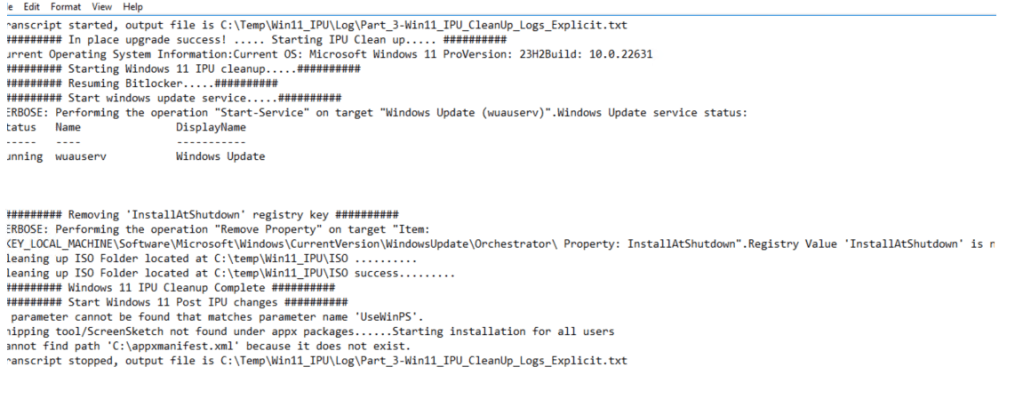
Results:
<######################################################################
Part 3: Cleanup
Post Windows 11 IPU, the last part includes cleanup post deployment.

Notes:
This script is intended ONLY for Dell and Lenovo system

# Part 3 script - cleanup & modifications
# Get windows OS version
# Resume Bitlocker, check windows update service
# Remove reg key New-ItemProperty -Path "HKLM:\Software\Microsoft\Windows\CurrentVersion\WindowsUpdate\Orchestrator\" -Name "InstallAtShutdown" -PropertyType "Dword" -Value "1"
# Mounted ISO are removed post reboot
# Modifications includes - reinstall snipping tool

######################################################################>
# Start logging
# Command start time: 20250405141035  = 2025-04-05 2:10pm Format:YYYY-MM-DD HH MM SS
Start-Transcript -Path "C:\Temp\Win11_IPU\Log\Part_3-Win11_IPU_CleanUp_Logs_Explicit.txt" -Force -IncludeInvocationHeader

$LogPath = "C:\temp\Win11_IPU\Log"
$Log = "Part_3_CleanUp_Logs.txt"
$AllError = "Part_3_CleanUp_Errors.txt"

######################################################################
try{
# Obtain the OS version post install
<#
ProductName        : Windows 11 Pro
DisplayVersion     : 23H2
CurrentBuildNumber : 19045
#>

$OSInfo = Get-CimInstance -ClassName Win32_OperatingSystem | Select-Object Version, Caption
$Version = Get-ItemProperty "HKLM:\SOFTWARE\Microsoft\Windows NT\CurrentVersion\"  'DisplayVersion'

#If OS equals windows 11, success. Else, setup failed.
if($OSInfo.Caption -match "Microsoft Windows 10"){

    Write-Output "In place upgrade failed, please review logs at 'C:\temp\Win11_IPU\Log' and try to re run script" | Tee-Object "$($LogPath)\$Log" -Append
    Write-Output "Current Operating System Information:`nCurrent OS: $($OSInfo.Caption)`nVersion: $($Version.DisplayVersion)`nBuild: $($OSInfo.Version)"  | Tee-Object "$($LogPath)\$Log" -Append


}elseif($OSInfo.Caption -match "Microsoft Windows 11"){

    Write-Output "`n########## In place upgrade success! ..... Starting IPU Clean up..... ##########`n" | Tee-Object "$($LogPath)\$Log" -Append
    Write-Output "Current Operating System Information:`nCurrent OS: $($OSInfo.Caption)`nVersion: $($Version.DisplayVersion)`nBuild: $($OSInfo.Version)"  | Tee-Object "$($LogPath)\$Log" -Append
}

######################################################################
##### Start cleanup #####
Write-Output "`n########## Starting Windows 11 IPU cleanup.....##########`n"

##### Resume Bitlocker #####

$BitlockerStatus = (Get-BitLockerVolume -MountPoint "C:").ProtectionStatus
$BitlockerInfo = manage-bde.exe -status C:

# If bitlocker is off, turn it on
if($BitlockerStatus -match "OFF"){

    Write-Output "`n########## Resuming Bitlocker.....##########`n" | Tee-Object "$($LogPath)\$Log" -Append

    Resume-BitLocker -MountPoint C: -erroraction silentlycontinue

}else{

    Write-Output "Bitlocker is already ON. Status:" $BitlockerInfo
}


##### Start windows update service #####
Write-Output "`n########## Start windows update service.....##########`n" | Tee-Object "$($LogPath)\$Log" -Append

start-Service -Name "wuauserv" -Verbose
$WindowsUpdateStatus = Get-Service -Name "wuauserv" -Verbose

Write-Output "`nWindows Update service status:$($WindowsUpdateStatus|out-string)" | Tee-Object "$($LogPath)\$Log" -Append

##### Remove Registry Key #####
# Remove "InstallAtShutdown" Reg value
Write-Output "`n########## Removing 'InstallAtShutdown' registry key ##########`n" | Tee-Object "$($LogPath)\$Log" -Append
Remove-ItemProperty  -Path "HKLM:\Software\Microsoft\Windows\CurrentVersion\WindowsUpdate\Orchestrator\" -Name "InstallAtShutdown" -Verbose -erroraction silentlycontinue

$OrchestratorValue = Get-ItemProperty "HKLM:\Software\Microsoft\Windows\CurrentVersion\WindowsUpdate\Orchestrator\"

if ($OrchestratorValue -cmatch "InstallAtShutdown"){

    Write-Output "InstallAtShutdown registry value is present. Removal unsuccessful" | Tee-Object "$($LogPath)\$Log" -Append

}else{
    Write-Output "Registry Value 'InstallAtShutdown' is not present. Removal successful! " | Tee-Object "$($LogPath)\$Log" -Append
}

##### Remove ISO Folder #####
# If OS is windows 11- remove folder, else keep it
$ISOPath = "C:\temp\Win11_IPU\ISO"
if($OSInfo.Caption -match "Microsoft Windows 11"){

    Write-Output "`nCleaning up ISO Folder located at C:\temp\Win11_IPU\ISO .........." | Tee-Object "$($LogPath)\$Log" -Append
    Remove-Item -Path $ISOPath -Force -Recurse -ErrorAction SilentlyContinue

}elseif($OSInfo.Caption -match "Microsoft Windows 10"){

    Write-Output "`nCurrent OS is: $($OSInfo.Caption | out-string).....Skipping clean up of ISO folder" | Tee-Object "$($LogPath)\$Log" -Append

}

# Verify item removal
$ISOPathVerify = Get-ChildItem $ISOPath -ErrorAction SilentlyContinue
if($ISOPathVerify){

    Write-Output "`nCleaning up ISO Folder located at C:\temp\Win11_IPU\ISO failed.........." | Tee-Object "$($LogPath)\$Log" -Append

}else{

    Write-Output "`nCleaning up ISO Folder located at C:\temp\Win11_IPU\ISO success........." | Tee-Object "$($LogPath)\$Log" -Append

}

######################################################################
#Catch any non terminating errors for this entire scriptblock
}catch{
    Write-Output "$($_.Exception.Message)" | Tee-Object "$($LogPath)\$Log" -Append
       }# end catch

Write-Output "`n########## Windows 11 IPU Cleanup Complete ##########`n"
######################################################################
##### Start Windows 11 Post IPU changes #####

Write-Output "`n########## Start Windows 11 Post IPU changes ##########`n"


# Windows 11 changes - -Snipping Tool and Snip and Sketch have been merged into a single experience keeping the familiar Snipping Tool name.
# Issue: Snipping tool does not show up post windows 11 IPU, reinstall it. It is most likly missing due to failed merged between "snip and sketch (win 11)" with "Snipping tool (win 10)"

# Use get-AppxPackage to reinstall snip it. Pick one that works.
# The -UseWinPS parameter with Import-Module Appx is used to force the Appx module to run in the Windows PowerShell compatibility session when you are in PowerShell 7.
try{
    Import-Module Appx
    Import-Module Appx -UseWinPS   # -UseWinPS may error out

}catch{

    Write-Output "$($_.Exception.Message)" | Tee-Object "$($LogPath)\$Log" -Append

}

try{
# start snipping tool appx installation:

$SnipTool = Get-AppxPackage *ScreenSketch*
# If device contains screensketch
if($sniptool.name -contains "Microsoft.ScreenSketch"){

    Write-Output "`nSnipping tool/ScreenSketch is already present on device as appx package.....Skipping installation`n"

#else if device does not have it installed, install it
}elseif($null -eq $sniptool.name ){

    Write-Output "`nSnipping tool/ScreenSketch not found under appx packages......Starting installation for all users`n"
    Get-AppxPackage -Allusers *Microsoft.ScreenSketch*| foreach {Add-AppxPackage -register “$($_.InstallLocation)\appxmanifest.xml” -DisableDevelopmentMode}

    # Verify installation:
    $SnipTool = Get-AppxPackage *ScreenSketch*

        if($sniptool.name -contains "Microsoft.ScreenSketch"){
            Write-Output "`nInstallation of Snipping tool/ScreenSketch completed successfully`n"
        }else{
            Write-Output "`nInstallation of Snipping tool/ScreenSketch failed.....skipping`n"

        }

    }# End installation
}catch{

    Write-Output "$($_.Exception.Message)" | Tee-Object "$($LogPath)\$Log" -Append
}

###### End Post Win11 IPU Modifications ######

######################################################################
# Display and log all errors from script
$Error | Out-File -FilePath "$($LogPath)\$AllError" -Append

# End logging
Stop-Transcript

######################################################################
# End of Windows 11 IPU script
 Steven’s Knowledge Base