
This post details step by step on creating a package utilizing powershell script to auto update dell devices using dell command update.
Note that the process uses multiple script bundled into a single package as I prefer to have some version control on the dell command update.
- It is not a single script that does all. The script can be done on a single script by calling other scripts like Dell-EMPS (https://github.com/gwblok/garytown/blob/master/hardware/Dell/CommandUpdate/EMPS/Dell-EMPS.ps1) and using winget to install Dell command update.
Deployment Method: PDQ
Overview:
The package installs all updates (firmware/bios/drivers,etc..) needed for device. DOES NOT require interaction. (Package works for both classic and universal version of DCU).

Install dell command update onto machine:

-- Requires device to be plugged into AC outlet
-- Requires restart
-- Script is intended for newly re imaged device OR existing devices
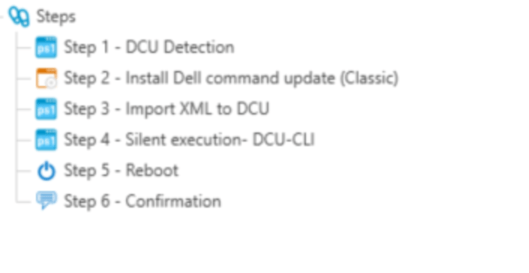
Step 1: DCU Detection
# Start logging under C:\temp. If folder does not exist, create one.

$TempPath = Test-Path -Path "C:\Temp\DCU-Log"
if($TempPath -eq $false ){
    New-Item -Path "c:\Temp" -Name "DCU-Log" -ItemType "Directory"
}


# Get installed DCU details and verify installation
$DCU_Details = Get-ItemProperty HKLM:\Software\Microsoft\Windows\CurrentVersion\Uninstall\* , HKLM:\Software\Wow6432Node\Microsoft\Windows\CurrentVersion\Uninstall\* | Select-Object DisplayName, DisplayVersion, Publisher, InstallDate | Where-Object DisplayName -match "Dell Command"

if($DCU_Details){

    Write-Output "`n DCU is already installed on computer. Current version: $($DCU_Details | Out-String)  `n"

    # Place file in $temppath if installation is already detected.
    New-Item -Path "C:\temp\DCU-Log" -Name "DCU_Installed" -ItemType File -Force

}else{

Write-Output "`nDCU is not installed..... starting installation`n"

}
Step 2: DCU install
Install Dell command update (classic) with the following parameter “/s”.
Example: C:\temp\Dell-Command-Update-5.4.0.exe /s
Step 3: Register the XML (optional)
If Admin have XML to import – inject the script below to import it and save to client.
Start XML export:
Generate the xml first from device with DCU installed. Modify the settings to your needs (Set update frequency, what catalog to search for, etc..)
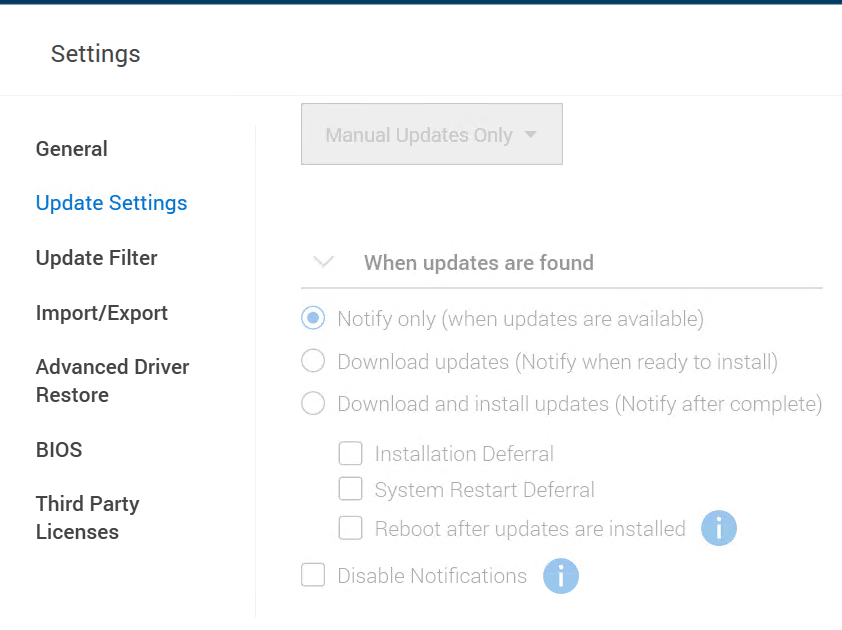
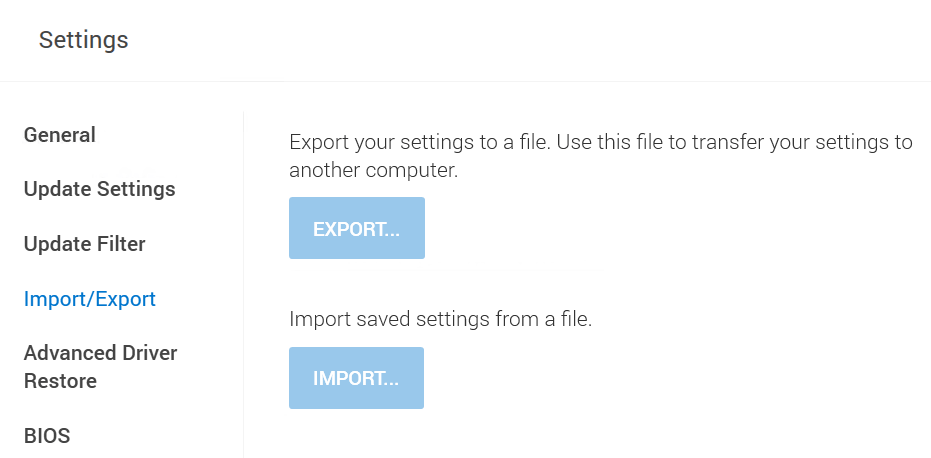
Once the export process is done. Save that xml file to a file share so it can be imported over with the script below.
Start XML Import
########## Start XML import ##########
# Copy xml over to "DCU-log"

Copy-Item -Path "\\Fileshare\DCU-XML.xml" -Destination "C:\Temp\DCU-Log"

# Import xml settings for DCU

$DCU_Classic = Test-path "C:\Program Files (x86)\Dell\CommandUpdate\dcu-cli.exe"
$DCU_Universal = Test-path "C:\Program Files\Dell\CommandUpdate\dcu-cli.exe"
$command = "/configure -importSettings=C:\Temp\DCU-Log\DCU-XML.xml"

if($DCU_Classic){

    Write-Output "#### Executing XML Import for Dell command update classic..... ####"
    Start-Process -filePath "C:\Program Files (x86)\Dell\CommandUpdate\dcu-cli.exe" -ArgumentList $command -wait

}

if($DCU_Universal){

    Write-Output "#### Executing XML Import for Dell command update universal..... ####"
    Start-Process -filePath "C:\Program Files\Dell\CommandUpdate\dcu-cli.exe" -ArgumentList $command -wait
}

##### End XML import #####
Step 4: Silent execution
At this point, once the xml gets imported, script will make the call to DCU in order to start update of bios, firmware, driver, application.
############ Silent update ############

# Execute DCU-CLI.exe with the following parameters to trigger system update
# Machine must be connected to AC power due perform BIOS update

$DCU_Classic = Test-path "C:\Program Files (x86)\Dell\CommandUpdate\dcu-cli.exe"
$DCU_Universal = Test-path "C:\Program Files\Dell\CommandUpdate\dcu-cli.exe"
$command = "/applyupdates -updatetype=bios,firmware,driver,application -reboot=disable -forceUpdate=enable -outputlog=c:\temp\DCULog-EXE-BIOS.log "

if($DCU_Classic){

    Write-Output "#### Executing Dell command update classic..... ####"
    Start-Process -filePath "C:\Program Files (x86)\Dell\CommandUpdate\dcu-cli.exe" -ArgumentList $command -wait

}

if($DCU_Universal){

    Write-Output "#### Executing Dell command update universal..... ####"
    Start-Process -filePath "C:\Program Files\Dell\CommandUpdate\dcu-cli.exe" -ArgumentList $command -wait
}

##### end silent update #####
Results:
CMD view of an update on one device:
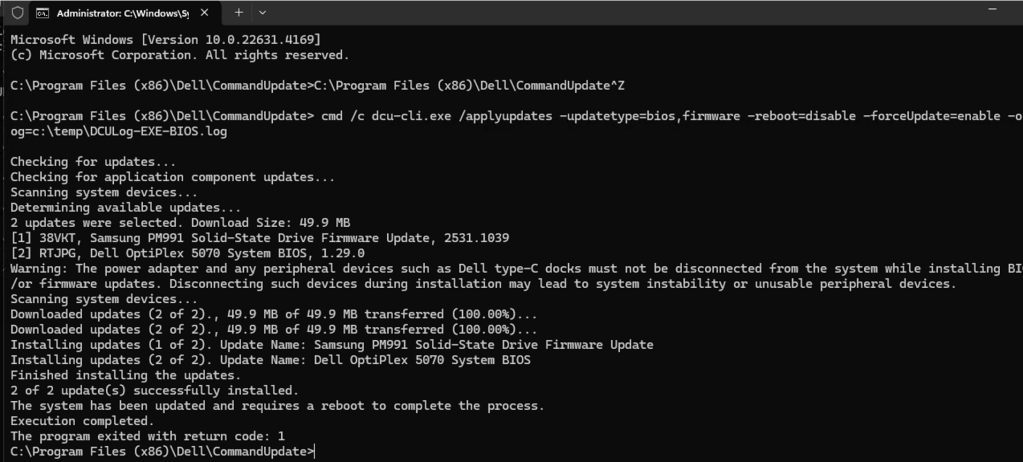
Logs: (DCULog-EXE-BIOS.log) of a second device
[2025-02-24 11:26:05] : The computer manufacturer is ‘Dell’
[2025-02-24 11:26:05] : Checking for updates…
[2025-02-24 11:26:05] : Checking for application component updates…
[2025-02-24 11:26:08] : Temporary closing synchronized view for the original memory map space in SSM
[2025-02-24 11:26:08] : Re-Initializing synchronized view for the original memory map space in SSM
[2025-02-24 11:26:12] : Scanning system devices…
[2025-02-24 11:26:19] : Determining available updates…
[2025-02-24 11:26:28] : The scan result is VALID_RESULT
[2025-02-24 11:26:28] : 7 updates were selected. Download Size: 2.1 GB
[2025-02-24 11:26:28] : [1] 3MK53, Intel Serial IO Driver, 30.100.2020.7
[2025-02-24 11:26:28] : [2] 4VJ35, Intel Management Engine Components Installer, 2435.6.36.0
[2025-02-24 11:26:28] : [3] DF8CW, Dell Security Advisory Update – DSA-2021-088, 2.1.0
[2025-02-24 11:26:28] : [4] KTG51, Intel Rapid Storage Technology Driver, 17.9.1.1009
[2025-02-24 11:26:28] : [5] PPR2C, Intel I2xx and 825xx PCIe Ethernet Controller Driver, 25.0.1.0
[2025-02-24 11:26:28] : [6] PTTV6, Realtek High Definition Audio Driver, 6.0.9235.1
[2025-02-24 11:26:28] : [7] 5KG00, Intel UHD/Iris Plus Graphics Driver, 31.0.101.2130
[2025-02-24 11:26:28] : Scanning system devices…
[2025-02-24 11:26:29] : Downloading updates (0 of 0), 0 bytes of 2.1 GB transferred (0.00%)…
[2025-02-24 11:28:10] : Downloading updates (1 of 7), 12.0 MB of 2.1 GB transferred (0.57%)…
[2025-02-24 11:28:13] : Downloading updates (2 of 7), 99.8 MB of 2.1 GB transferred (4.69%)…
[2025-02-24 11:28:14] : Downloading updates (2 of 7), 189.0 MB of 2.1 GB transferred (8.89%)…
[2025-02-24 11:28:15] : Downloading updates (2 of 7), 278.5 MB of 2.1 GB transferred (13.10%)…
[2025-02-24 11:28:16] : Downloading updates (2 of 7), 372.0 MB of 2.1 GB transferred (17.50%)…
[2025-02-24 11:28:17] : Downloading updates (2 of 7), 462.8 MB of 2.1 GB transferred (21.77%)…
[2025-02-24 11:28:18] : Downloading updates (2 of 7), 549.8 MB of 2.1 GB transferred (25.86%)…
[2025-02-24 11:28:19] : Downloading updates (2 of 7), 593.6 MB of 2.1 GB transferred (27.93%)…
[2025-02-24 11:28:29] : Downloading updates (3 of 7), 603.6 MB of 2.1 GB transferred (28.39%)…
[2025-02-24 11:28:31] : Downloading updates (4 of 7), 625.0 MB of 2.1 GB transferred (29.40%)…
[2025-02-24 11:28:35] : Downloading updates (5 of 7), 648.0 MB of 2.1 GB transferred (30.48%)…
[2025-02-24 11:28:38] : Downloading updates (6 of 7), 725.0 MB of 2.1 GB transferred (34.11%)…
[2025-02-24 11:28:39] : Downloading updates (6 of 7), 817.5 MB of 2.1 GB transferred (38.46%)…
[2025-02-24 11:28:40] : Downloading updates (6 of 7), 901.2 MB of 2.1 GB transferred (42.40%)…
[2025-02-24 11:28:41] : Downloading updates (6 of 7), 967.2 MB of 2.1 GB transferred (45.50%)…
[2025-02-24 11:28:42] : Downloading updates (6 of 7), 1.0 GB of 2.1 GB transferred (48.96%)…
[2025-02-24 11:28:43] : Downloading updates (6 of 7), 1.1 GB of 2.1 GB transferred (50.61%)…
[2025-02-24 11:28:51] : Downloading updates (7 of 7), 1.1 GB of 2.1 GB transferred (53.67%)…
[2025-02-24 11:28:52] : Downloading updates (7 of 7), 1.2 GB of 2.1 GB transferred (58.17%)…
[2025-02-24 11:28:53] : Downloading updates (7 of 7), 1.3 GB of 2.1 GB transferred (62.61%)…
[2025-02-24 11:28:54] : Downloading updates (7 of 7), 1.4 GB of 2.1 GB transferred (66.96%)…
[2025-02-24 11:28:55] : Downloading updates (7 of 7), 1.5 GB of 2.1 GB transferred (71.03%)…
[2025-02-24 11:28:56] : Downloading updates (7 of 7), 1.6 GB of 2.1 GB transferred (75.37%)…
[2025-02-24 11:28:57] : Downloading updates (7 of 7), 1.6 GB of 2.1 GB transferred (79.05%)…
[2025-02-24 11:28:58] : Downloading updates (7 of 7), 1.7 GB of 2.1 GB transferred (83.43%)…
[2025-02-24 11:28:59] : Downloading updates (7 of 7), 1.8 GB of 2.1 GB transferred (87.78%)…
[2025-02-24 11:29:00] : Downloading updates (7 of 7), 1.9 GB of 2.1 GB transferred (91.85%)…
[2025-02-24 11:29:01] : Downloading updates (7 of 7), 2.0 GB of 2.1 GB transferred (96.17%)…
[2025-02-24 11:29:02] : Downloading updates (7 of 7), 2.1 GB of 2.1 GB transferred (100.00%)…
[2025-02-24 11:29:17] : Creating system restore point…
[2025-02-24 11:29:30] : Downloaded updates (7 of 7)., 2.1 GB of 2.1 GB transferred (100.00%)…
[2025-02-24 11:29:30] : Installing updates (1 of 7). Update Name: Dell Security Advisory Update – DSA-2021-088
[2025-02-24 11:30:21] : Installing updates (2 of 7). Update Name: Intel Serial IO Driver
[2025-02-24 11:30:44] : Installing updates (3 of 7). Update Name: Intel Management Engine Components Installer
[2025-02-24 11:31:46] : Installing updates (4 of 7). Update Name: Intel UHD/Iris Plus Graphics Driver
[2025-02-24 11:36:30] : Installing updates (5 of 7). Update Name: Intel Rapid Storage Technology Driver
[2025-02-24 11:36:54] : Installing updates (6 of 7). Update Name: Intel I2xx and 825xx PCIe Ethernet Controller Driver
[2025-02-24 11:37:02] : Installing updates (7 of 7). Update Name: Realtek High Definition Audio Driver
[2025-02-24 11:38:06] : Finished installing the updates.
[2025-02-24 11:38:06] : 7 of 7 update(s) successfully installed.
[2025-02-24 11:38:06] : The system has been updated and requires a reboot to complete the process.
[2025-02-24 11:38:06] : The system will automatically reboot to finish applying the updates.
[2025-02-24 11:38:07] : Execution completed.
[2025-02-24 11:38:07] : The program exited with return code: 1
[2025-02-24 11:38:07] : State monitoring instance total elapsed time = 00:12:02.4822700, Execution time = 689mS, Overhead = 0.0953684718103878%
[2025-02-24 11:38:07] : State monitoring disposed for application domain dcu-cli.exe
Step 5: Reboot
Finalize the install with reboot step. That should be it. The device is all updated.
 Steven’s Knowledge Base