
Another important aspect of OSD deployment using MDT is ensuring that Group Policy updates are applied to the device before it is handed off to the end user. One key point to understand is that Group Policy updates cannot be applied during the State Restore phase of the task sequence. They must be executed after the task sequence has fully completed.
With that in mind, let’s take a closer look at a feature called SMSTSPostAction.
SMSTSPostAction
Specifies a command that’s run after the task sequence completes. Just before exiting the task sequence, the TSManager process spawns the specified post action. It doesn’t wait or record any status, just exits after calling that command.
For example, specify shutdown.exe /r /t 30 /f to restart the computer 30 seconds after the task sequence completes. In our scenario we will implement batch to gpupdate /force instead.
Why Gpupdate is not applied by default:

• After Windows is installed but before the logon screen appears, Windows Setup searches for the SetupComplete.cmd file in the %WINDIR%\Setup\Scripts\ directory.

• If a SetupComplete.cmd file is found, Windows Setup runs the script. Windows Setup logs the action in the C:\Windows\Panther\UnattendGC\Setupact.log file.
Setup does not verify any exit codes or error levels in the script after it executes SetupComplete.cmd.

• If the computer joins a domain during installation, the Group Policy that is defined in the domain is not applied to the computer until Setupcomplete.cmd is finished. This is to make sure that the Group Policy configuration activity does not interfere with the script.

https://learn.microsoft.com/en-us/windows-hardware/manufacture/desktop/add-a-custom-script-to-windows-setup?view=windows-11#run-a-script-after-setup-is-complete-setupcompletecmd
So when should GP apply in Task sequence?
Receiving group policy in the middle of state restore task sequence step is highly discouraged as policy may impact interactive logon targeting administrator accounts along with other restrictions on the device. Therefore, it is recommended to start it post task sequence, meaning the very last step.
- Create the batch file with the following commands to trigger gpupdate first:
:: Trigger gpupdate /sync for device. Log the command into c:\temp\
:: The script will update device upon user sign on (User policy) or restart (computer policy)

:: The command executes the following and passes "N" to both of the prompt
:: For synchronous foreground user policy application, a relogon is required.
:: For synchronous foreground computer policy application, a restart is required.
:: OK to restart? (Y/N)OK to log off? (Y/N)

@echo off
set LOGFILE=C:\temp\MDT\Gpupdate.log
call :LOG > %LOGFILE%
exit /B

:LOG
(echo n& echo n) |gpupdate /sync /force
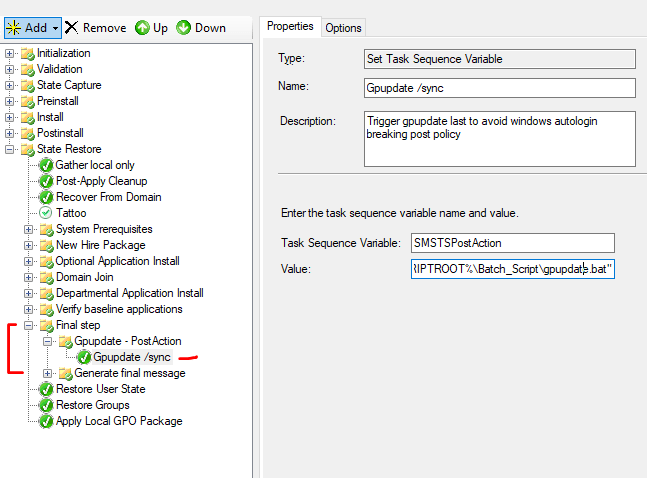
2. Run the batch file at the last step.
Task sequence variable: SMSTSPostAction
Value: %COMSPEC% /c “%SCRIPTROOT%\Batch_Script\gpupdate.bat”
**Feel free to experiment with implementing restarts to apply computer policies.
Verify

Logs:
For synchronous foreground user policy application, a relogon is required.
For synchronous foreground computer policy application, a restart is required.
OK to restart? (Y/N)OK to log off? (Y/N)
 Steven’s Knowledge Base