
An Azure Automation Runbook is a set of automated tasks, routines, or workflows compiled into a single script or visual process that runs from Azure. Runbooks automate repetitive, time-consuming, or error-prone management tasks across Azure resources, multi-cloud platforms, and on-premises infrastructure. For new hire project, runbook will be heavily utilized to target on premise server with hybrid runbook workers.
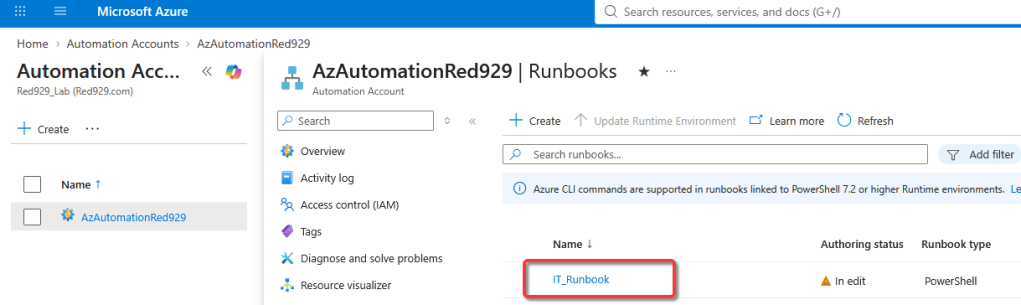
Key Capabilities & Execution

Supported Languages: Authored using PowerShell, Python, or visual Graphical drag-and-drop designers.

Flexible Execution Environments:
Azure Cloud Sandboxes: Runs directly in Azure's managed multi-tenant environment for cloud operations.

Hybrid Runbook Workers: Executes directly on local virtual machines or on-premises physical servers to manage hybrid network resources.

Integration & Orchestration: Can be triggered via schedules, Azure webhooks, Azure Logic Apps, or directly through API calls via Entra ID authentication.
Azure runbook scripts can be written in the following ways:
| Runbook Type | Core Engine / Language | Primary Strengths & Features | Best Used For |
| PowerShell | Standard PowerShell (e.g., 7.4, 7.6, 5.1) | Direct, fast execution without workflow compilation overhead; supports cloud and Hybrid Worker runtimes. | General system management, API calls, and standard automation scripts. |
| PowerShell Workflow | Windows PowerShell Workflow | Supports long-running tasks, parallel execution, and checkpoints to resume logic after transient errors. | Complex, multi-step orchestration that requires state persistence across restarts. |
| Python | Python (3.10 recommended) | Native support for Python packages and libraries; runs across Azure sandboxes and Linux/Windows Hybrid Workers. | Data processing, multi-cloud operations, and AI/ML integrations. |
| Graphical | Visual Canvas (Generates PowerShell) | Visual drag-and-drop authoring without needing to write raw code; simplifies control and data flow modeling. | Teams seeking low-code workflow design or visual representations of processes. |
| Graphical PowerShell Workflow | Visual Canvas (Generates PS Workflow) | Combines visual drag-and-drop authoring with underlying PowerShell Workflow capabilities like checkpoints. | Low-code authoring for complex, stateful workflows that require error resumption. |
Important Considerations
- Lifecycle Alignment: Azure Automation tracks language lifecycle deprecations. Microsoft recommends targeting actively supported runtimes like PowerShell 7.4/7.6 and Python 3.10 as of the current date.
- Conversion Limits: Graphical runbooks can be converted between standard Graphical and Graphical PowerShell Workflow types, but cannot be converted directly to raw textual scripts.
- Hybrid Execution: Text-based PowerShell and Python runbooks can execute in the cloud or directly on target servers using Hybrid Runbook Workers.
Common Use Cases

Identity & Resource Provisioning: Automating user onboarding/offboarding tasks, license assignments, or group syncs across Entra ID and local Active Directory.

Routine Maintenance: Starting/stopping VMs on a schedule to save costs, managing patch updates, and rotating access keys.

Incident Remediation: Automatically responding to Azure Monitor alerts or Security operations (SOC) triggers to isolate breached resources or restart failed services.

Configuration Management: Auditing resource compliance and enforcing uniform configurations across servers.
 Steven’s Knowledge Base