
Managed Identity is essentially a special type of Service Principal managed automatically by Microsoft. It offers feature that allows Azure services to authenticate to each other securely, without needing to store credentials in your code or configurations.
Managed identity does not require any secret or certificate rotation compared to service principal. When it comes to accessing ONLY Azure resources, it is best to use managed identity. Else, it is best to use service principal.
For example, the project of creating a new hire provisioning workflow in this lab – managed identity would be used to authenticate to Azure automation connector from logic app. The connector calls an azure run book to trigger. The runbook script will then utilize an on premise service account in order to communicate with on premise Active directory under this hybrid environment.
| Feature | Service Principal | Managed Identity |
| Needs secret/cert | ✅ Yes | ❌ No |
| Secret rotation required | ✅ Yes | ❌ No |
| Works outside Azure | ✅ Yes | ❌ No |
| Best for CI/CD | ✅ Yes | Sometimes |
| Best for Azure resources | Good | ⭐ Best |
Do note that not all Azure services offer authentication via managed identity according to:
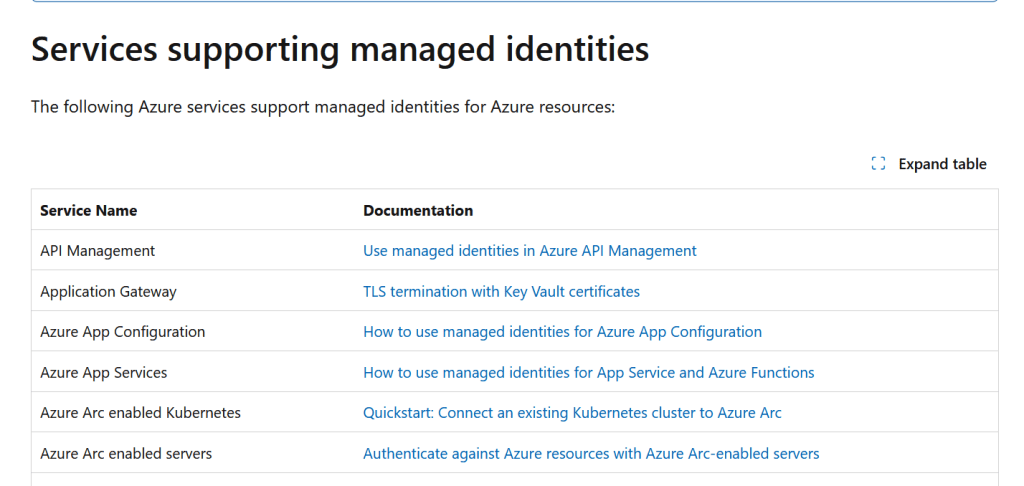
Few services like Azure Virtual Machines, Azure App Service, Azure Kubernetes Service , Azure Functions, Azure Logic Apps and Azure run book offers it but not ALL services offer BOTH user-assigned and system-assigned managed identity.
Types of managed identity
System assigned managed identity:

Enabled directly on an Azure resource (e.g., a Virtual Machine, Azure Function, or Logic App). It shares the lifecycle of that resource—if you delete the VM, Azure automatically deletes the corresponding Service Principal in Entra ID. Only one can be created.

✅ Best for: Apps with a 1:1 identity relationship
User assigned managed identity:

Created as a standalone Azure resource. You can assign it to multiple Azure resources (e.g., 5 VMs that all need access to the same Key Vault), and its Service Principal exists independently until you delete it.

✅ Best for: Sharing identity across multiple services
How to create/enable managed identity
Enable System-assigned managed identity for Azure automation:

From Azure portal > automation account > select automation account > identity > turn on [System Assigned] in order to tie the managed identity to that account.

Once the identity is established, it ties itself to principal ID.
* The service CAN have BOTH user/system identity if allowed.


Create user-assigned managed identity for Azure automation:

Go to Azure portal > managed identity

Select create > fill out the information >

Isolation scope - In Azure Managed Identity, isolation scope refers to the boundary within which a Managed Identity is recognized, issued tokens, and bound to Azure resources.

None - unrestricted/global - The identity or resource is not restricted to a specific region for processing, token issuance, or storage.

Regional (Locally Bounded) - The identity or resource boundary is strictly locked to a single specified Azure region (e.g., East US, West Europe).

Once the identity is created - add it to automation account. From automation account > IAM > configure the necessary permissions for the managed identity.

Locating the identities
Managed identity are type of service principal managed by Entra ID so it is located under Entra admin center Enterprise application: (It is hidden by default- you must copy and paste the principal ID)
So far, we have created/enable two identities:

(AzAutomationRed929) - System managed(principal ID): 3bc219ed-94af-4284-9d53-7719626d7751

(UAMI_Red929) - User assigned(principal ID): 8b9613f6-5d4f-4d09-97ad-a5079e9ea795


Source
https://learn.microsoft.com/en-us/entra/identity/managed-identities-azure-resources/overview

