
A Service Principal in Microsoft Entra ID is a security identity used by applications, services, or automation — instead of a human user — to access resources securely.
For this project, we will use a Service Principal to manage and verify Microsoft Entra users through Microsoft Graph. This post provides an overview and fundamental understanding of how Service Principals operate in this architecture.
Overview:
Application Object (Managed via App registrations in the Microsoft Entra admin center)
When a company builds an app, they register it in Microsoft Entra ID. This creates an Application Object.

The Application Object is the app's master blueprint. It lives in the app's home tenant (the tenant where it was created), and there is only one Application Object for that app.

It defines things like:

 • The app's name and logo
 • Redirect URLs
 • The permissions the app can request
 • Certificates and client secrets used for authentication

It describes what the app is, but it doesn't actually access resources itself.
Service Principal (Managed via Enterprise applications in the Microsoft Entra admin center)
The blueprint can't do anything on its own. To actually sign in and access resources, the app needs an identity. That identity is the Service Principal.

Whenever an organization (called a tenant) uses the app, Microsoft Entra creates a Service Principal for that tenant.

Each tenant has its own Service Principal for the app, even though they all share the same Application Object.

The Service Principal determines:

 • What permissions have been granted in that tenant
 • What Azure RBAC roles the app has
 • Which users or groups can use the app
 • Which resources can the app access within that tenant

Think of it as the app's employee ID badge inside a particular organization.
Three types of service principals:
🤖 Application — the normal kind, built from the application object; one gets created in each tenant that uses the app (Authenticate with – Client secret, Certificate, Federated credentials).
** When you register an application, a service principal is created automatically. You can also create service principal objects in a tenant using Azure PowerShell, Azure CLI, Microsoft Graph, and other tools.
🪄 Managed identity — a special kind that doesn’t need a password/secret at all — Microsoft manages its credentials automatically. It has no application object behind it.
🕰️ Legacy — an older kind made before app registrations existed. It only works in the one tenant where it was created, and has no application object either.
Relationships:
If just one company uses the app privately, there’s only one service principal (Single-Tenant Apps)
If many companies use the same app, each tenant gets its own separate service principal — same application object, but each service principal only obeys that tenant’s own consented permissions (Multi-Tenant Apps)
Deleting and deactivating
If you delete the application object, its service principal in the home tenant gets deleted too — and restoring the application object afterward won’t bring that service principal back. If you just want to pause the app instead, you can deactivate it, which blocks new sign-ins but keeps both the application object and service principal safe for later.
Examples:
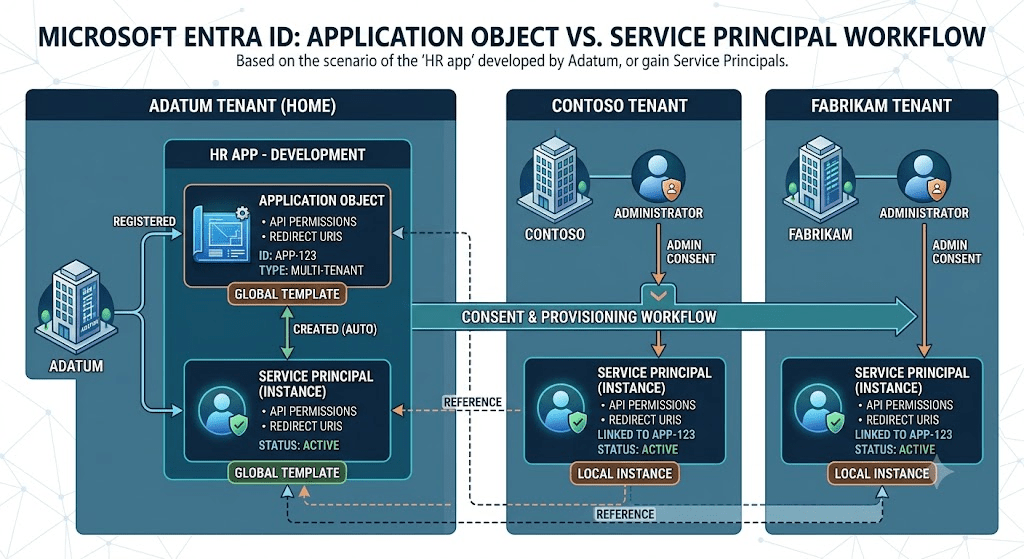
A pretend company, Adatum, builds an “HR app” — creating the application object and the first service principal in Adatum’s home tenant. When another company, Contoso, wants to use it, their admin consents, and Contoso gets its own service principal created in Contoso’s tenant. The same happens for a third company, Fabrikam. Three tenants, three separate service principals — but only one application object, back at Adatum.
This relationship highlights a one to many case with multi tenant app.
Scenarios:
When an application needs access to the following below, a service principal can be used to:
Access Azure resources

Call Microsoft Graph

Authenticate to APIs

Run automation (CI/CD, scripts, apps)
How to create a service principal:
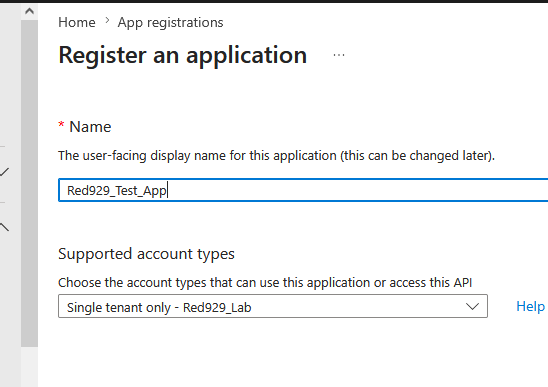
Under Entra admin portal > App registration > select “New Registration” > input name of app. (*When you register an application, a service principal is created automatically)
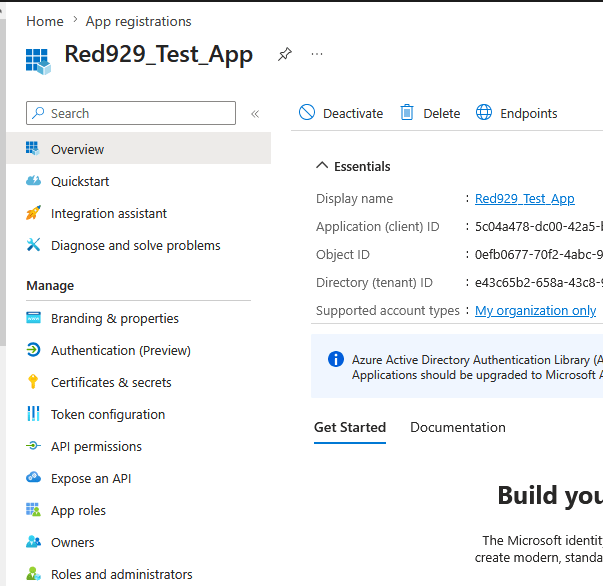
Once its created, on [App Registration] – the menu to provide permission, authentication, branding, etc.. becomes available for the app.
We configure access for service principals here along with the following:

 • The app's name and logo
 • Redirect URLs
 • The permissions the app can request
 • Certificates and client secrets used for authentication
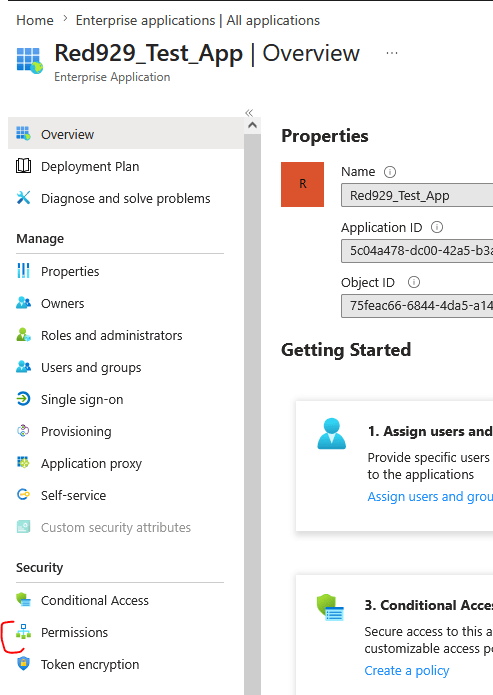
On [Enterprise application] – the service principal is created with one to one match for the app.
The enterprise application blade is intended for the following:

 • What permissions have been granted in that tenant
 • What Azure RBAC roles the app has
 • Which users or groups can use the app
 • Which resources can the app access within that tenant
Application Permissions
To Set Application Object Permissions: Go to [App Registration] > API Permissions > Add permissions > Select Delegated or Application Permissions. For automation purposes, I suggest using application permissions.
*Some permission requires admin consent which impacts all identity in the tenant
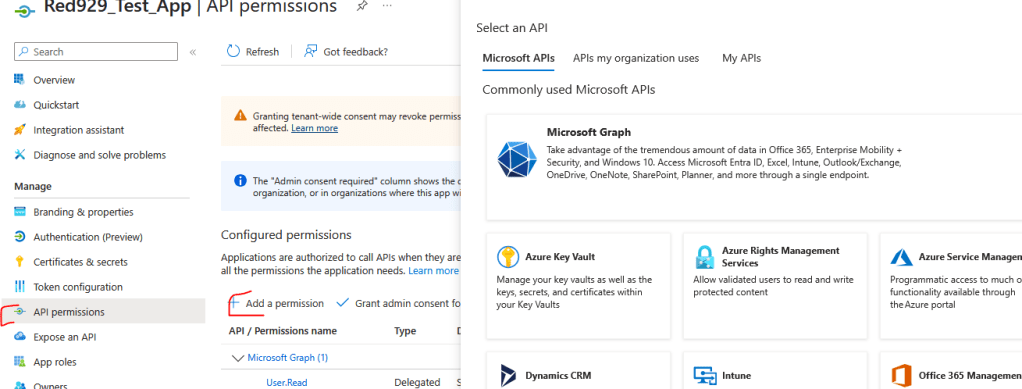
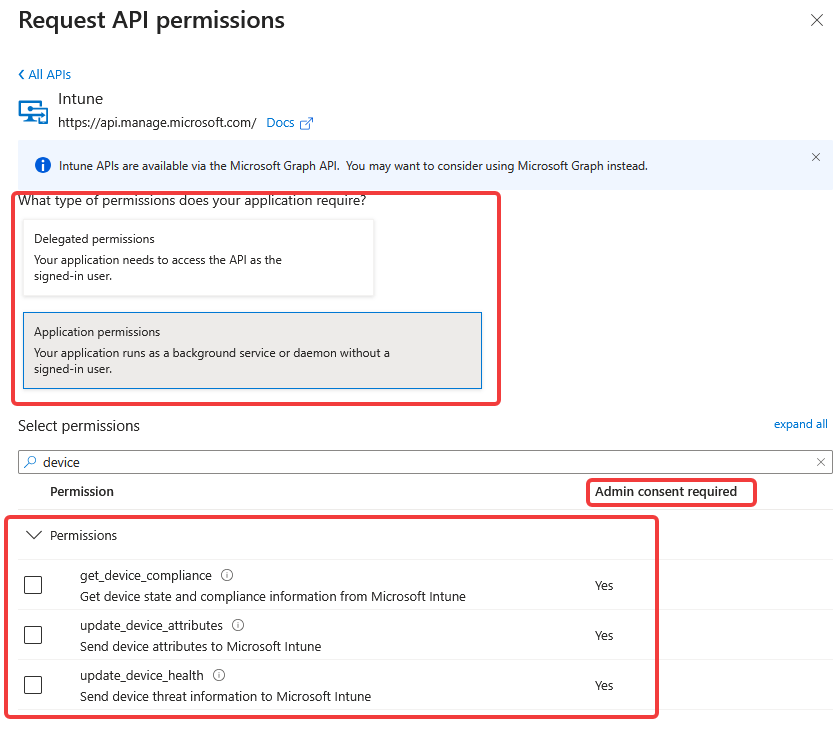
Results: Provide API permission to app. Once set, it has [Read] access for Microsoft Graph and [Update] access for Intune devices
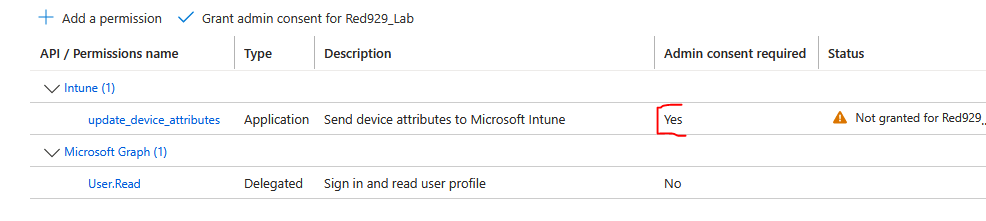
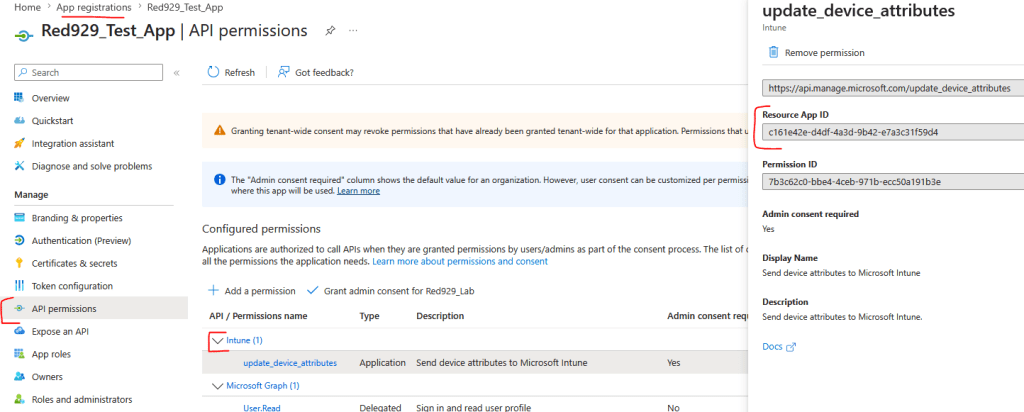
To view Application Object Permissions: Go to [App Registration]
The screenshot below shows the global Application (Client) ID for Intune API. Every first-party Microsoft API has a hard-coded, well-known App ID across all of Azure/Entra ID globally.
Whenever any app requests permissions for Microsoft Intune, it targets this exact App ID.
To view service principal permissions: Go to [Enterprise Applications]
The Service Principal ID tells Microsoft Entra ID who is asking. The Authentication Method (a Client Secret, Certificate, or Federated Identity Credential) proves to Entra ID that the requester actually owns that identity. If authentication is successful, the global (App ID/Client ID – Intune) will provide necessary API permissions against the service principal.
** Grant the admin consent for this service principal if the API permission requires it **
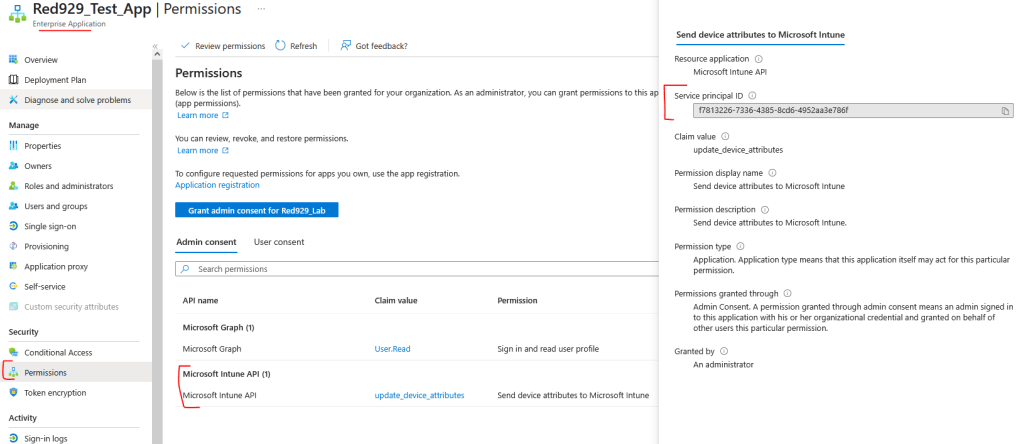
Why are there two different IDs for Microsoft Graph?
It comes down to Global Blueprint vs. Local Instance:
| Term | Location | What It Represents | ID Example |
| Resource App ID (the app/client ID) | App registrations | The global blueprint ID for Microsoft Intune across all Microsoft cloud environments. | c161e42e-d4df-4a3d-9b42-e7a3c31f59d4 |
| Service Principal ID | Enterprise applications | The local instance ID of Microsoft Intune inside your specific tenant (Red929_Lab). | f7813226-7336-4385-8cd6-4952aa3e786f |
How They Work Together in Practice
The Definition (App Registration / Application ID)

 • Defined once (by Microsoft or a developer).

 • Declares what the app is capable of requesting (e.g., "This app is designed to read user profiles or manage Intune devices").

 • It doesn't hold permission state inside your specific tenant; it just defines the requested API scopes/roles in its manifest.

The Execution (Service Principal / Object ID)

 • Created in your tenant the moment you consent to the app or provision it.

 • Acts as the actual identity object that Entra ID evaluates when a request comes in.

 • Holds the actual access grants, admin consents, conditional access policies, and group assignments specific to Red929_Lab.


One thought on “Service Principal”