
In this post, we will setup Azure runbook hybrid worker group in order to execute runbook against on premise endpoints. The worker group will be the primarily runbook that will be used in a hybrid environment. In order to accomplish this task, we need to invoke a secondary service like Azure Arc.
Azure Arc is Microsoft’s bridge for extending the Azure Resource Manager (ARM) control plane to non-Azure infrastructure. It provides a single pane of glass to project, govern, and manage resources running outside of Azure.
Once the on premise server is managed by Azure Arc, only then can we execute hybrid worker runbook against it.

Overview:

Azure Runbook Hybrid Workers let you run Azure Automation runbooks on machines outside of Azure’s cloud sandbox—such as on-prem servers or Azure VMs inside your own network. This is useful when you need access to:

• On-prem resources (file servers, domain controllers, internal APIs)
• Private network endpoints
• Installed software or local modules
• Higher resource limits than Azure sandbox provides (bypasses cloud sandbox limitations (such as disk space, memory limits, or the 3-hour job execution limit)

In order for the setup to work successfully, the on prem VM must be connected to Azure Arc. Extension-Based Hybrid Runbook Worker Agent V2 will be used on the VM.
How it works:

Hybrid Worker Groups: Workers are organized into groups for high availability and load balancing. When you trigger a job targeted at a group, the active workers poll the Automation service (every 30 seconds) on a first-come, first-served basis to execute it.

Execution Context: Runbook jobs run under the local System account on Windows or the nxautomation account on Linux.

Limits: An Automation Account supports up to 4,000 User Hybrid Workers and 4,000 System Workers.
Platform Architecture

Extension-Based (V2): The current, supported model. It uses native VM extensions (managed by the Azure VM Agent on Azure VMs or the Azure Arc Connected Machine agent on non-Azure/on-premises servers). It integrates with Microsoft Entra system-assigned managed identities and supports automatic minor version upgrades.

Agent-Based (V1): The legacy platform that depended on the Log Analytics agent. It was retired on August 31, 2024, and all jobs running on agent-based workers stopped as of April 1, 2025.
Example: The following will detail how to create hybrid worker group, enable azure arc and execute runbook against an on premise server.
1. Create automation account on azure automation first.

2. Create hybrid work group: (Select only user hybrid worker group)
User Hybrid Worker Group:
○ Designed to run custom runbooks (Fully controlled by admin)
○ Created manually inside the Automation Account
○ Useful for running script against:
	On-prem domain controllers
	Internal SQL servers
	File servers
	Line-of-business application servers

System Hybrid Worker Group:
○ Managed by Azure (Runbooks are not assigned to this group)
○ Automatically created when you enable the Hybrid Worker extension
○ Mainly used by platform features (like Update Management; Update Manager / patch orchestration)
○ Group name is system-generated (you don’t control it)

Name: Hybrid_Worker_929_East_01

Use Hybrid worker credential:
Default - uses local System account
Custom credentials - use if the hybrid worker requires accessing network resources**
** No need to add any machine/workers to the group yet **
3. Add on premise server to Azure Arc using Azure machine connect agent (Azure Arc will establish a tunnel to azure on that server and have it managed under azure portal)
A) Navigate to Azure portal > Azure Arc blade > Infrastructure > machines > onboard/create

B) Fill out the basic information (Resource group, region, tags ,etc..)
Our connectivity method will be [Public Endpoint] for the arc agent as it is standard for most enterprises.

Authentication: Authenticate machine manually

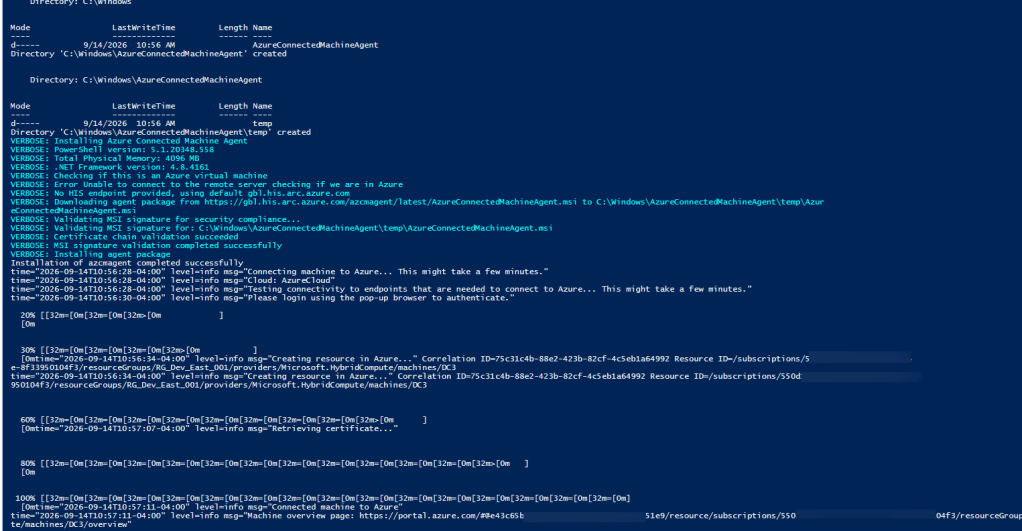
C) In the final step, a PowerShell script will be generated for admin to download. Execute the script for the on premise machine. (If authenticating machine manually, OAuth authentication is required via web browser). The following screenshot shows the complete enrollment of on premise server (DC3) to azure arc.
Optional: Another way to install azure arc on server is to download the ArcSetup.exe setup file


The on premise Server (AD-Connect) is now connected and ready to be managed from Azure Arc

4. Navigate back to Azure automation accounts portal
Select Hybrid worker group and add the servers that just got uploaded to Azure arc:
A) Select the user hybrid worker group > Hybrid workers > add worker to the group (AD-Connect)

B) The server/worker is now part of the Hybrid worker group for azure runbook


Once the endpoint is added to hybrid worker group – verify with hybrid worker runbook. The example below ran a script against one of the workers in the group grabbing its hostname.

Verify which user the runbook is executing under

Successfully executed hybrid worker runbook against an on-premise server. With this setup, we can now add script to modify group membership, create new users from within exchange admin center in our AD environment.
*** If runbook script requires modules – make sure to install them first for on-premise endpoint ***
Troubleshooting:
Issue: Runbook failed to execute script due to executable not found at “C:\Powershell7\pwsh.exe”

Failed
pwsh.exe is not recognized as a command or operable program. Install the language interpreter and add the installation path to PATH environment variable. If installation was done recently, restart the Hybrid Worker Service for extension based installation or restart the Microsoft Monitoring Agent for agent based installation. Looking for the executable at default location C:\PowerShell7\pwsh.exe.
To resolve:
1. To run PowerShell 7.2 runbooks on a Windows Hybrid Worker, install PowerShell on AD-Connect server. See Install PowerShell on Windows.

After PowerShell 7.2 installation is complete:

Control panel -> system -> advanced settings -> environment variables -> click path variable -> edit

Variable name = powershell_7_2_Exe_Path
Variable value = C:\Program Files\PowerShell\7\pwsh.exe

Restart the Hybrid Runbook Worker service (V2 agent) after environment variable is created successfully.


Since the default path for powershell 7 on windows server is [C:\Program Files\PowerShell\7], runbook will NOT be able to locate the pwsh.exe since it is looking at [C:\PowerShell7\pwsh.exe.]
An edit to the environment variable to point pwsh.exe to [C:\Program Files\PowerShell\7] in order for hybrid worker runbook to work.


