An Access Control List (ACL) is an ordered collection of security rules tied to every Active Directory object (such as users, groups, computers, OUs, and file shares). It defines which security principals (users or groups) are authorized or denied access to perform specific actions on that object.
For the new user provisioning project, a service account will used to create the user, modify its group membership and password. This post will detail how to proceed with this task following the Principle of Least Privilege (Grant only the minimum permissions required for a user or service account to complete its task).
The type of ACL to target is object and directory service. Although managed service accounts is great, it is not the prefer method to be used since the runbook script includes “invoke-command” that requires passing credentials.
Key Types of ACLs:

1.Discretionary ACL (DACL): Specifies who can access an object and what operations they can perform.

2.System ACL (SACL): Used for security auditing. Logs successful or failed access attempts to the Windows Event Viewer

3.Object & Directory Service ACLs: Control fine-grained permissions for specific objects or across entire Active Directory structures (like delegating management over an Organizational Unit).
Type of Accounts for automation:

1.Managed Service Accounts (MSAs)

* These are a special type of Active Directory accounts designed specifically to run services, applications, or tasks on Windows server.
* Passwords are automatically generated and rotated by default every 30 days.
* Can only be used on one computer unless group managed service accounts (gMSAs) is configured.
* Much more secure by default compared to regular service accounts.
* Operates like managed system identity in Azure except MSA are bound to on premise machine.

2.Regular Service Accounts

* These are regular Active Directory user accounts that are used to run a service or scheduled task
* You set and manage the password manually
* Can be used on multiple computers by default
* Passwords are often set to never expire and often never changed (increase security risk)
* Works everywhere (apps, scripts, scheduled tasks) - flexible.

3.Group Managed Service Accounts (gMSAs)

* gMSAs extend the functionality of MSAs by allowing multiple computers to use the same managed service account.
The goal is to use regular service account (SVC_AD_Provision_01) for the new user creation workflow in order for it to work with azure hybrid worker runbook. We will target the object and directory service ACL to provide the permissions (Create new user, Set password for the user, Add user to group, Modify AD attributes).
GUI delegation of control wizard:
The default option to delegate permission can be done on AD users & computers > delegate control (if Advanced view is turned on)
Select the OU that the service account should have permission to modify first
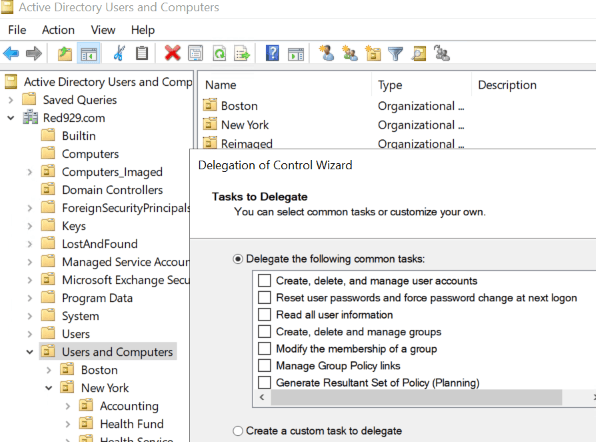
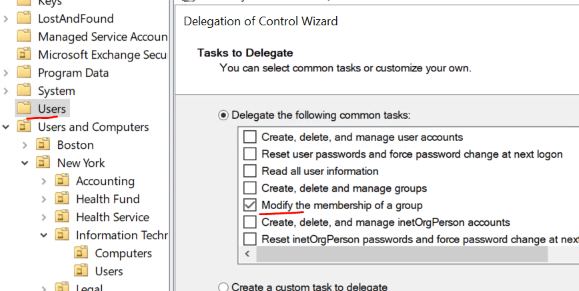
Select the following highlighted task:

• Create, delete an manage user accounts
• Reset user passwords and force password change at next logon
• Read all user informaiton
• Modify the membership of a group
• Create, delete and manage inetOrgPerson acocounts
• Reset inetOrgPerson password an force password change at next logon
• Read all inetOrgPerson information
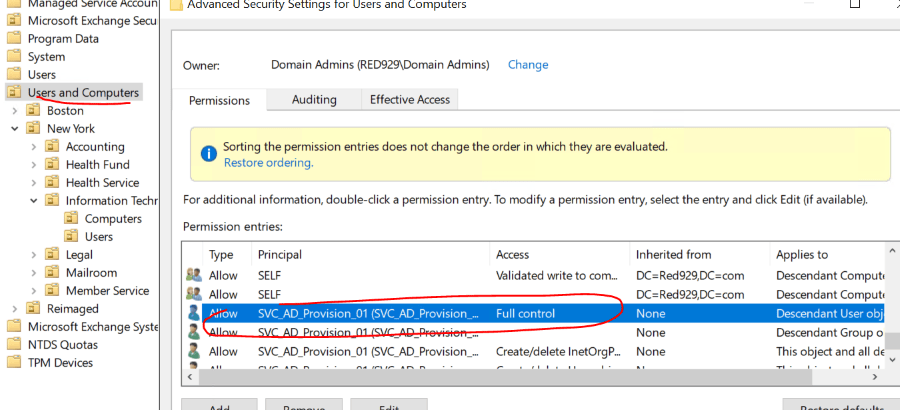
Command line delegation with DSACLS
For more granular control of permission delegation – Admin can utilize the DSACLS command line to execute specific rights for the user account. DSACLS means Domain or Directory Services Access Control Lists. The tool is based on command lines and serves the control of access authorizations.
DSACLS lets you:
View permissions on users, groups, OUs, etc.
Grant or deny access rights
Delegate control (e.g., allow a service account to create users)
Reset permissions to defaults

Notes:
*Avoid over provisioning a service account as it is a security hazard
*Never assign Domain Admin unless necessary.

DSACLS Command:
https://learn.microsoft.com/en-us/previous-versions/windows/it-pro/windows-server-2012-r2-and-2012/cc771151(v=ws.11)
Example: Delegate unlock account permissions to a user
This script delegates the right to read and write the lockoutTime attribute for all user objects within a specific OU to a specified user.

$OU_Path = "OU=Users and Computers,DC=Red929,DC=com"
$Delegate_User = "Svc_AD_Provision_01"
Write-Host "Delegating Unlock Account permissions for $OU_Path…..."

dsacls "$OU_Path" /G "$Delegate_User`:WP;lockoutTime;user" /I:S /P:Y
dsacls "$OU_Path" /G "$Delegate_User`:RP;lockoutTime;user" /I:S /P:Y
Verify permission:
$SVC = (Get-aduser -identity svc_ad_provision_01).DistinguishedName
dsacls.exe $SVC > c:\temp\permission.text
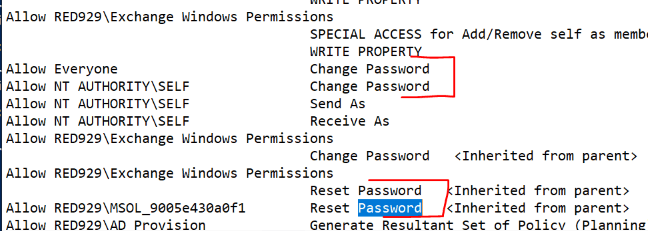
Invoke command
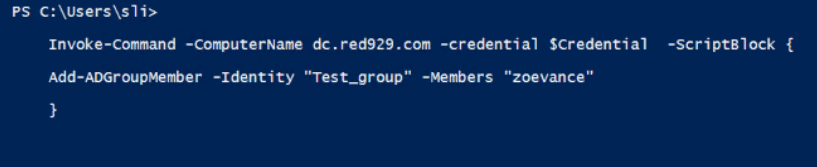
In order to invoke AD command from runbook – the service account must be in the remote management group for the target device.
Verify that the service account can set passwords in AD as well as add new user to groups.
This is critical as the workflow for new user provision requires executing runbook script to target on premise Azure arc device (AD-Connect). From (AD-Connect), invoke the command with service account credentials targeting the domain controller (DC) with AD modules to manipulate AD accounts. The target is the domain controller since that holds the active directory role.

Troubleshooting:
Access denied – run powershell as ADMIN before executing command
Insufficient access rights – most likely because the group being modified is outside of the scope of delegation

If that’s the case, select the out of scope OU and delegate control to “Modify membership of group” for the service account