
This post will review how to automate delta sync to trigger when a new account is provision within on premise AD environment. The purpose is to sync the user to Entra in order to continue with group membership modification for Entra group, Microsoft 365 group, etc…
The script used for this post is designed to run under Azure Automation Runbook using hybrid worker group. It remotely connects to an on-premises Microsoft Entra Connect (Azure AD Connect) server via Invoke-Command to trigger an on-demand delta synchronization cycle.
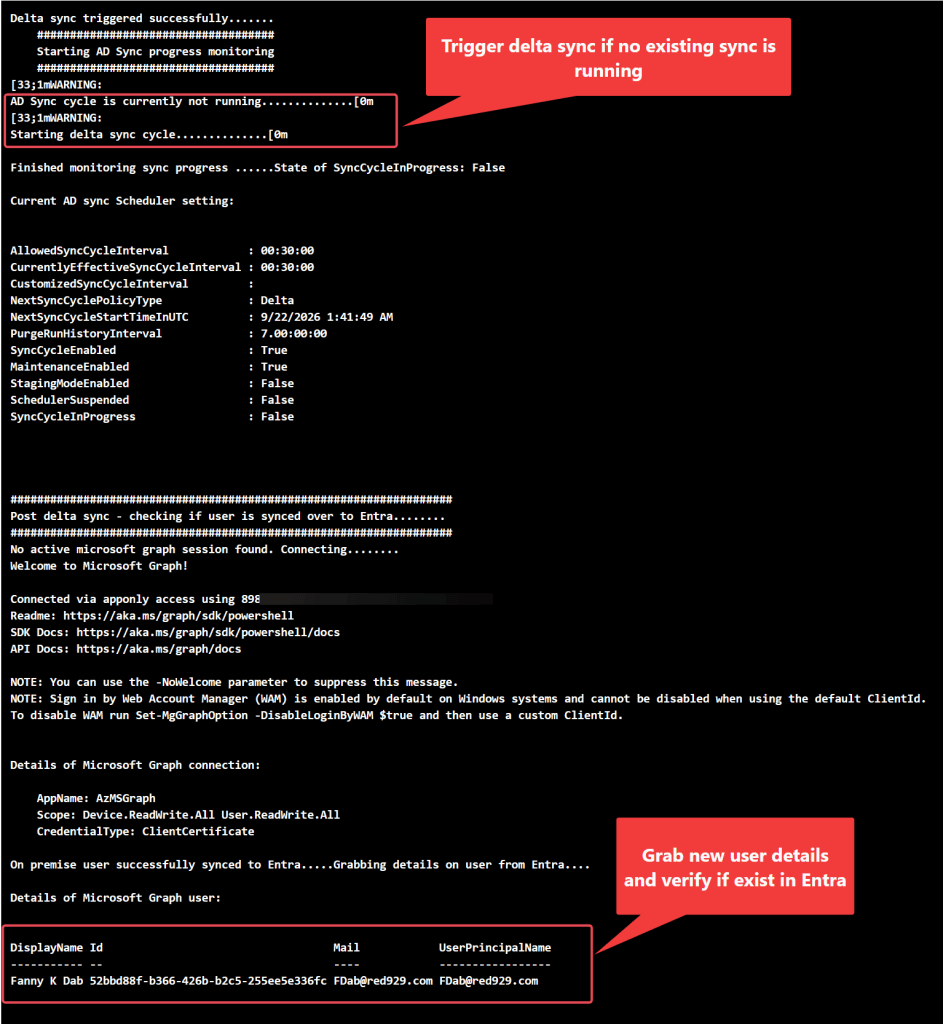
Once the synchronization starts, it monitors the sync process and verifies that a specific on-premises Active Directory user has successfully synchronized over to Microsoft Entra ID using the Microsoft Graph PowerShell SDK.
Prerequisite – on premise device must be able to do certificate based access (CBA) for Microsoft Graph. This step is crucial as it is used to verify if user is synced over to Entra.
Key Phases of Execution of delta sync script

1.Initialization & Remote Execution
•Input Parameter: Accepts a mandatory User Principal Name ($UPN) passed from a calling application (like a Logic App).

•Remote Session: Pull secrets from azure key vault to run a script block directly on the local AD Connect host via Invoke-Command. This is necessary because the ADSync module can only be executed locally on the server hosting the synchronization engine.

2.The Delta Sync Phase (DeltaSync) - (Function ADSyncProgress)
•Sync Trigger: Executes Start-ADSyncSyncCycle -PolicyType Delta to push recent on-premises changes to the cloud.

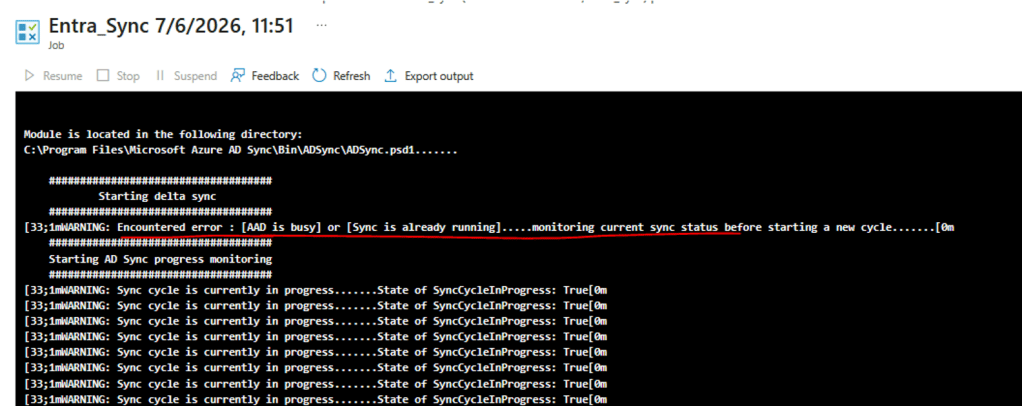
•Error Handling: If a sync cycle is already actively running or if Azure AD reports as busy, the script gracefully catches the error and moves directly to monitoring instead of crashing.

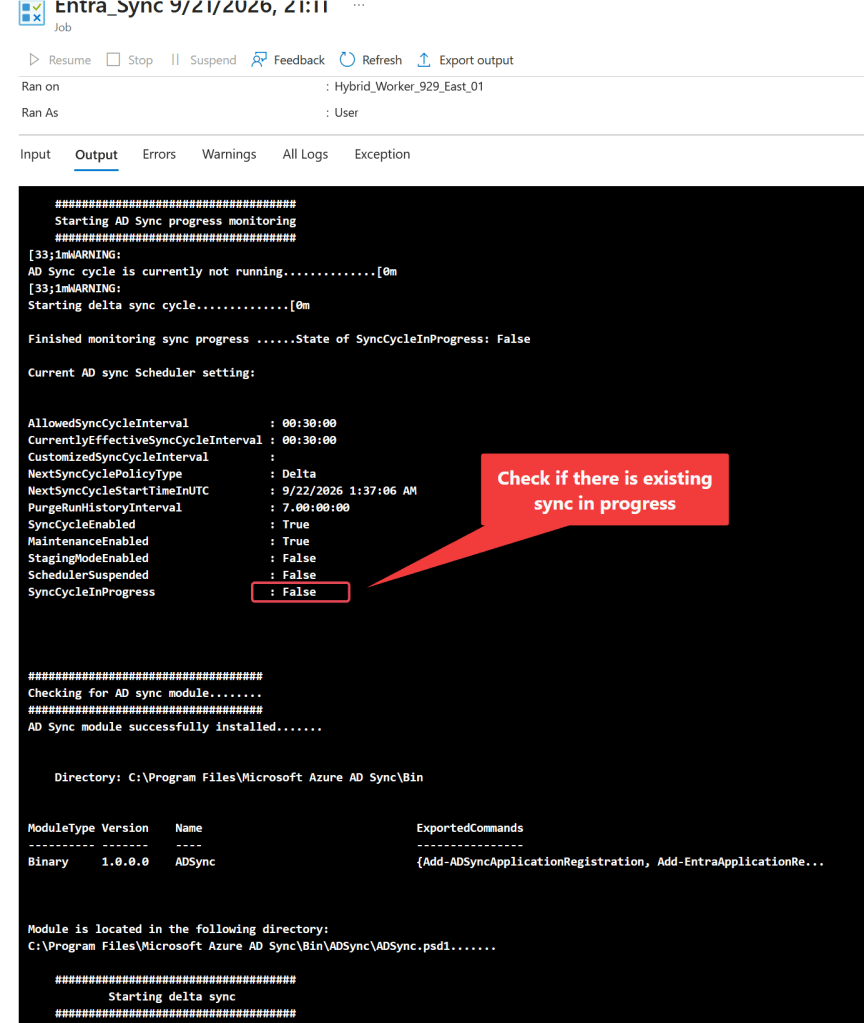
•On-Premises Monitoring: Loops and checks Get-ADSyncScheduler every second. It waits for SyncCycleInProgress to return False. This loop features a hard stop timeout (default: 300 seconds) to prevent the script from hanging indefinitely if the sync engine gets stuck.

3.Cloud Verification Phase - (Function EntraSyncProgress)
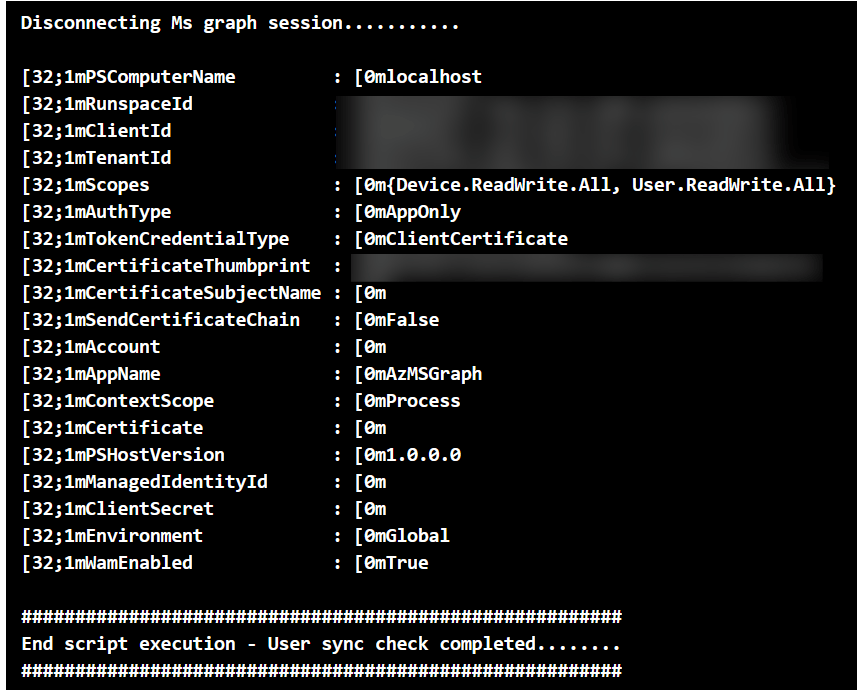
•Authentication: Establishes a connection to Microsoft Graph (Connect-MgGraph) using a secure, certificate-based authentication method via Tenant ID, Client ID, and a local certificate thumbprint.

•Initial User Check: Attempts to pull the user's cloud account using Get-MgUser.

•Fallback & Retry Monitoring:
  *If the initial check fails with a 404 or Request_ResourceNotFound error (meaning the user hasn't arrived in the cloud yet), it triggers a second delta sync cycle.

  *It then enters an infinite loop checking for the user every 10 seconds. Unlike the on-premises check, this loop has no timeout and will run continuously until the user is successfully detected in Entra ID. By default, a delta sync triggers ever 30 min, the user should sync over within that time frame, thus ending the loop.
>> Show Delta Sync Script <<
<#This script is intended for azure runbook invoking on premise AD connect server to start delta sync and detect if user is in Entra. Triggers Microsoft Entra ID Connect (Azure AD Connect) sync cycles for hybrid env. 1. Sent command to trigger delta sync (The delta sync will only sync the changes from AD on-premises to Microsoft Entra ID) Function ADSyncProgress has a HARD STOP of X Seconds for monitoring.... Function EntraSyncVerify loop has no hard stop. Loops only ends if user is synced over. Checks are done with [Get-MSUser] cmdlet. By default, a delta sync triggers ever 30 min- the user should sync over within that timeframe.... 2. Verify user is on entra.#################################################Notes: 1. The scriptblock needs to be invoked from on-premise AD connect server because runbook cannot import AD sync module. 2. No need to import AD sync module as it is installed alongside Microsoft Entra Connect (formerly Azure AD Connect) installation. 3. It relies on local Windows Services (ADSync), specific DLLs, registry keys, and database connections (local SQL Server) present only on the host server where the sync engine is installed. Check for AD sync cmdlets availabilty by using [get-Module -ListAvailable ADSync]. If module is not available, cmdlet would not work. *** AD sync module cannot be imported in a remote session or any other device *** Error - The term 'Start-ADSyncSyncCycle' is not recognized as a name of a cmdlet, function, script file, or executable program. (Test in PS version 5.1 and not 7+) 4. This script is intended for concurrent sessions - If a sync is already running, the script will monitor the current sync progress and wait for it to complete before starting a new delta sync. - If a sync is already running, the script will monitor the current sync progress and wait for it to complete before checking if the user is synced over to Entra.#>########################################## Start Declare Parameter ###########################################Pass Parameters from logic app to runbook. Parameter MUST always be declared first!Param( [parameter(Mandatory=$true)] [string] $UPN)############################## Declare variable ######################################################################################################## Start Get the credential from AZURE KEY VAULT ########################################################################## Load the following modules:Import-Module Az.Accounts<# Ensures you do not inherit an AzContext in your runbookBy default, Azure PowerShell can automatically save your login context (subscription, tenant, account) so it persists across sessions.Disable-AzContextAutosave turns that behavior off, meaning: • Your Azure login context will not be saved after the session ends. • You must re-authenticate when starting a new PowerShell session. • Useful for: Automation scripts, CI/CD pipelines, Secure environments, Shared machines #> Disable-AzContextAutosave -Scope Process <# Connect to Azure with system-assigned managed identity.(-Identity) tells Connect-AzAccount to authenticate using a Managed Identity instead of:Username/password, Service principal secret or Interactive login.This works in environments like Azure VM (with system/user-assigned identity), Azure App Service, Azure Functions, Azure Automations #> $AzureContext = (Connect-AzAccount -Identity).context <# Set and store context. Set-AzContext is a PowerShell cmdlet in the Az.Accounts module used to select the active subscription and tenant for your current Azure session in Microsoft Azure.#> $AzureContext = Set-AzContext -SubscriptionName $AzureContext.Subscription -DefaultProfile $AzureContext# Define variables for key vault$vaultName = "Az-KeyVault-Red929"$secretName = "SVC-AD-Provision-929"$userName = "Red929\SVC_AD_Provision_01" # Retrieve the secret directly as a SecureString$securePassword = (Get-AzKeyVaultSecret -VaultName $vaultName -Name $secretName).SecretValue# Create the PSCredential object$creds = New-Object System.Management.Automation.PSCredential ($username, $securePassword)########################################################################## End Get the credential from AZURE KEY VAULT #########################################################################$AppID = "APPID"$Thumbprint = "THUMBPRINT"$TenantID = "TENANTID"$TimeoutSeconds = 300 # Hard stop for monitoring sync progress - 5 minutes$UserId = "$UPN@red929.com"Invoke-Command -ComputerName "AD-Connect.red929.com" -Credential $creds -ScriptBlock{############################## Declare function ##############################function Get-ADSync{Write-Output @"###################################Checking for AD sync module........###################################"@# Check if AD Sync module is installed $ADSync = get-Module -ListAvailable ADSync # If module is loaded - continue script if($ADSync){ Write-Output "AD Sync module successfully installed.......`n$($adsync|out-string)" # Module path $Path = (Get-Module -ListAvailable ADSync).path Write-Output "Module is located in the following directory:`n$path.......`n" } # If module is not loaded - exit script if(-not $ADSync){ Write-Warning "AD Sync module NOT installed.......`nTerminating script.................." Exit 66 }} #End function [Get-ADSync]function ADSyncProgress { # The following function will output the status of [SyncCycleInProgress] every X seconds for X minute. # start Verification Write-Output @" #################################### Starting AD Sync progress monitoring ####################################"@ # Start the stopwatch and define the hard timeout (in seconds) $Stopwatch = [System.Diagnostics.Stopwatch]::StartNew() do { # Refresh the sync status at the start of every loop iteration $sync = Get-ADSyncScheduler if ($sync.SyncCycleInProgress -eq $true) { Write-Warning "Sync cycle is currently in progress.......State of SyncCycleInProgress: $($sync.SyncCycleInProgress)" # Pause for X seconds inside loop Start-Sleep -Seconds 60 } else { Write-Warning "`nAD Sync cycle is currently not running.............." Write-Warning "`nStarting delta sync cycle.............." } # Check if loop hit the hard stop time limit. If limit is reached, break out of loop. if ($Stopwatch.Elapsed.TotalSeconds -ge $Using:TimeoutSeconds) { Write-Error "`nHARD STOP REACHED: Monitoring timed out after $Using:TimeoutSeconds seconds. Entra AD connect sync taking longer than usual......" break } # *** Loop runs UNTIL the sync progress ends *** } until ($sync.SyncCycleInProgress -eq $false) # Clean up stopwatch memory $Stopwatch.Stop() Write-Output "`nFinished monitoring sync progress ......State of SyncCycleInProgress: $($sync.SyncCycleInProgress)" Write-Output "`nCurrent AD sync Scheduler setting:`n$($sync|out-string)"}#End function [ADSyncProgress]function EntraSyncVerify { # The following function will check if AD user is synced over to Entra. The loops ends ONLY if a value is returned from [Get-MsUser]. do { Write-Output "~~~~~ Checking for user in Entra ~~~~~" $EntraDetails = Get-MgUser -UserId "$using:UserId" -ErrorAction SilentlyContinue Start-Sleep 60 # If user is detected - break loop if($EntraDetails){ Write-Output "~~~~~ The following AD user [$($entradetails.displayname)] successfully synced over to Entra ~~~~~" break } # *** Loop runs UNTIL the user is found (variable not null) *** }until($null -ne $EntraDetails) # Get user details. $EntraDetails = Get-MgUser -UserId "$using:UserId" Write-Output "`nFinished monitoring sync progress .........." Write-Output "`nGrabbing entra user details .........." $($EntraDetails|out-string)}#End function [EntraSyncVerify]function StartDeltaSync { try{ # Get ADSync module - check for module install firstGet-ADSync# start syncWrite-Output @" #################################### Starting delta sync ####################################"@# Trigger Delta sync once module is loaded$Deltasync = Start-ADSyncSyncCycle -PolicyType Delta -Verbose -ErrorAction stop $ADSyncSetting = Get-ADSyncScheduler if($Deltasync.result -eq "Success" ){ # Result code is success when sync is triggered Write-Output "`nDelta sync triggered successfully......." Start-Sleep -Seconds 60 # Check sync progress.... ADSyncProgress }}catch{ # 1. Capture the immediate message, the inner remote message, AND the raw stack trace $message = $_.Exception.Message $innerMessage = $_.Exception.InnerException.Message # 2. Combine them into one string so our wildcards look at EVERYTHING $combinedErrorText = "$message $innerMessage" if( $combinedErrorText -like "*AAD is busy*" -or $combinedErrorText -like "*Sync is already running*" -or $combinedErrorText -like "*A sync cycle has already being requested*" -or $combinedErrorText -like "*Cannot start a new run till this one completes*"){ # Output warning Write-warning "Encountered error : [AAD is busy] or [Sync is already running].....monitoring current sync status before starting a new cycle......." # Check sync progress.... ADSyncProgress }else{ # This catches all other non-identity issues Write-Error -message "`n ~~~~~ Critical error encountered ~~~~~ " Write-Output " $($_.Exception.Message)" Write-Output "Current AD sync Scheduler setting:`n$($ADSyncSetting|out-string)" Continue } }}#End function [StartDeltaSync]######################################### Verify AD sync cycle status######################################### Verify AD sync status first before starting delta sync# Since azure automation runs are happening at concurrent times, we need to check if a sync is already running before starting a new delta sync.ADSyncProgress######################################### Start sync from on premise to Entra######################################### Once function [ADSyncProgress] is completed, we can start delta sync to push changes from on premise to Entra.StartDeltaSync ######################################### Start user check up on Entra######################################### Connect to entra using certificate based authentication# Make sure the certificate is installed on local machine and MS graph module installed# start syncWrite-Output @"###################################################################Post delta sync - checking if user is synced over to Entra........###################################################################"@try {# Check if a Graph session already exists$MGSession = Get-MgContextif ($MGSession) { Write-Warning "Existing Graph session found for account:` AppName: $($MGSession.AppName)` Scope: $($MGSession.Scopes) CredentialType: $($MGSession.TokenCredentialType) "}else{ Write-Output "No active microsoft graph session found. Connecting........" # Connect to MS Graph with certificate Connect-MgGraph -TenantId $using:TenantID -ClientId $using:AppID -CertificateThumbprint $using:Thumbprint # Query session $MGSession = Get-MgContext #List details on connection: Write-Output "`nDetails of Microsoft Graph connection:`n` AppName: $($MGSession.AppName)` Scope: $($MGSession.Scopes) CredentialType: $($MGSession.TokenCredentialType) "}# Get user details. # Put a stop action to catch error in catch block$EntraDetails = Get-MgUser -UserId "$Using:UserId" -ErrorAction stop# If user is sync or not sync to entra if($EntraDetails){ Write-Output "On premise user successfully synced to Entra.....Grabbing details on user from Entra...." write-Output "`nDetails of Microsoft Graph user:`n" $EntraDetails|Out-String #Clean up Write-Output "Disconnecting Ms graph session..........." Disconnect-MgGraph }}catch { # catch error from raw error body or JSON payload sent back by an external API server with errordetails.message # $_.Exception.Message: Contains the standard, generic .NET framework exception message. Write-output "StatusCode: " $_.Exception.Response.StatusCode.value__ Write-Output "StatusDescription:" $_.Exception.Response.StatusDescription if($_.ErrorDetails.Message){ Write-Output "######### Encountered the following ms graph error ##########:` $_.ErrorDetails.Message" } # check for a specific error so that we can retry the request otherwise if($_.ErrorDetails.Message -match "404" -or $_.ErrorDetails.Message -match "Request_ResourceNotFound" ){ Write-Warning "Error encountered when checking for Entra user. [Error 404] or [Request_ResourceNotFound] encountered.....User is not sync over to Entra yet......" Write-Warning "Re running delta sync.........." # Trigger delta sync again StartDeltaSync # Post delta sync - check if user is sync to entra...function will loop until the user is located in entra.... NO hard stop EntraSyncVerify }else{ # get terminating error # Output error to [Error] stream Write-Error -message $_.Exception # output error to [Output] stream Write-Output " $($_.Exception.Message)" throw $_.Exception.Message } }# end catch [ms graph]######################################### End user check up on Entra######################################### start syncWrite-Output @"########################################################End script execution - User sync check completed........########################################################"@}# End invoke command
Result
The script works even if multiple instance of delta sync is ongoing. It will output a warning but will wait for other process to end first before starting a new sync.
IF there is ongoing sync:
IF no conflict in sync:
Troubleshoot
Issue: Delta sync cannot run if there is an existing run ongoing:
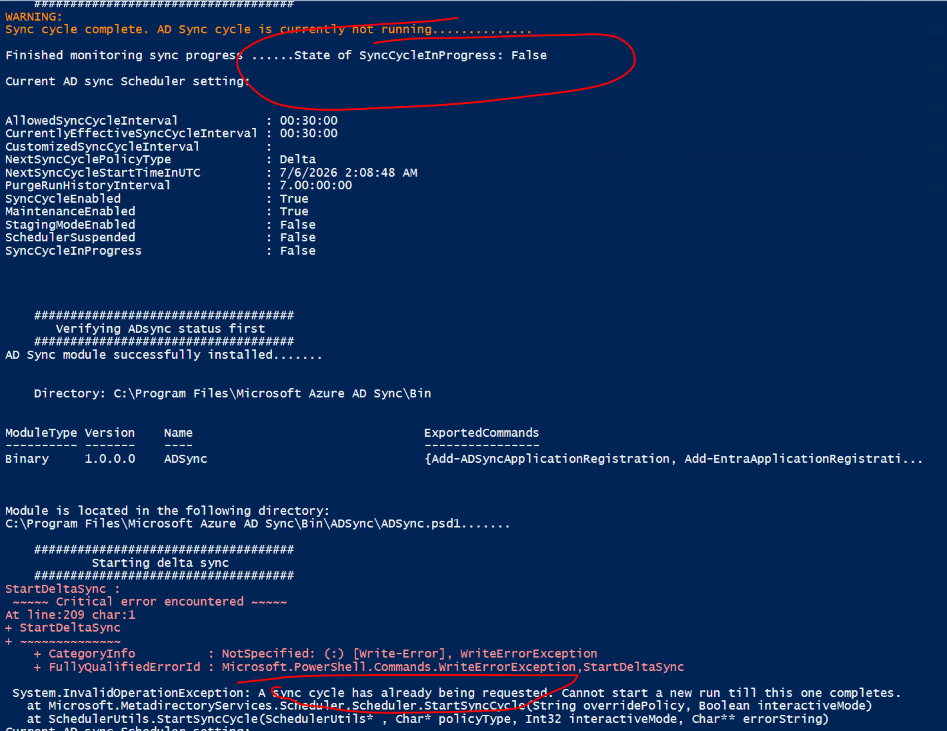
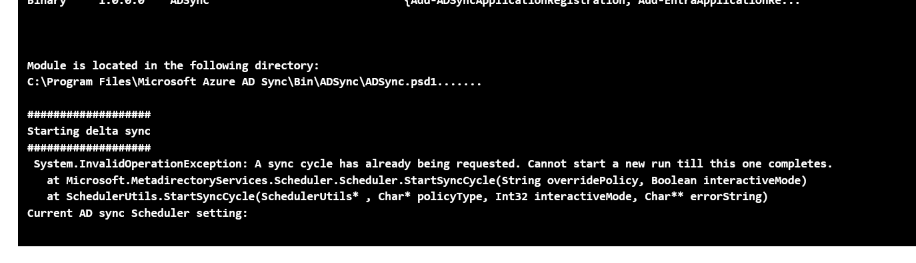

Since the automation process handles concurrent runs (multiple runs at the same time) – it is critical to time the trigger of the delta sync and to wait until the status of [SyncCycleInProgress] to be false first. However, when the run is triggered at the same time – it revokes the start of second sync since there is ANOTHER cycle already going on.
The function StartDeltaSync resolves this issue by using trycatch block to catch terminating error matching the string declared, output the warning to prompt. Then it calls the function ADSyncProgress on the same block to keep monitoring for the “SyncCycleInProgress” setting to evaluate if its false. If its false, continue. If its not false and there is ongoing sync, keep monitoring until timeout period. A 300 second timeout period should be safe as it does not take that long for delta sync to complete.
Issue: Cannot invoke local host or run does not run properly

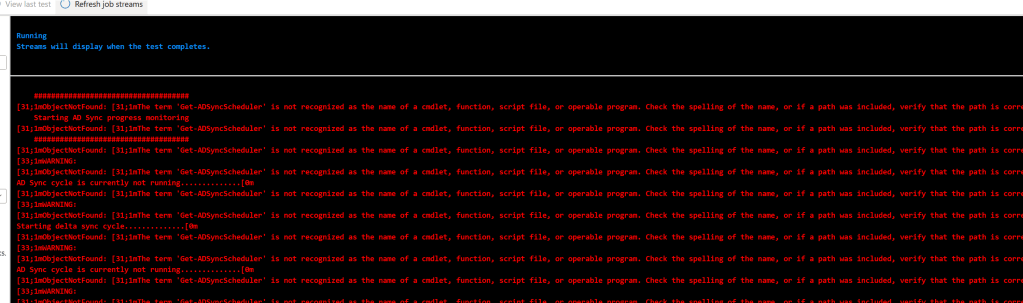
Resolution: Give it time for service to start up like winRM, this error from runbook is common when the server has just recently undergo reboot process.

