In this post, I will cover a few common errors I encountered while working with the Microsoft Graph PowerShell SDK and how to resolve them. I hope this helps anyone facing similar issues!
Error: Insufficient privilege to execute “Get-MgServicePrincipal”

Resolution:
1. Run the following command to get the current permissions for the scope
(Get-MgContext).Scopes
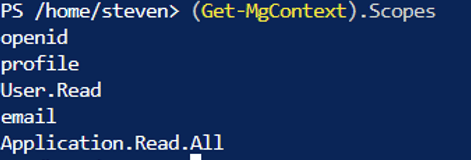
2. Execute ms graph with the following command and try “Get-MgServicePrincipal” again.
Connect-Graph -scopes “Application.Read.All”
Error: Insufficient privilege to execute “New-MgServicePrincipalAppRoleAssignment”

Resolution: Command requires the following permission in scope: “Directory.Read.All”, “AppRoleAssignment.ReadWrite.All”
Connect-Graph -scopes “Application.Read.All” ,”AppRoleAssignment.ReadWrite.All”,”Directory.Read.All”
Error: Cannot import Microsoft.graph.users or any ms graph modules

Resolution:
1. Disconnect from graph and close out the session.
2. Open a new session
3. Install module for all users

Install-Module Microsoft.Graph -Scope AllUsers -Repository PSGallery -Force

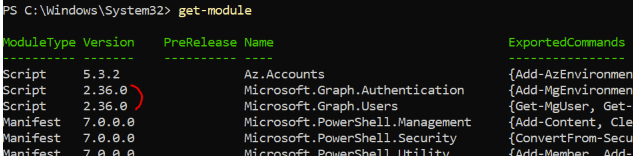
4. Verify module installation

Get-InstalledModule Microsoft.Graph
Error: Unable to use ms graph module due to invalid authentication token

Update:

This has been warned for a while, but calling Get-AzAccessToken and other related methods will now return a SecureString by default and will no longer be able to provide plaintext.


try {
    #Get the token using a managed identity and connect to graph using that token

     Connect-AzAccount -Identity -ErrorAction Stop | Out-Null

     $graphToken= Get-AzAccessToken -ResourceUrl "https://graph.microsoft.com" -ErrorAction Stop

 #  remove: Connect-MgGraph -AccessToken ($AccessToken.Token | ConvertTo-SecureString -AsPlainText -Force) -ErrorAction Stop | Out-Null

      Connect-MgGraph -AccessToken $graphToken.Token

      Get-MgUser -UserId sli@red929.com | select DisplayName, UserPrincipalName, UserType, AccountEnabled

} catch {

    Write-Error $_.Exception.Message -ErrorAction Stop
}
Error: Unable to use module due to incorrect permission
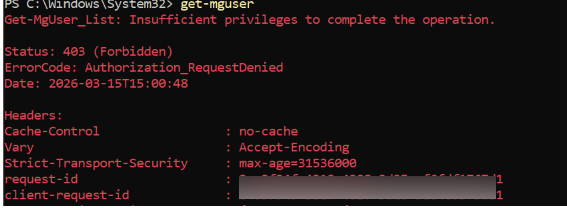
To identify the permissions needed to run a specific cmdlet of the microsoft.graph module you can use the find-mgGraphCommand cmdlet,

Example:
(Find-MgGraphCommand -Command get-mguser).permissions

To identify which permissions are assigned to the current session you can use the get-mgcontext cmdlet, e.g.
(get-mgcontext).scopes

Resolution: Reconnect to graph with the correct scope – “User.Readbasic.all”