
Here are some scenarios where I had to troubleshoot during my experience with runbook. The target is set to hybrid workers:
Issue: Unable to invoke command for computer across network

Resolution:
1. Check if WinRM Service Status is running on remote machine.
 > Get-Service WinRM | Select-Object StartType". This will show you the current startup type of the WinRM service.

2. Check firewall setting
 > Test-NetConnection Server_name -Port 5985 Successful

3. Test-WSMan -ComputerName "RemoteComputerName to confirm WinRM is working for the remote machine.

4. Try different authentication method

6. Check for conflicting settings in GPO that can prevent Windows Remote Management from running.
Issue: Unable to establish session with New-PSSession to exchange server

Resolution: when attempting to establish pssession with exchange server using the following commands fails:
New-PSSession -ConfigurationName Microsoft.Exchange -ConnectionUri http://exchange01.red929.com/powershell -Credential $credentials -Authentication Kerberos

1. Make sure the exchange server can be resolved in network

2. The user must be a member of a management role group, or be directly assigned a management role that enables the user to run Exchange cmdlets.

3. Ensure user can remote powershell access enabled
 > Get-User -Identity "<UserIdentity>" | Format-List RemotePowerShellEnabled
Issue: Entra sync script is not working properly as it cannot find the “Get-ADSyncScheduler” cmdlet.
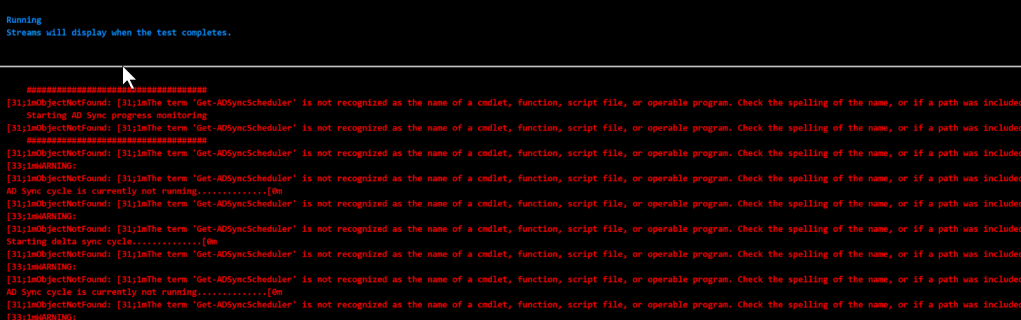
Resolution: For hybrid runbook with missing modules, make sure it is locally installed first. For this scenario,”Get-ADSyncScheduler” is part of the ADSyncTools.psm1 PowerShell module included with Microsoft Entra Connect. So this cmdlet is tied to a single device.
The reason why it cannot be found for this run is because the hybrid worker group targets the machine that does not have the Entra connect tool installed on it.
For hybrid worker groups – Every worker polls every 30 seconds and pick up jobs on a first-come, first-serve basis from the group queue, if there is a specific module that can ONLY be run from that machine, make sure that the worker group ONLY contains that single device in it.

